

Vibeship — Development skill for Claude Code
🚀 Vibeship: a 3D spaceship for your Claude Code agents (mod/plugin).
How to install Vibeship
This entry records only its repository, not the path inside it, so there is no
exact command to give. Open wag-me/vibeship and copy the folder into
~/.claude/skills/, or the file into ~/.claude/agents/.
What Vibeship does
🚀 Vibeship: a 3D spaceship for your Claude Code agents (mod/plugin).
Alternatives in Development
- Skills Directory — 462 skills across 35 categories Browse online: spawner.vibeship.co/skills 845 ★
- Ontology Engineer — Use when building, modifying, or validating ontologies 80 ★
- Cc Mod Image View — Claude Code mod: thumbnails of pasted images above the prompt instead of bare [Image #n] tags 27 ★
README

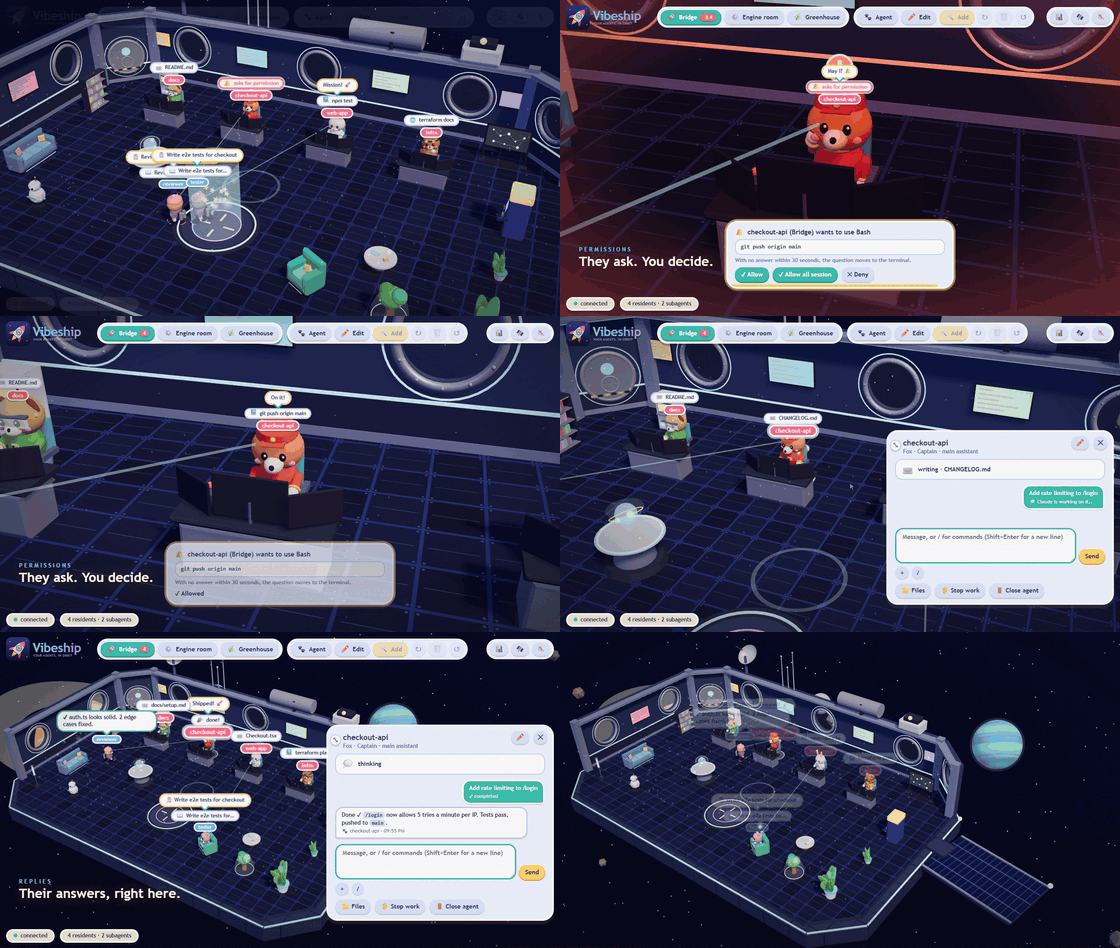
A **3D spaceship** where your [Claude Code](https://claude.com/claude-code) agents work in crew uniforms. It is a Claude Code *mod* (plugin): every session becomes a little animal that walks, sits at the console, thinks, sleeps and cheers while it really works.
What it does
- See what your agents are doing: they read, write, run commands, search the web. Each agent has a species (fox, cat, dog, raccoon, rabbit, bear, bird) and a uniform (captain, engineer, pilot, scientist, medic, explorer, cadet).
- Three locations (Bridge, Engine room, Greenhouse), each with its own agents. Move an agent from its card or by dragging it onto a location's tab (in edit mode).
- Chat with your agents from the window: see the conversation, the state of each message and the reply. You can stop or close an agent. When the window is opened again (even from another folder) or a session is resumed, the latest messages and actions are read back from Claude Code's transcript.
- Type
/to run slash commands and skills, with suggestions as you type (/compact,/cost,/model sonnet, ...). They run in that session as if typed in the terminal and their output comes back in the chat. A bare/modelshows a model chooser in the window.
- Type
- See what was done: the agent card has a Recent activity feed (files written with
+/−lines, commands run, failures in red) and a 📁 Files button. Files browses the agent's working folder and previews text files; the ones Claude touched are highlighted, and clicking an activity row opens that file. It is read-only, limited to the working folder, a
Related Skills
Ctx Handoff Mod
Claude Code mod: auto handoff to a fresh conversation when context hits a threshold, keeps the prompt cache wa

Claude Auto Handoff
Claude Code mod: hand a long session off to a fresh one with a structured brief, instead of auto-compacting

Accessibility Mod Template
A structured Claude Code template for creating accessibility mods that make games playable with screen readers


Claude Paste View
Claude Code mod: preview pasted images and long pasted text above the prompt


Cc Mod Park
Claude Code mod: /park a session and resume it later from a new session in the same folder


Rimworld Modding Skill
Claude Code agent skill for RimWorld mod development. 环世界Mod制作全流程Claude Code技能——XML Def、C#、Harmony补丁、Steam Wor

Related Agents

Identify Programming Language
find -name ".go" -o -name ".c" -o -name ".py" -o -name ".rs" -o -name ".cs" ls /Makefile /CMakeLists.txt /go.m


GPT 5.6 Luna
General-purpose agent that runs on GPT-5.6-Luna (routed through the shunt gateway to the ChatGPT/Codex subscri


Phase7 Selfmod Auditor
Use proactively after every code change in the Phase-7 self-mod area (jarvis/core/self_mod/, pre-validate pipe
