
Cloud Extension — AI skill for Claude Code
Vinkius is the AI Gateway Runtime for MCP servers.
How to install Cloud Extension
This entry records only its repository, not the path inside it, so there is no
exact command to give. Open vinkius-labs/cloud-extension and copy the folder into
~/.claude/skills/, or the file into ~/.claude/agents/.
What Cloud Extension does
Vinkius is the AI Gateway Runtime for MCP servers. Point it at any API and you get a production-ready, governed MCP server — one that Cursor, Claude, Copilot, Windsurf, Cline, and ChatGPT can all connect to out of the box. This extension puts your Vinkius dashboard right inside your IDE.
Alternatives in AI
- MCP Use — The fullstack MCP framework to develop MCP Apps for ChatGPT / Claude & MCP Servers for AI Agents 9.5k ★
- Welcome — AI Research Skills — You now have access to 86 production-ready skills covering the entire AI research lifecycle: literature survey 5.4k ★
- Contributing To Claude Skills Library — Thank you for your interest in contributing to the Claude Skills Library 5.3k ★
README
Vinkius
[](https://marketplace.visualstudio.com/items?itemName=vinkius.cloud-extension) [](https://marketplace.visualstudio.com/items?itemName=vinkius.cloud-extension)
**[Vinkius](https://vinkius.com) is the AI Gateway Runtime for MCP servers.** Point it at any API and you get a production-ready, governed MCP server — one that Cursor, Claude, Copilot, Windsurf, Cline, and ChatGPT can all connect to out of the box.
This extension puts your Vinkius dashboard right inside your IDE. Every server on your account shows up in the sidebar. Click one and you get a live tab: connections, requests, errors, token spend, DLP events, the works. Manage tokens, toggle tools, dig through logs, check deployments — no browser required.
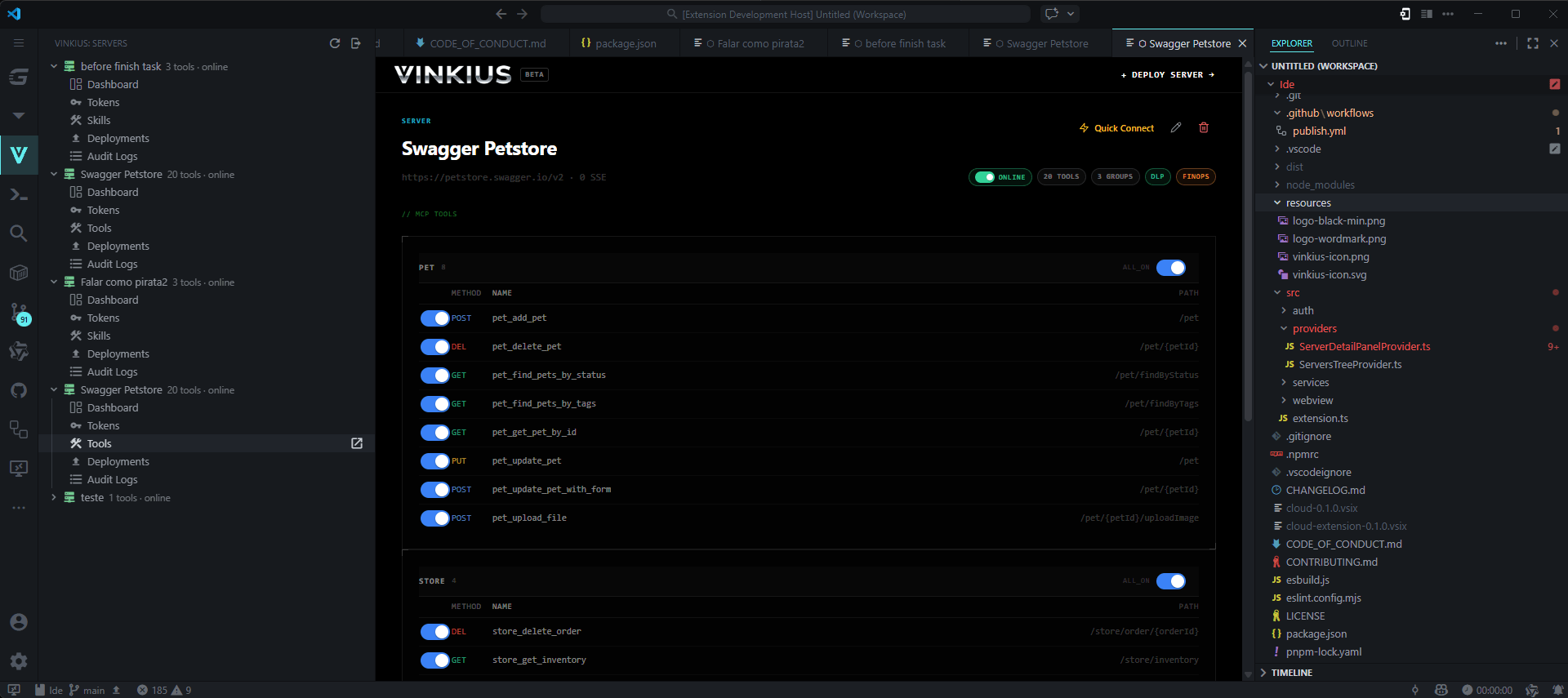
Your MCP servers, live in the sidebar
Install the extension and a Vinkius panel appears in the Activity Bar. Every server on your Vinkius Cloud account is listed there with live status, active connections, and tool count. You'll know immediately if something's down — no tab-switching required.
Click any server and its full dashboard opens as a tab right in your editor.
The dashboard
Everything you need to run a production MCP server, without leaving your IDE:
**Overview** — The key numbers at a glance: active connections, total requests, P95 latency, error rate, uptime, DLP intercepts, and token cost. Plus a live feed of every request as it comes in.
**Tokens** — Create and revoke API tokens for your clients. Give them names, set expiry dates, see when they were last used.
**Tools** — See every tool your server exposes. Enable or disable individual tools on the fly — no redeplo
Related Skills

Orchy
Runtime-agnostic multi-agent orchestration skill for AI coding agents (Claude Code, Antigravity, Cursor, Codex


SRouter
Local-first AI Gateway: Connect Claude Code, Cursor, Windsurf, & Cline to Antigravity, OpenAI, Claude, & Gemin

Kc LLM Wiki Starter
Production-ready starter template for LLM-maintained wikis. Karpathy's 2026-04 three-tier pattern (raw/wiki/sc

Agent Context Framework
Production-ready Markdown (.md) context templates for AI coding agents (Cursor, Claude Code, Aider, Windsurf).

Openclaw Cookbook
Production-ready recipes for OpenClaw — self-hosted multi-channel AI agent gateway. Telegram, Discord, Slack,


The AI Engineers Handbook
A practical handbook for software engineers using Claude, ChatGPT, Cursor and AI agents. 35 chapters covering

Related Agents

Agentic Auditor
PYA specialist spawned by the /pya orchestrator. Audits AI agent and LLM surfaces in an untrusted repository:


10x Tool Calls
Cursor and Windsurf meter usage by requests and tool calls rather than tokens, which means a finished or stall


Audit Geo
Evaluates AI crawler access, llms.txt compliance, content citability, brand authority signals, and multi-platf
