
Ascii Logo — Development skill for Claude Code
Display giant ASCII-art logos with colorful gradients in your terminal — like Claude Code or Gemini CLI.
How to install Ascii Logo
This entry records only its repository, not the path inside it, so there is no
exact command to give. Open talknerdytome-labs/ascii-logo and copy the folder into
~/.claude/skills/, or the file into ~/.claude/agents/.
What Ascii Logo does
Display giant ASCII-art logos with colorful gradients in your terminal — like Claude Code or Gemini CLI.
Alternatives in Development
- Understand Anything — Graphs that teach graphs that impress 80.7k ★
- Vibe Kanban — Get 10X more out of Claude Code, Gemini CLI, Codex, Amp and other coding agents 23.5k ★
- MiniCode Architecture — 简体中文 This document describes the lightweight architecture decisions behind mini-code 388 ★
README
oh-my-logo
[](https://github.com/Piebald-AI/awesome-gemini-cli)

Create stunning ASCII art logos with beautiful gradient colors in your terminal! Perfect for project banners, startup logos, or just making your terminal look awesome.
You can also create stunning animations like these by using it as a library in your programs!
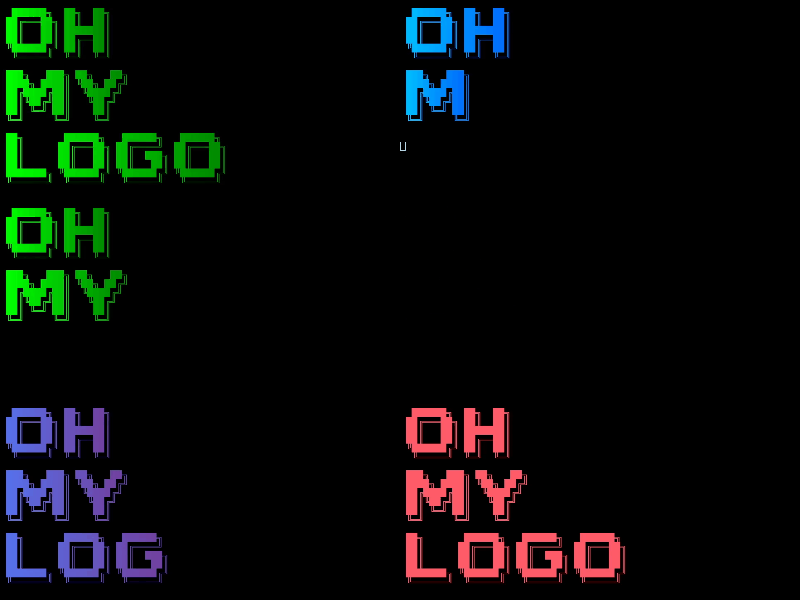

The logos produced by `oh-my-logo` are CC0 (public domain); feel free to use them anywhere.
✨ Features
- 🎨 Two Rendering Modes: Choose between outlined ASCII art or filled block characters
- 🌈 13 Beautiful Palettes: From sunset gradients to matrix green
- 📐 Gradient Directions: Vertical, horizontal, and diagonal gradients
- 🔤 Multi-line Support: Create logos with multiple lines of text
- ⚡ Zero Dependencies: Run instantly with
npx- no installation required - 🎛️ Customizable: Use different fonts and create your own color schemes
- 🎭 Shadow Styles: Customize shadow effects in filled mode with different block fonts
- 🔄 Letter Spacing: For
--filledmode: character spacing for different visual densities - 🔄 Reverse Gradients: Flip color palettes for unique effects
🚀 Quick Start
No installation needed! Try it right now:
npx oh-my-logo "HELLO WORLD"Want filled characters? Add the `--filled` flag:
npx oh-my-logo "YOUR LOGO" sunset --filled🆕 New in v0.3.0
**Customize shadow styles in filled mode:**
# Box-drawing shadows (default)
npx oh-my-logo "STYLE" fire --filled --block-font block

# Minimal sleek shadows
npx oh-my-logo "STYLE" fire --filled --block-font chrome

# Dotted/shaded shadows
npx oh-
Related Skills

Ip As Logo Skill
A compact Agent Skill for highly simplified, rounded, subtly neo-skeuomorphic IP mascot logos.

Wife
Local, persistent and auditable memory layer for Claude Code, Codex, Cursor & Gemini CLI. Your coding agent st


Alan Code Agent
Open-source Python implementation of a Claude-Code-like agent (Gemini CLI, Codex, Copilot...). Usable in CLI,

Tradwife
Local, persistent and auditable memory layer for Claude Code,Cursor, Codex & GEMINI CLI. Your coding agent sto

Context Arbitration Layer
Context Arbitration Layer (CAL) extends claude-code with persistent, multi-subprocess context management. It o

Heptareel
Agent skill: 7 code-built motion reel styles (one-line graph, one-ball showreel, ASCII terminal, pixel dither,

Related Agents

Agent Of Empires
Claude Code, OpenCode, Mistral Vibe, Codex CLI, Gemini CLI Coding Agent Terminal Session manager via tmux and


Abtop
AI agent monitor for your terminal. Like btop++, but for AI coding agents. Supports Claude Code and Codex CLI.


Brand Logo Finder
Finds brand logos using Brandfetch. Use when user asks for a brand's logo, brand assets, or brand identity inf
