
Claude Sandbox Zsh — Development skill for Claude Code
Run Claude Code CLI inside a macOS sandbox with restricted file system access.
How to install Claude Sandbox Zsh
This entry records only its repository, not the path inside it, so there is no
exact command to give. Open simbo1905/claude-sandbox-zsh and copy the folder into
~/.claude/skills/, or the file into ~/.claude/agents/.
What Claude Sandbox Zsh does
Run Claude Code CLI inside a macOS sandbox with restricted file system access.
Alternatives in Development
- Agent Of Empires — Manage multiple Claude Code, OpenCode agents from either TUI or Web for easy access on mobile 3.1k ★
- Vibekit — A simple SDK for safely running Codex, Gemini CLI, and Claude Code in a secure sandbox 1.7k ★
- Claude Code Zh Cn — Claude Code CLI 简体中文本地化 / 汉化插件;支持 macOS、Linux、WSL、Windows 与新版 native,一行安装,更新后自动修复 721 ★
README
Claude Code sandbox for macOS
A security wrapper for [Claude Code](https://github.com/anthropic-ai/claude-code) that runs the CLI inside macOS's `sandbox-exec`. The sandbox grants read/write acess only to your current project directory (plus the system temp dir) while allowing just enough extra permissions for Claude Code to work smoothly.
[!WARNING] **Heads-up**: `sandbox-exec` is deprecated in macOS 14 (Sonoma), but still functional as of June 2025 in macOS 15 (Sequoia). Apple may remove it in a future release.
Demo
[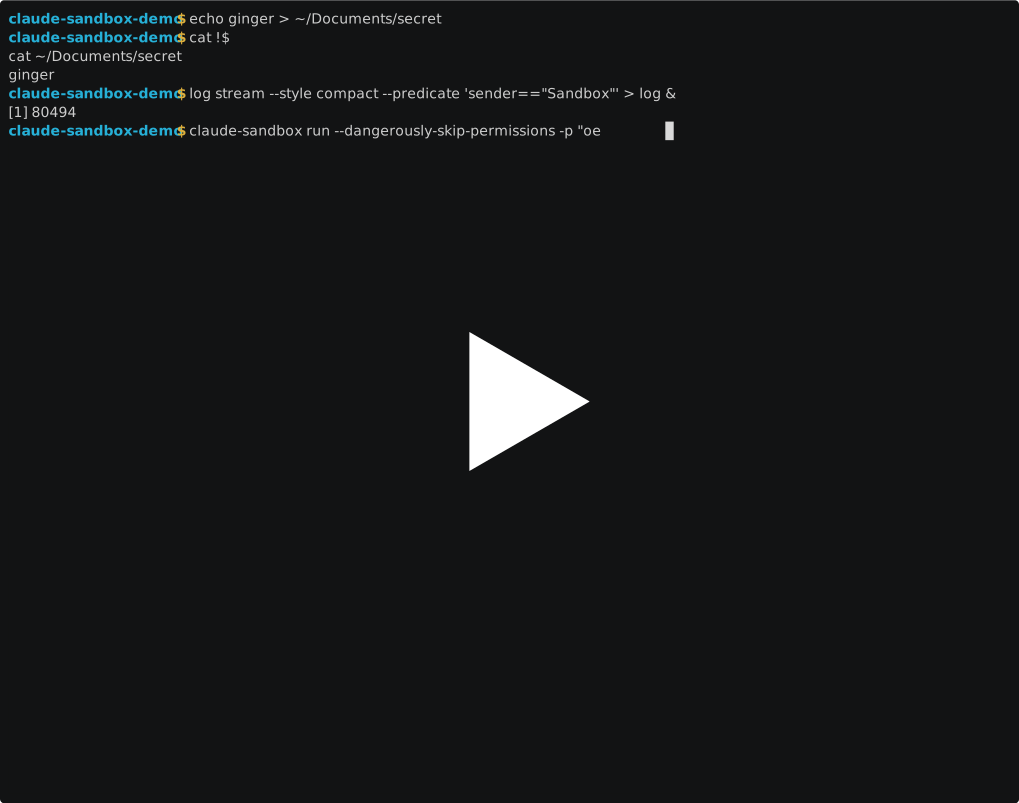](https://asciinema.org/a/cmbhNcAOiNjrfWcLiqdUa36q0)
Overview
This tool provides additional security when running Claude Code with permission skipping enabled (`--dangerously-skip-permissions`). It creates a sandbox that:
- ✅ Allows full file access to your current project directory
- ✅ Allows reading system files needed for execution
- ✅ Allows network access (for the Claude API, but also for anything else!)
- ❌ Blocks access to your Documents, Desktop, Downloads, and other personal folders
- ❌ Blocks access to sensitive config files like
.ssh,.aws, etc.
Why Use This?
Claude Code is an AI coding assistant that can read and write files and access the internet, etc. When you skip permission prompts for convenience, you're trusting it with full file system access. This sandbox adds a safety layer by restricting access to only the files you're actually working on or need to read/exec from the system. (Or at least attempts to! It's default deny, but I may have written the sandbox profile wrong.)
The goal here is to prevent some damaging footguns, while acknowledging there are [other risks](https://simonwillison.net/series/prompt-injection/) associated with using LLMs as agents that are out of scope for this approach.
Installation
- Download the
claude-sandboxscript to a directory in your PATH (e.g.,~/.local/bin/):curl -o ~/.local/bin
Related Skills
ClaudeInHA
Claude Code CLI as a polished web console inside Home Assistant — tabs, clipboard, file attachments, and full


Cc Agents Kit
Claude Code plugin marketplace. guard-hooks: five defensive hooks that block dangerous shell commands and secr


Apple Bridges
Native macOS app access — manage Apple Reminders, Calendar, Contacts, Notes, Mail, and tmux sessions via Swift

Tool Sandbox MCP
📦 MCP server that runs agent code in a sandbox with access to upstream MCP tools

Ecocash Instant Payment API
A clear, step-by-step guide to integrating EcoCash Instant Payment: get sandbox access, charge an EcoCash wall


Openshell Deepagent
A general-purpose coding agent that runs inside an NVIDIA OpenShell sandbox, orchestrated by Deep Agents and p

Related Agents
Docker Sandbox
Isolated autonomous scanning agent — runs in a temporary worktree with restricted Bash access. Requires ROE au

Bash Zsh macOS Engineer
Use this agent when you need to develop, optimize, or debug bash/zsh scripts specifically for macOS environmen


Tm Implementer
Implements exactly one planned task inside its own git worktree, restricted to a declared file set, and return
