

Sidebutton — AI skill for Claude Code
Open-source browser automation for AI agents.
How to install Sidebutton
This entry records only its repository, not the path inside it, so there is no
exact command to give. Open sidebutton/sidebutton and copy the folder into
~/.claude/skills/, or the file into ~/.claude/agents/.
What Sidebutton does
Open-source browser automation for AI agents. MCP server + Chrome extension + YAML workflow engine + knowledge packs. Give your AI agent a browser and domain expertise.
Alternatives in AI
- AIHawk — Open-source AI browser agent: describe any task in plain language and it autonomously browses, clicks, types a 30.3k ★
- WeKnora — Open-source LLM knowledge platform: turn raw documents into a queryable RAG, an autonomous reasoning agent, an 26.9k ★
- Design Md Chrome — Chrome extension to extract styles from any website and generate DESIGN.md files and design skills for AI base 2.7k ★
README
SideButton
**Open-source AI agent platform for agentic coding — MCP server, knowledge packs, and AI workflow automation.**
[](https://www.npmjs.com/package/sidebutton) [](LICENSING.md)
**[sidebutton.com](https://sidebutton.com)** · **[docs.sidebutton.com](https://docs.sidebutton.com)**
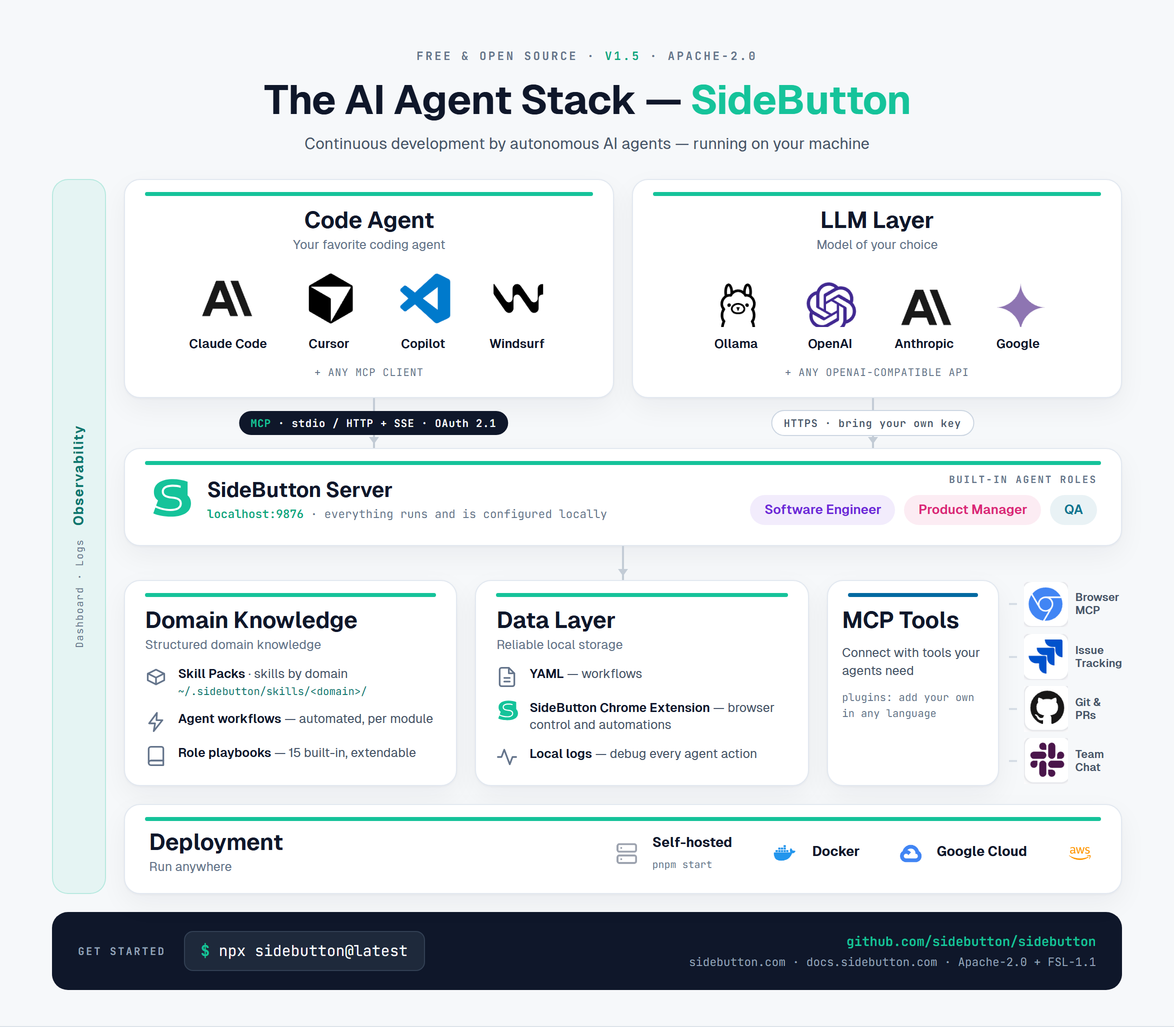
Run AI coding agents with agentic workflows, knowledge packs, and real browser control. Connect Claude Code, Codex, Cursor, ChatGPT, or any MCP client.
npx sidebutton@latest
# Dashboard at http://localhost:9876
What you get
| MCP Server | AI agent tools for browser control, workflow execution, and knowledge pack access. Stdio and SSE transports. |
| REST API | Trigger workflows remotely from webhooks, cron jobs, mobile apps, or other agents. |
| Workflow Engine | AI workflow automation with browser, git, issue-tracking, LLM, shell, and control-flow steps. Define agentic workflows in YAML. |
| Knowledge Packs | Installable domain knowledge — CSS selectors, data models, state machines. Role playbooks turn coding agents into an AI software engineer, QA, or PM. |
| Chrome Extension | Browser commands with real DOM access via WebSocket, not screenshots. Recording mode. |
| Dashboard | Svelte UI — workflow browser, run logs, skill pack manager, system status. |
Quick Start
# Install and start
npx sidebutton@latest

# Or from source
pnpm install && pnpm build && pnpm start

# Open http://localhost:9876
CLI
pnpm cli serve          # Start server with dashboard
pnpm cli serve --stdio  # Start with stdio tra
Related Skills
Taw Computer
Give any AI a real computer. Open source MCP server with Ubuntu sandbox, browser automation, desktop control,


Pear Skills
Battle-tested Agent Skills that give AI coding agents (ZCode, Claude Code, Cursor, etc.) plug-and-play domain


Cursor Anthropic Skills
Comprehensive framework for integrating Anthropic Skills into Cursor IDE, ensuring AI agents consistently appl

Openbrowser
Give AI your browser. Check email, track orders, download receipts -- all authenticated, no API keys. Open sou

Deepseek Cowork
Open-source alternative to Claude Cowork - Browser automation & AI assistant powered by DeepSeek


Pilot
Chrome extension + MCP server — AI agents control a tab in your real browser, already logged in

Related Agents
Extension Smoke Test
Pre-reload smoke test for the WXT browser extension. Run this agent before reloading the extension in Chrome t


Browser Extension Developer
Chrome, Firefox, and cross-browser extension development specialist. Manifest V3, service workers, content scr


Extension Author
WRITE-access implementer for the browser extension (apps/extension/ — MV3, Chrome + Firefox) and the desktop⇄e
