
Ccinv — AI skill for Claude Code
Inventory dashboard for Claude Code — commands, skills, agents, hooks, MCP, plugins across user/project/local scopes.
How to install Ccinv
This entry records only its repository, not the path inside it, so there is no
exact command to give. Open Sianmin/ccinv and copy the folder into
~/.claude/skills/, or the file into ~/.claude/agents/.
What Ccinv does
Inventory dashboard for Claude Code — commands, skills, agents, hooks, MCP, plugins across user/project/local scopes. Zero LLM, zero servers.
Alternatives in AI
- HarnessKit — More than a skill manager — manage skills, MCP servers, plugins, hooks, CLIs, configs, memory & rules across e 416 ★
- onWatch — Open-source Go CLI that tracks AI API quota usage across 7 providers (Synthetic, Z.ai, Anthropic, Codex, GitHu 397 ★
- Tma1 — Local-first observability your agent reads back 116 ★
README
ccinv
Inventory dashboard for [Claude Code](https://docs.claude.com/en/docs/claude-code) resources — commands, skills, agents, hooks, MCP servers, and plugins — across **user**, **project**, and **local** scopes.
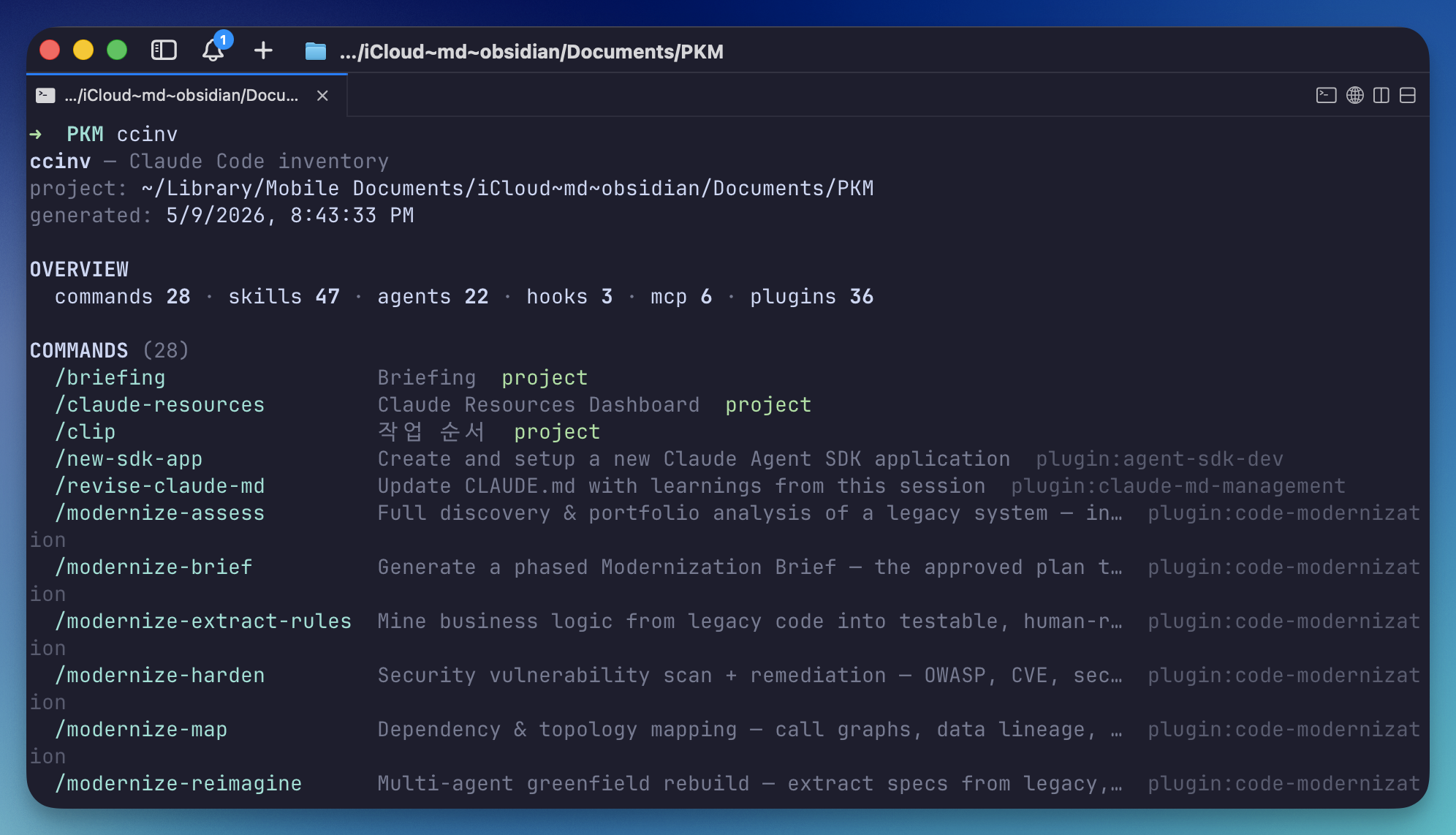
Zero LLM calls. Zero servers. Zero runtime dependencies. `npx ccinv` and you get a colored terminal table; pass `--html` to open a single-file dashboard in your browser instead.
Why
Claude Code spreads configuration across `~/.claude/`, `/.claude/`, plugin marketplaces, and per-user `settings.local.json`. Existing dashboards (SkillDeck, ClaudHub) only scan the user scope. ccinv scans **all three scopes plus plugins** and renders the result instantly.
It's deterministic file-system work — there's no reason to burn LLM tokens for it.
Inspired by [ccusage](https://github.com/ryoppippi/ccusage). Same `cc*` ergonomics — quick `npx`, table-first output, optional richer formats — applied to "what's installed?" instead of "what did I spend?".
Install / Run
npx ccinvThat's it — no install, no config. ccinv prints a colored inventory table for the current scope (the screenshot above is from a real Obsidian vault project).
For a richer view, render an HTML dashboard:
ccinv --html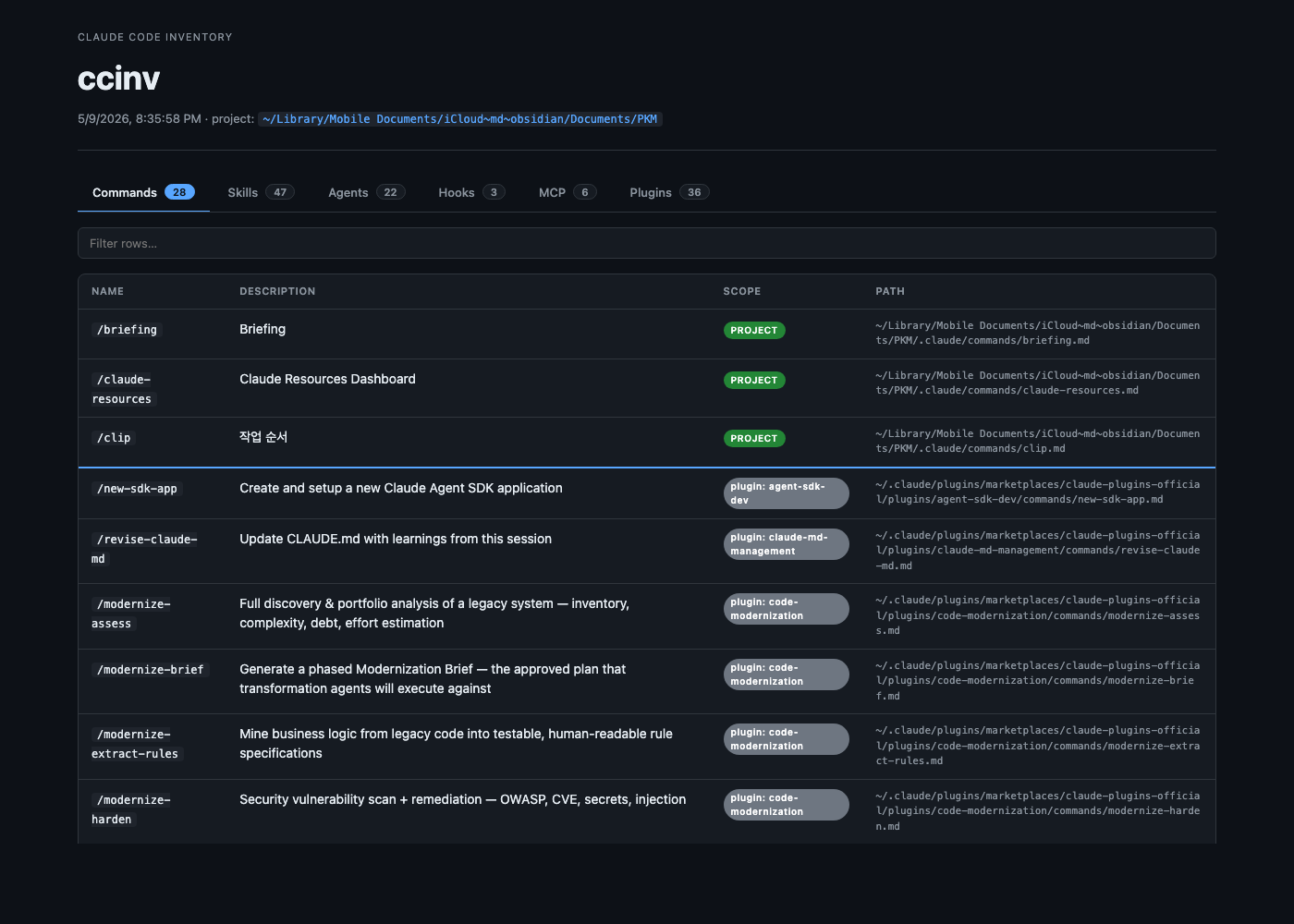
Usage
ccinv [options]

Output formats:
      --html             Render as HTML and open in browser
      --json             Print inventory JSON to stdout

Filtering:
      --no-plugins       Hide plugin-scope resources in table output
      --scope      Comma-separated: user,project,local,plugin
                         (applied to JSON / HTML)

HTML options:
  -o, --output     Write HTML to a specific file path (with --html)
      --no-open          Do not auto-open the HTML in browser
      --stdout           Print HTML to
Related Skills
Agentic Access Control
Read-only, local-first dashboard showing what your AI agents (Claude Code, Gemini CLI, MCP servers) are actual


Yotta Memory
File-based cross-agent memory standard for AI agents. Zero-dependency CLI (init/remember/recall/forget/archive

AI Harness Character Creator
AgentDeck: one local GUI to configure every AI coding agent. Tune behavior, permissions, token usage and cost,


Xenopus
Specimens from my LLM lab: agents, hooks, instructions, MCP servers, prompts, and skills for Claude, Codex, Ge

CC Toolbox
CC-Toolbox — Claude Code 可视化工具箱管理面板:一块深空数据大屏统一管理 Skills / MCP / CLI / Hooks / Plugins / Commands,支持 AI 一键部署、中文


Bullpen Coach
Switch Sage (the wellness coach) on or off. When on, Sage sends proactive check-ins (rest reminders, ship cele

Related Agents

Agentic Auditor
PYA specialist spawned by the /pya orchestrator. Audits AI agent and LLM surfaces in an untrusted repository:


Light Security ClaudeSettingsAudit
Audit Claude Code config files (settings.json, settings.local.json, .mcp.json) for unsafe or malicious content

Toolchain Installer
Use for requests to install, configure, repair, or validate MCP servers, Claude Code skills, tool integrations
