
Porthole — Development skill for Claude Code
Run and supervise Claude Code on your own computer from your Android phone, over your own Tailscale network.
How to install Porthole
This entry records only its repository, not the path inside it, so there is no
exact command to give. Open ShrimpScript/porthole and copy the folder into
~/.claude/skills/, or the file into ~/.claude/agents/.
What Porthole does
Run and supervise Claude Code on your own computer from your Android phone, over your own Tailscale network.
Alternatives in Development
- Offline — PUA 离线模式 — 关闭所有联网反馈/排行榜上报,保留本地 PUA 行为 19.5k ★
- Lamda — The most powerful Android RPA agent framework, next generation mobile automation 7.7k ★
- Android Release — Prepare and execute an Android release (patch/minor/major) 1.6k ★
README
Porthole
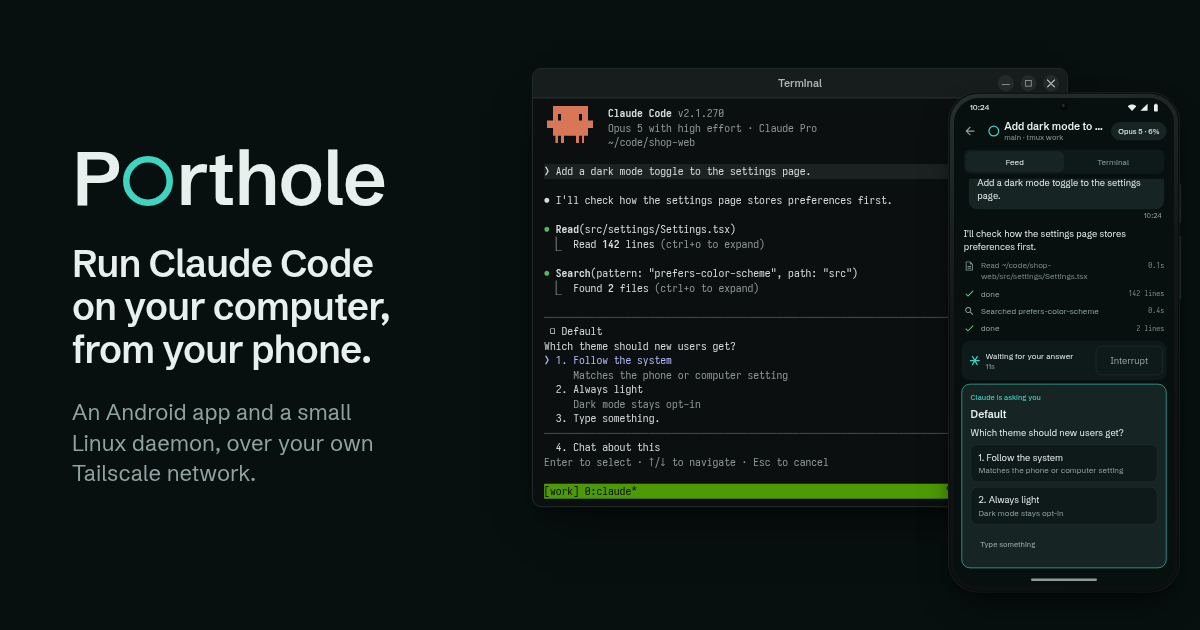
Run and supervise Claude Code on your own Mac or Linux computer from your Android phone, over your own Tailscale network. No account, and no Porthole server in between: your sessions travel only between your phone and your computer.
**[Website](https://porthole-one.vercel.app)** · **[Docs](https://porthole-one.vercel.app/docs)** · **[Download for Android](https://github.com/ShrimpScript/porthole/releases/latest/download/porthole.apk)** · **[Changelog](https://porthole-one.vercel.app/changelog)**
What the phone can do
- Every session at a glance. One row per running Claude Code, grouped into Needs you, Live and Recent, with what each is doing and for how long - across more than one computer.
- Answer Claude's questions by tap. When Claude Code asks a multiple-choice question, the choices appear as buttons exactly as they stand on the computer's screen.
- Approve or deny tool calls from anywhere, with the command in full and a countdown. There is no "always allow".
- The feed. The conversation as rendered markdown with tool calls, timings and turn lines, a line where you left off, quick replies, slash commands and photo attachments.
- What changed. The git diff of the session's directory, file by file.
- A real terminal. The tmux pane at the desk's width, with a key row built for Claude Code.
- Start, resume, or start another. The + on the session list starts a fresh Claude Code in
any project folder, in a tmux session of its own, like
portholeat the desk. - Notifications while a turn runs, when it finishes (with Reply from the shade), when a question waits, when a usage limit hits, and when the computer comes back.
- Builds of your own Android projects, published on the computer, installed on the phone in one tap.
- Preview a dev server from the computer in the
Related Skills

Pocketdev
Develop from your phone: Claude Code writes code on your Mac while you watch it live on a real iPhone. Local x

Android Harness
Turn an Android phone into a full agent environment — Python, Node, Claude Code, Termux:API — provisioned in o

Oar
Row your coding agents from anywhere — self-hosted web relay that drives Copilot, Claude, Cursor, Grok, and Op


CLI Agent Runner
Keep agent CLIs running 7×24 — supervise Claude Code / aider / any prompt-arg agent with 11-layer defenses and


Netclode
Self hosted cloud coding agent with k3s + kata containers + cloud hypervisor microVMs + tailscale + any harnes


Tailclaude
Claude Code on your Tailscale tailnet, powered by the iii engine.

Related Agents

ZeroClaw Android
Run AI agents 24/7 on your Android phone. Native Rust core, 25+ providers (OpenAI, Claude, Gemini, Groq, DeepS

Android Design Reviewer
Android / Jetpack Compose design reviewer. Checks UNIVERSALITY across the full Android device fragmentation (p


Peer Reviewer Computational
A simulated peer reviewer specializing in computational social science methods — NLP/text-as-data, machine lea
