
Ccbrief — Development skill for Claude Code
Minimal, configurable status line for Claude Code — context, tokens, cost and rate limits at a glance in your terminal.
How to install Ccbrief
This entry records only its repository, not the path inside it, so there is no
exact command to give. Open shehab267/ccbrief and copy the folder into
~/.claude/skills/, or the file into ~/.claude/agents/.
What Ccbrief does
Minimal, configurable status line for Claude Code — context, tokens, cost and rate limits at a glance in your terminal.
Alternatives in Development
- Claude Dashboard — Comprehensive status line plugin for Claude Code with context usage, API rate limits, and cost tracking 258 ★
- SafeClaw — to make running containerized Claude Code sessions easy 131 ★
- Cctop — Like htop, but for Claude Code 70 ★
README
ccbrief — a minimal status line for Claude Code
A minimal, configurable **status line (statusline) for [Claude Code](https://claude.com/claude-code)** — your context window, tokens, session cost and rate-limit usage, at a glance in your terminal. Install it from [npm](https://www.npmjs.com/package/ccbrief) with one command: `npx ccbrief init`.
[](https://github.com/shehab267/ccbrief/actions/workflows/ci.yml) [](https://www.npmjs.com/package/ccbrief) [](https://nodejs.org) [](./LICENSE)
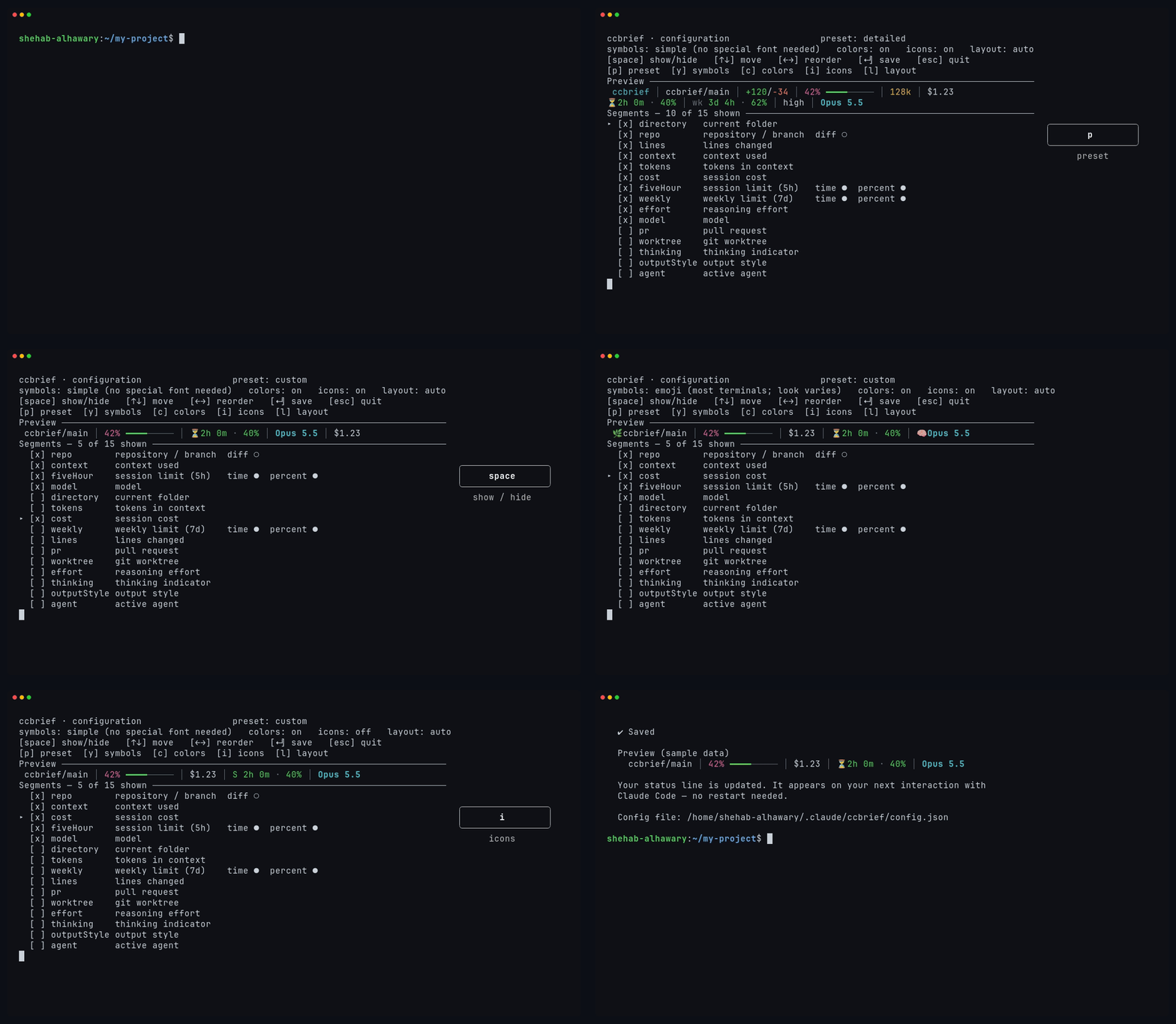
Install, then choose what it shows. The badge on the right shows each key as it is pressed.
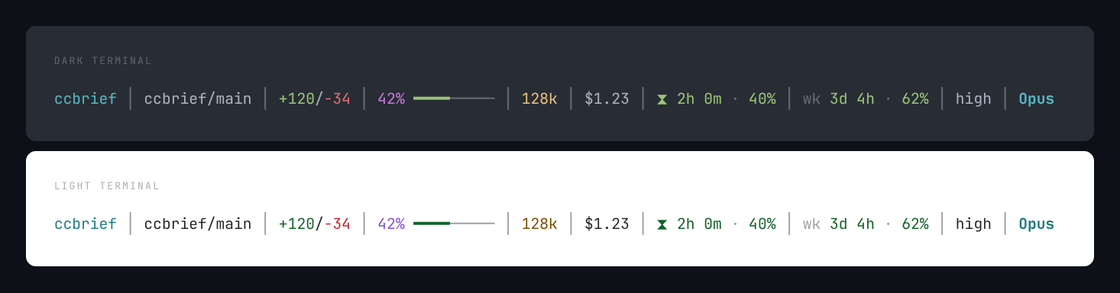
ccbrief │ ccbrief/main │ +120/-34 │ 42% ━━━━───── │ 128k │ $1.23 │ ⏳2h 0m · 40% │ wk 3d 4h · 62% │ high │ Opus 5.5One line, shown above on a dark and a light terminal — the same colors, resolved by each theme. See Colors and symbols
Related Skills
Ccli
Terminal view of every Claude Code session across all your accounts: tokens, list-price cost, subagent trees,

Tokamon
A pet for your Claude Code status line whose mood tracks your tokens, cost and usage limits

Cc Statusline Chili Edition
🌶️ An informative multi-line status line for Claude Code — context, cost, reasoning mode, and account limits


Cockpit For Claude
Live instrument panel for Claude Code: context, rate limits, cost, subagents, tools, diffs and tests, plus a g

Claude Usage Band
A usage band above the Claude Code prompt: limits, context, tokens, cost and more


Claude Dashboard Trmnl
Claude Code dashboard for TRMNL e-ink display: rate limits, costs, agents, tokens.

Related Agents

Context Auditor
Use proactively when the user wants to cut Claude Code token cost or asks "why is this session so expensive /


Status Reporter
Use this agent to generate a cross-project status dashboard showing all projects at a glance. Run weekly or on


Escalate
Solve one bounded subtask the main thread is stuck on, in a fresh context. Returns a plan, a minimal diff, and