

Legible — AI skill for Claude Code
Plain writing, a live canvas and local explainer videos for Claude Code, after Karpathy's post on reading LLM output.
How to install Legible
This entry records only its repository, not the path inside it, so there is no
exact command to give. Open sebi75/legible and copy the folder into
~/.claude/skills/, or the file into ~/.claude/agents/.
What Legible does
Plain writing, a live canvas and local explainer videos for Claude Code, after Karpathy's post on reading LLM output.
Alternatives in AI
- Cursor Talk To Figma MCP — TalkToFigma: MCP integration between AI Agent (Cursor, Claude Code, Codex) and Figma, allowing Agentic AI to c 7k ★
- ARIS Agent Guide — For AI agents reading this repo 6.2k ★
- System — You are YouClaw, a helpful AI assistant 684 ★
README
legible
Three additions to Claude Code that make its work easier to follow. They come from [Andrej Karpathy's post](https://x.com/karpathy/status/2105819303471976479) on reading LLM output (October 2026), which lists four formats, each better than the last: plain writing, diagrams, web pages and explainer videos.
| part | what you get | how |
|---|---|---|
| Plain writing | Ten rules that move replies toward ASD-STE100, the controlled English of aircraft manuals | a section in ~/.claude/CLAUDE.md |
| Canvas (diagrams and web pages) | A web page in a pane beside the transcript. Claude updates it every reply, and you can click, type into and scroll it. | the agent-canvas mod |
| Explainer videos | Narrated 3Blue1Brown-style videos on any topic | an explainer skill that uses manim and Kokoro, a voice model that runs on your machine. No voice or video API. |
Canvas
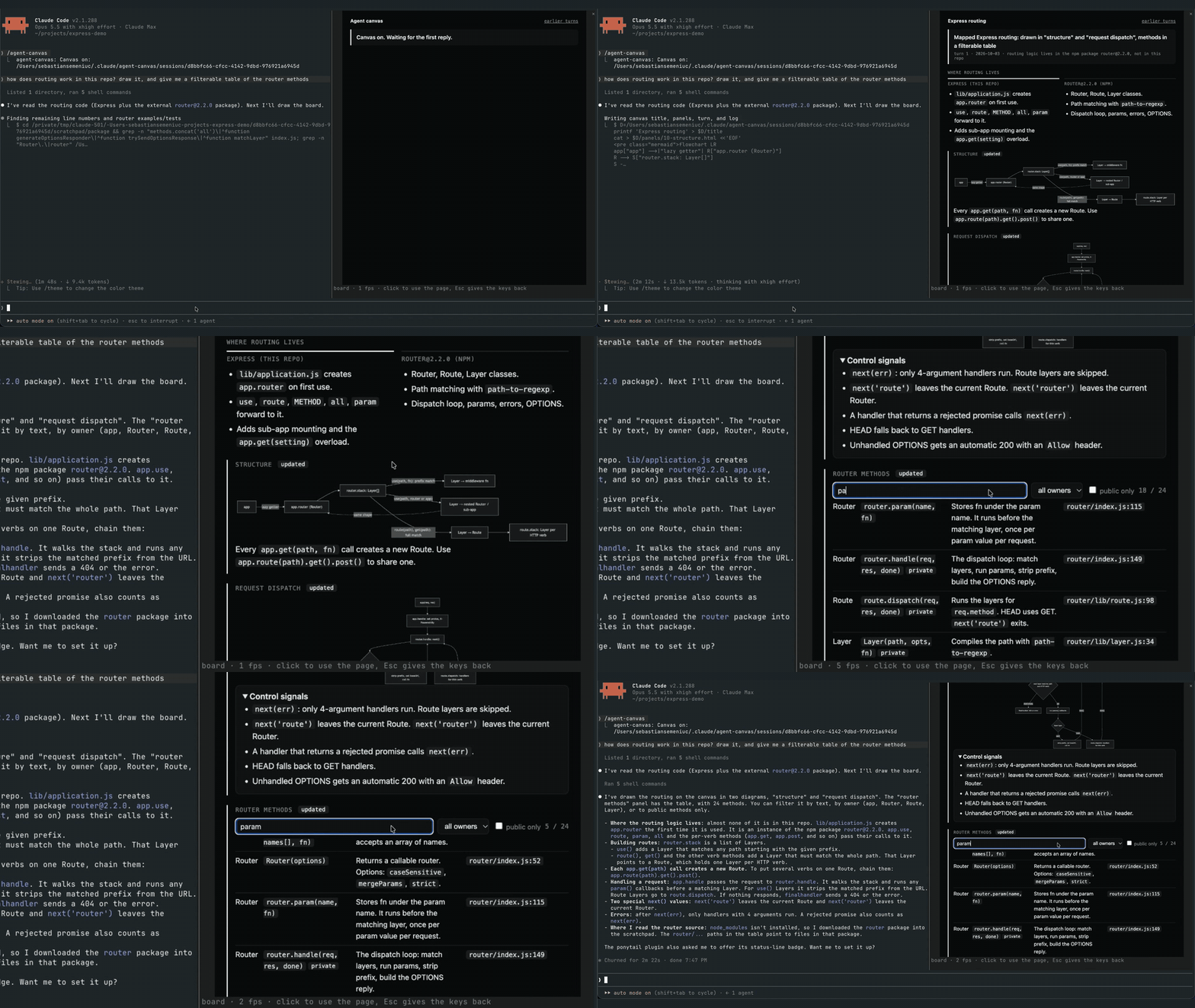
Run `/agent-canvas` in a session. From then on, every reply updates the canvas: this reply's news on top, then panels that last across turns (a plan, a diagram, open questions), with the ones that changed marked. Each turn keeps a snapshot. Headless Chrome renders the canvas, so scripts, links, forms and hover work. Its text cannot be selected, and the Desktop app and the VS Code extension cannot show it. The [agent-canvas README](https://github.com/sebi75/agent-canvas) explains how it works.
Explainer videos
[](docs/explainer-hash-table.mp4)
Ask Claude for a video, for example "make an explainer video about how a hash table finds a value". The skill writes the narration first, draws each beat in manim, renders a 480p draft, checks a sheet of frames for layout p
Related Skills
Bbn Video Studio
Claude Code plugin: AI music videos and 3D explainer videos (Blender + three.js, narrated, captioned) from one

Repo Explainer
Automatically generate 30-second explainer videos from any git repository using AI

Lean Guard
A policy layer for AI coding agents, written and proved in Lean 4. Every Claude Code tool call is checked by a

Dsh Plugin Hooks
DeepSeek Harness plugin: Claude-Code-style lifecycle hooks for DSH. Configure shell commands that run automati

Post Compact
Rehydrate after a MANUAL /compact. A model-generated SUMMARY of the pre-compact context is

Loomwatch
Put your AI apps to work as a team. Connect Claude Code, Codex and OpenCode on one canvas, ask in plain words,

Related Agents
Explainer Director
Delegate to this agent to make a vertical first-person making-of video (3-5 min, 公众号/视频号/抖音) with real-data ca

Explainer Researcher
Deeply explores a local codebase, skill, or feature and returns a structured research brief for an explainers

Content To Video
Bridge agent that combines Gemini research analysis with video synthesis. Analyzes content with video-research
