

Clauster — Design skill for Claude Code
Your homelab's Claude Code launchpad.
How to install Clauster
This entry records only its repository, not the path inside it, so there is no
exact command to give. Open schubydoo/clauster and copy the folder into
~/.claude/skills/, or the file into ~/.claude/agents/.
What Clauster does
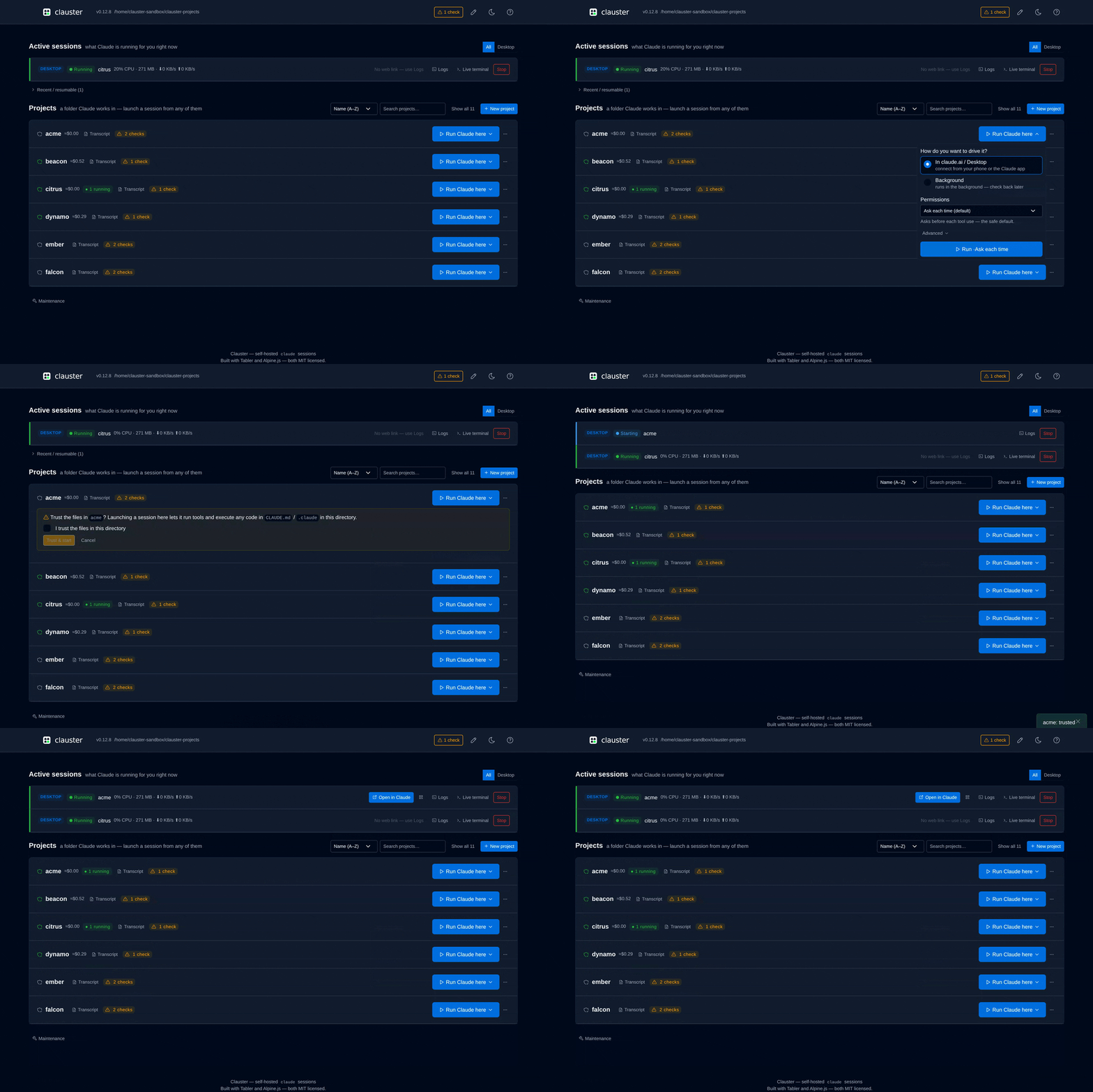
Your homelab's Claude Code launchpad. Self-hosted web UI that spawns & manages remote-control bridges on a remote host from any browser or phone — start/stop, spawn & permission modes, CLAUDE.md editor, git clone, live log tail, cost tracking. Loopback by default; password/reverse-proxy auth. No telemetry.
Alternatives in Design
- Clui Cc — A lightweight, transparent desktop overlay for Claude Code on macOS 956 ★
- Taiyi Forge — TaiyiForge engine control — init, next, harness, continue (OMX-style) 881 ★
- Plan Artifact — Creates one polished, self-contained HTML artifact from a plan, PRD, roadmap, strategy, migration, rollout, re 652 ★
README
Clauster
Run Claude Code on your own server — and drive it from your phone.
Clauster is a self-hosted web dashboard that starts Claude Code sessions in any
project directory on your homelab, NAS, or VPS. You attach from
claude.ai/code or the Claude mobile app. No SSH session required.




Why not just SSH in and run `claude`?
| SSH + terminal | Clauster | |
|---|---|---|
| From a phone | Type into a mobile SSH client | Tap a project in a browser, then use the Claude app |
| When you close the laptop | Session dies with the shell | Session keeps running on the host; reattach later |
| Starting a session | cd to the project, remember the flags |
One click per project, spawn + permission modes preset |
If you already live in a terminal on the same machine as your code, you don't need this. Clauster is for when your code lives on **a box you don't want to SSH into every time**.
Quick start
curl -fsSL https:/Related Skills

Box
Box — self-hosted Claude Code in your pocket. Run real Claude Code & Codex sessions on your own server, driven

Herdr Web UI
Browser and phone client for herdr: chat and live terminal for every agent pane, remote PCs over SSH, web push


Paddock
Self-hosted web UI for Claude Code. Persistent, resumable chats on your own server — fork, rewind, and reach t

Hermes Studio
Web UI & dashboard for Hermes Agent — chat, memory, skills, terminal, approvals, multi-agent orchestration. Se

Agcluster Container
Self-hosted platform for Claude Agent SDK agents. Container isolation, real-time execution tracking, and Web U


Fleet Verify
Use after a UI or user-visible change and before you claim it works — it spawns ONE CCC verification lane that

Related Agents

Homelab Platform
Home-lab site reliability and platform operations for Linux hosts, VMs, container stacks, networking, storage,


Homelab Engineer
Home-lab site reliability and platform operations for Linux hosts, VMs, container stacks, networking, storage,

ZeroClaw Android
Run AI agents 24/7 on your Android phone. Native Rust core, 25+ providers (OpenAI, Claude, Gemini, Groq, DeepS
