
Mulmoterminal — Development skill for Claude Code
Run multiple Claude Code and Codex sessions in parallel — a browser terminal grid that shows which agent needs you.
How to install Mulmoterminal
This entry records only its repository, not the path inside it, so there is no
exact command to give. Open receptron/mulmoterminal and copy the folder into
~/.claude/skills/, or the file into ~/.claude/agents/.
What Mulmoterminal does
Run multiple Claude Code and Codex sessions in parallel — a browser terminal grid that shows which agent needs you. Local, tmux-backed, MIT.
Alternatives in Development
- Happy Coder — by GrocerPublishAgent - Spawn and control multiple Claude Codes in parallel from your phone or desktop 15.7k ★
- Claude Swap — Switch between multiple Claude Code accounts, with automatic rate-limit rotation, usage dashboard, and paralle 2k ★
- Opslane Old — Run multiple Claude Code sessions in parallel 772 ★
README
MulmoTerminal
**Run multiple Claude Code and Codex sessions in parallel — and see which one needs you.**
A **browser terminal** for **parallel AI coding agents**: several **Claude Code** and **Codex** sessions side by side, each in its own cell, with the one that needs you marked in colour. Vibe coding with a single agent needs nothing but a shell — this is for when you run several and lose track of which is waiting. Sessions survive a reload (tmux), work isolates in **git worktrees**, and a **phone push** reaches you when a turn finishes.
**Every cell is a real pty.** `htop`, `lazygit`, a dev server and Claude Code are the same kind of object here — which is why the one-session-per-worktree limit applies to **agents only**, and a shell or a `yarn dev` launcher can sit in the same worktree an agent is working in.
Demo
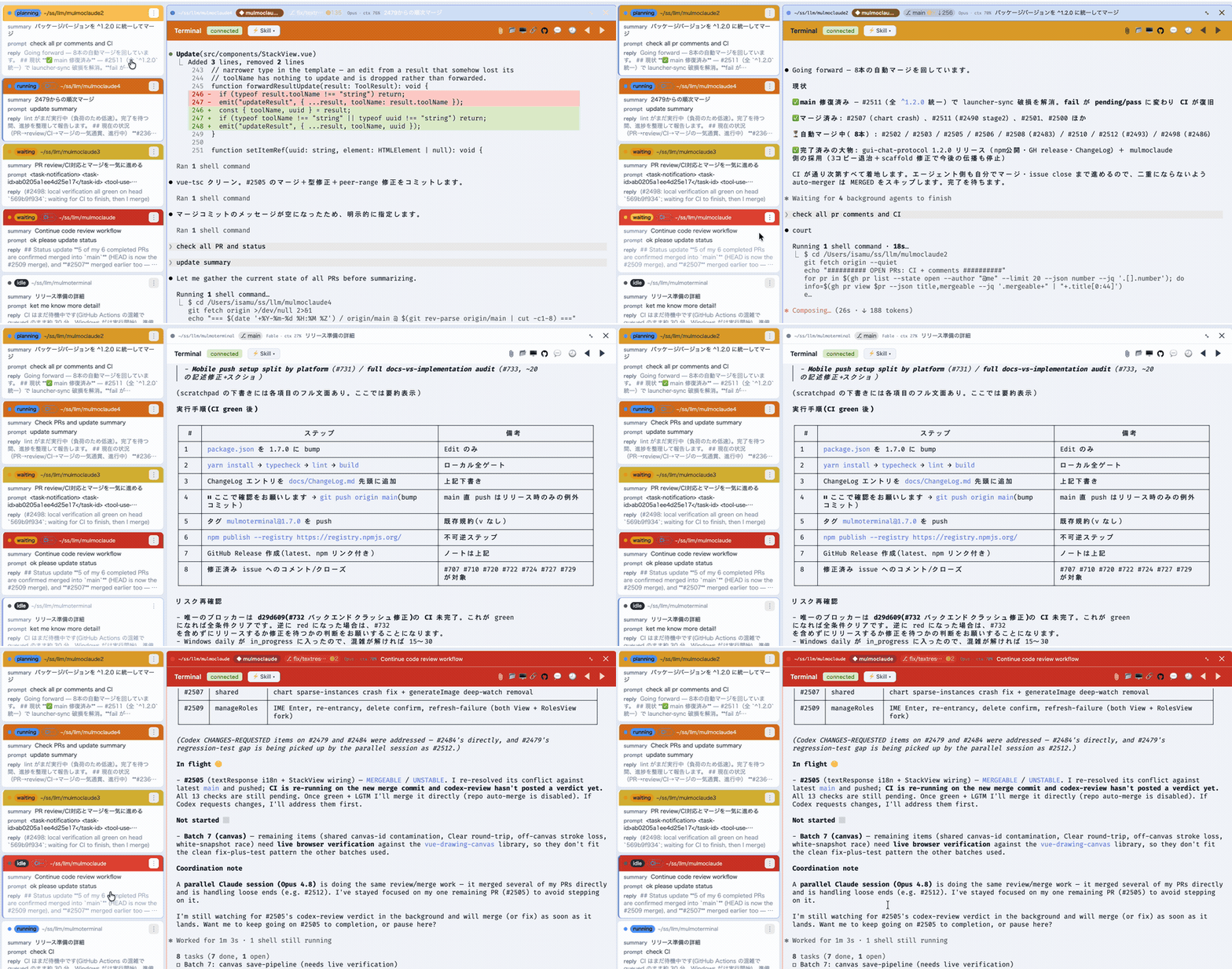
*The grid, live — each cell coloured **working**, **done** or **needs you**.*
https://github.com/user-attachments/assets/0b8dd582-6c0d-4be3-b0b4-3740ad0bdba6
*90 seconds, with sound: one agent, then a grid of them. Zoom into one and the roster still holds what every other session asked, answered and did, so you go to whichever is lit and lose nothing catching up.*
Transcript of the narrationWhen you ran one coding agent, the slowest thing in the room was the agent.
Now that you run five, the slowest thing in the room is probably you.
One of them is always stopped. A permission prompt. A question. Until you notice, it does nothing at all.
MulmoTerminal puts every session on one screen. Blue is working. Green is done. Amber is waiting on you.
You stop hunting. You go where the light is.
The other kind of slow is: what did I even ask this one? The roster keeps one line per session — what you asked
Related Skills
Serai
A single attach point for your terminal, SSH, and Claude Code sessions across local and remote hosts, backed b

ClaudeShip
ClaudeShip: run your Claude Code sessions from anywhere — a macOS menu bar app that shows what every session i

Synapse
A modern terminal window manager. Manage multiple terminal sessions with workspace persistence, window groups,


Leapfrog MCP
Multi-session browser MCP server -- 15 parallel isolated Chromium sessions so multiple Claude Code terminals c

Tmux Agent Status
Quiet tmux status for Claude Code, Codex, opencode & pi — shows nothing while agents work, a small marker when


Gw Iss Run Parallel
Create multiple parallel implementations with tmux for trying different approaches.

Related Agents

Agent Of Empires
Claude Code, OpenCode, Mistral Vibe, Codex CLI, Gemini CLI Coding Agent Terminal Session manager via tmux and


Codex Orchestrator
CLI tool for delegating tasks to GPT Codex agents via tmux sessions. Designed for Claude Code orchestration wi

Claude Squad
Manages multiple AI terminal agents including Claude Code and Aider in parallel