

Agent Flow — Git skill for Claude Code
Real-time visualization of Claude Code agent orchestration — see your agents think, branch, and coordinate as they work.
How to install Agent Flow
This entry records only its repository, not the path inside it, so there is no
exact command to give. Open patoles/agent-flow and copy the folder into
~/.claude/skills/, or the file into ~/.claude/agents/.
What Agent Flow does
Real-time visualization of Claude Code agent orchestration — see your agents think, branch, and coordinate as they work.
Alternatives in Git
- Bulletproof Quick Start Guide — Target Audience: Complete beginners Never used Python/git before 11.1k ★
- CCometixLine — A high-performance Claude Code statusline tool written in Rust with Git integration and real-time usage tracki 2.4k ★
- TDD Guard — by Nizar Selander - A hooks-driven system that monitors file operations in real-time and blocks changes that v 1.9k ★
README
Agent Flow
Real-time visualization of Claude Code agent orchestration. Watch your agents think, branch, and coordinate as they work. [Demo video here](https://www.youtube.com/watch?v=Ud6eDrFN-TA).
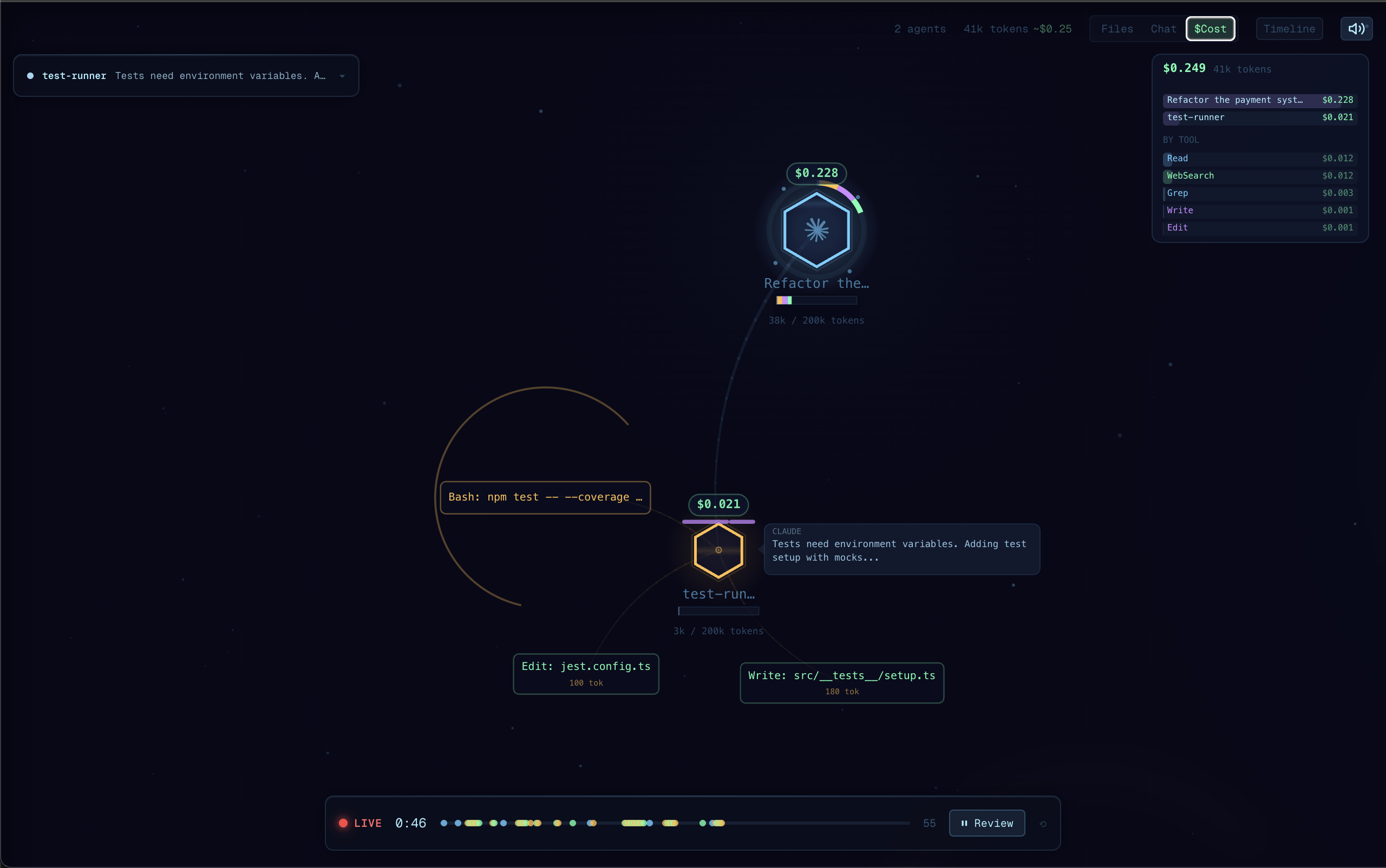
Why Agent Flow?
I built Agent Flow while developing [CraftMyGame](https://craftmygame.com), a game creation platform driven by AI agents. Debugging agent behavior was painful, so we made it visual. Now we're sharing it.
Claude Code is powerful, but its execution is a black box — you see the final result, not the journey. Agent Flow makes the invisible visible:
- Understand agent behavior — See how Claude breaks down problems, which tools it reaches for, and how subagents coordinate
- Debug tool call chains — When something goes wrong, trace the exact sequence of decisions and tool calls that led there
- See where time is spent — Identify slow tool calls, unnecessary branching, or redundant work at a glance
- Learn by watching — Build intuition for how to write better prompts by observing how Claude interprets and executes them
Features
- Live agent visualization: Watch agent execution as an interactive node graph with real-time tool calls, branching, and return flows
- Auto-detect Claude Code sessions: Automatically discovers active Claude Code sessions in your workspace and streams events
- Claude Code hooks: Lightweight HTTP hook server receives events directly from Claude Code for zero-latency streaming
- Multi-session support: Track multiple concurrent agent sessions with tabs
- Interactive canvas: Pan, zoom, click agents and tool calls to inspect details
- Timeline & transcript panels: Review the full execution timeline, file attention heatmap, and message transcript
- JSONL log file support: Point at any JSONL event log to replay or watch agent activity
Getting Started
Quick Start (no VS
Related Skills
Rogue Agentic Flow Skill
Canonical multi-agent orchestration: decompose work, dependency graphs, parallel tracks, handoffs, and merge.


Git Agent
Coordinate issue intake, branch work, and merge steps.


Factory Coordinate
Drive ONE campaign — plan, claim, dispatch, gate, merge, hand off to review — on two reads/tick. Real-locked (

Allele
Native macOS session manager for Claude Code. APFS copy-on-write workspaces branch your real working tree — di


Barista
A modular statusline for Claude Code CLI - real-time context usage, rate limits, costs, git status, and 20+ cu

Agenteye
A real-time dashboard for all your GitHub Copilot CLI & Claude Code sessions: live state, checkpoints, history

Related Agents

Monitor UI
Use this agent proactively whenever:\n- The user mentions monitoring, dashboards, metrics, or real-time data v


Maestro
You are a specialized orchestration agent. Your job is to coordinate multiple agents, manage complex multi-pha

Ava CI Medic
Diagnoses CI. Distinguishes a real code failure from an infrastructure or billing outage before anyone wastes
