
Commit Fm
Description
Your GitHub profile is a museum. This is a radio station. An animated SVG now playing banner for your profile README: what you are building right now, what is in rotation, in seven retro skins. GitHub Actions only, no server. Your AI agent can take the microphone.
Installation
This entry records only its repository, not the path inside it, so there is no
exact command to give. Open the source below and copy the folder into
~/.claude/skills/, or the file into ~/.claude/agents/.
README
Commit FM
**Your GitHub profile is a museum. This is a radio station.**
An animated SVG banner for your profile README that shows the repositories you are actually working on right now, and the others in rotation, in seven retro skins. Runs on GitHub Actions. No server, no API key, no model calls.
Why
Stars, streaks and a language pie chart are all past tense. None of them tell a visitor what you are building this week, which is the only thing they actually came to find out.
That is the same information problem a music player solves: one thing is playing, a queue sits behind it, and one small display has to say so at a glance. So Commit FM borrows the display. Repository name, one line about it, how warm the last push is, and the rest of the rotation scrolling past.
It is built for busy profiles. If you have twenty repositories and four of them are alive this month, a visitor currently has no way to tell which four.
Skins
Pick one with `"style"` in your config. Every skin renders from the same data.
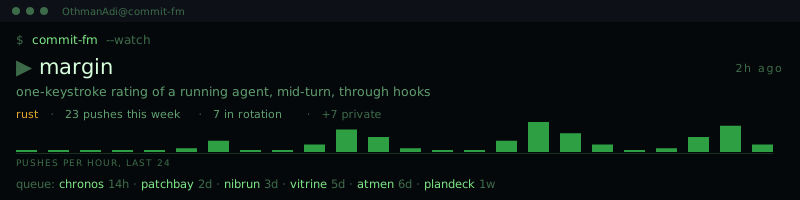
terminal
cmus with a cava spectrum. Native to the audience reading a developer's profile. The bars are real pushes per hour over the last 24, with a fast attack and a slow decay.
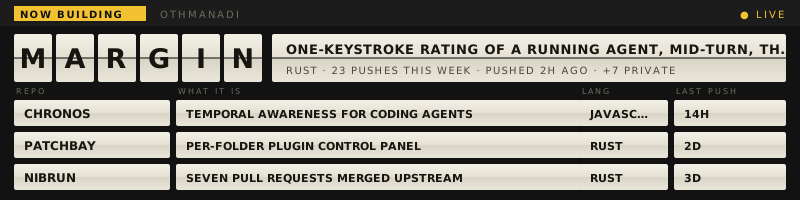
splitflap
An airport departures board. The only skin that gets better the more repositories you have, because more rows is what the object is for.
dotmatrix
An amber LED destination sign. The one that can honestly represent private work: it prints a count with no repository name attached.
<
Related Skills
Doc Co-authoring
Guide users through structured workflow for co-authoring documentation

Docx
Create, edit, and analyze Word documents with tracked changes, comments, and formatting
Extract text, create PDFs, merge/split documents, and handle forms
Pptx
Create, edit, and analyze PowerPoint presentations with layouts and templates
Xlsx
Create, edit, and analyze Excel spreadsheets with formulas, formatting, and visualization
mcp-server-fetch
Fetch and convert web pages to markdown.
