
Sit — Testing skill for Claude Code
⚙️ [Skill] A Git-native semantic safety layer for AI agents editing Skill packages — validates, diffs, reviews, and gates prompt/schema/test changes before they ship.
How to install Sit
This entry records only its repository, not the path inside it, so there is no
exact command to give. Open OpenRaiser/Sit and copy the folder into
~/.claude/skills/, or the file into ~/.claude/agents/.
What Sit does
⚙️ [Skill] A Git-native semantic safety layer for AI agents editing Skill packages — validates, diffs, reviews, and gates prompt/schema/test changes before they ship.
Alternatives in Testing
- Debug — You are tasked with helping debug issues during manual testing or implementation 10k ★
- Claude Codepro — by Max Ritter - Professional development environment for Claude Code with spec-driven workflow, TDD enforcemen 1.6k ★
- Add Scaffold — 按 14-phase 工作流为指定 app 编写清理 scaffold(含需求采集、实测勘测、TOML、safety test、UI 集成) 1.3k ★
README
Quick Start | Why sit? | Real Case | Agent Loop | PyPI | Releases
Real case: see how paper-webpage-builder uses Skill-style prompts, schemas, scripts, and golden behavior checks.
**A Git-native safety layer for AI agents that edit prompts, schemas, scripts, and Skill packages.**
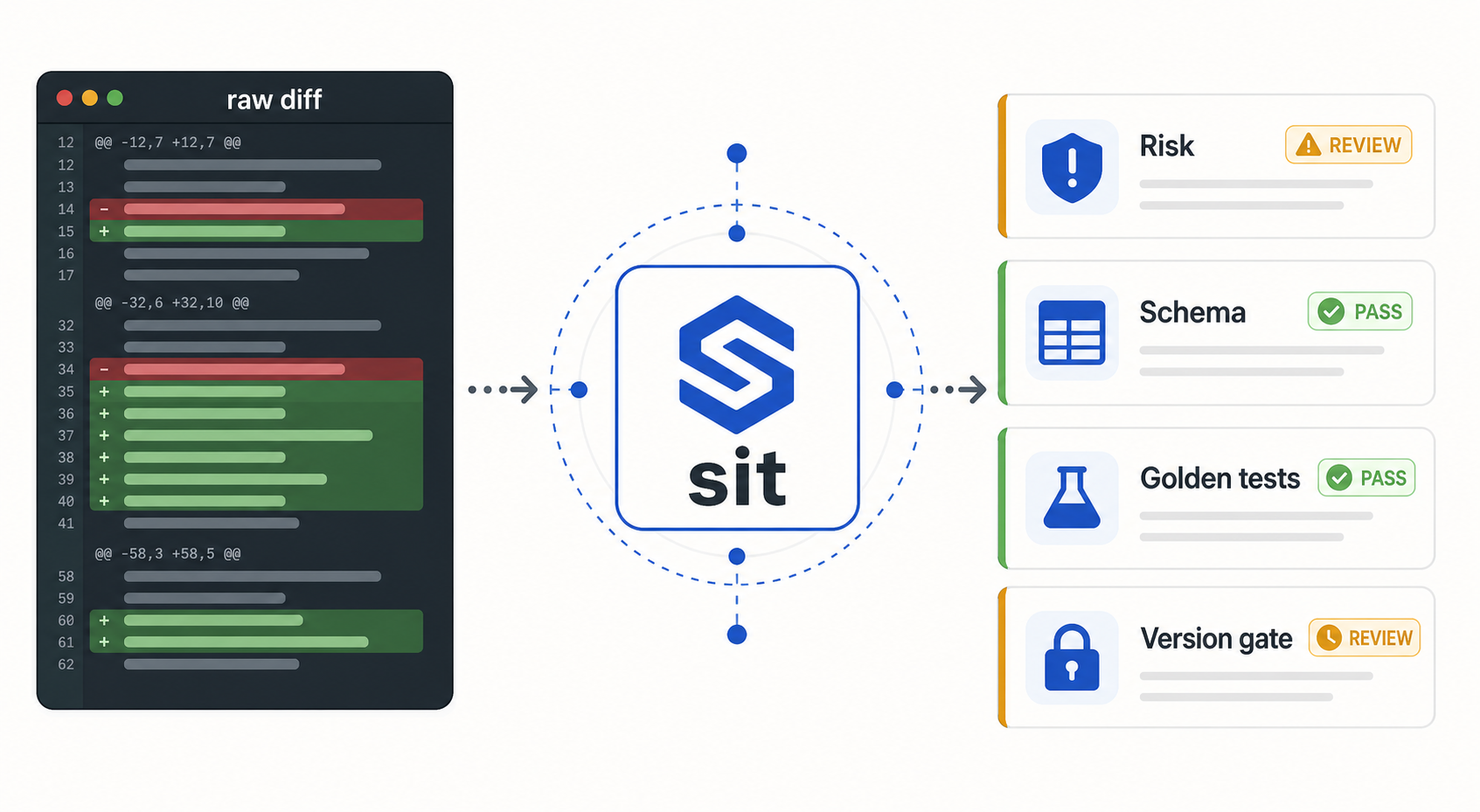
Git can tell you that a prompt changed. `sit` tells you whether that change is a typo fix, a behavior change, a schema contract change, a test update, or a release risk.
pip install sit-toolkit
sit diff HEAD..WORKTREE
sit review HEAD..WORKTREE
Use `sit` when humans or AI agents evolve reusable skills and you need semantic diffs, golden tests, version gates, PR reviews, and reproducible releases without replacing Git.
Why sit?
AI Skill packages are not just
Related Skills
Kb Validate
Validate a ckb.json against the CKB spec (JSON Schema + semantic rules R1–R7) and report freshness and report

Etemi Create Skill Skill
Converts prompts, workflows, or instructions into installable Claude Code skills (SKILL.md + assets + scripts

Propagate
Use after editing an upstream doc (PRD/SRS/tech-design/feature-spec) to propagate changes downstream and keep

Super Orkestra
Open-source AI coding orchestrator: a conductor model plans & reviews, worker models (Claude Code, Codex, Gemi

Orchestrate Skill
Ledger-based orchestration skill for Claude Code — plan, fence, review, and smoke-test multi-batch changes wit


Autonom
Universal mobile test and debug harness for AI coding agents on Android emulators and iOS Simulator, with sema

Related Agents

Diff Reviewer
Use when changes touch internal/diff/, internal/parser/, internal/merge/, or match key / field comparison logi

Gemini Delegate
Delegate broad, purely reading analysis over a lot of material to Gemini (Antigravity CLI) — condense large di


Render QA
Renders a built artboard, records deterministic visual/GIF evidence, and applies render, contrast, seam, motio
