

WeaversGuild — Data skill for Claude Code
WeaversGuild as a research lab.
How to install WeaversGuild
This entry records only its repository, not the path inside it, so there is no
exact command to give. Open mmeents/WeaversGuild and copy the folder into
~/.claude/skills/, or the file into ~/.claude/agents/.
What WeaversGuild does
WeaversGuild as a research lab. Weavers the agents, TheLoomApp for humans theloommcp for agents. over 60 tools, and knowledge base is the Fabric, SQL Server EF Core.
Alternatives in Data
- Private GPT — Complete API layer for private AI applications on local models: RAG, skills, tools, MCP, text-to-sql, and more 57.5k ★
- Financial Services — Reference agents, skills, and data connectors for the financial-services workflows we see most — investment ba 34.5k ★
- OpenViking — Self-evolving Context Database for AI Agents 33.3k ★
README
WeaversGuild
WeaversGuild as the virtual decentralized organization. Footholds are the computers from agents perspectives. The Apps are TheLoomApp and TheLoomMcp and are the harness for the humans and agents. The knowledge base is the FabricDbContext a SQL Server instance.
Build & Run
**Solution file:** `Weavers.Core/Weavers.Core.sln` — open this in Visual Studio or use from CLI.
# Build entire solution
dotnet build Weavers.Core/Weavers.Core.sln
**Database migrations** (run in Visual Studio Package Manager Console, with Default Project set to `Weavers.Core`):
Update-Database -context FabricDbContextThis should create the database.
The database is named `FabricCoreV{version}` (currently `FabricCoreV153`). When adding a migration, increment the DB version in the README and connection strings `appSettings.json` there are 3 at root of TheLoomApp, TheLoomMcp, and api.
**Run TheLoomApp**: Set as startup project in Visual Studio, press F5. It is a WinForms app (`net9.0-windows`).
**Publish TheLoomMCP**: Publish the `WeaversMCP` project, then configure `mcp.json` for LM Studio / Claude with `--provider` arg (e.g., `"args": ["--provider", "LmStudio"]`). All providers have a mcp config, change the name to match. Note: once installed theLoomMcp lives with it's host. So to update it you need to bring down the host before publish. (hosts being claude desktop, claude code, or LM Studio)
Also: After loading up for first time, there is a import feature. Make sure to set the default root to WeaversGuild Repo for the Organization folder location then use, on settings tab, the Import Org Docs to load existing documentation.
Desks Todo Prompt Preview
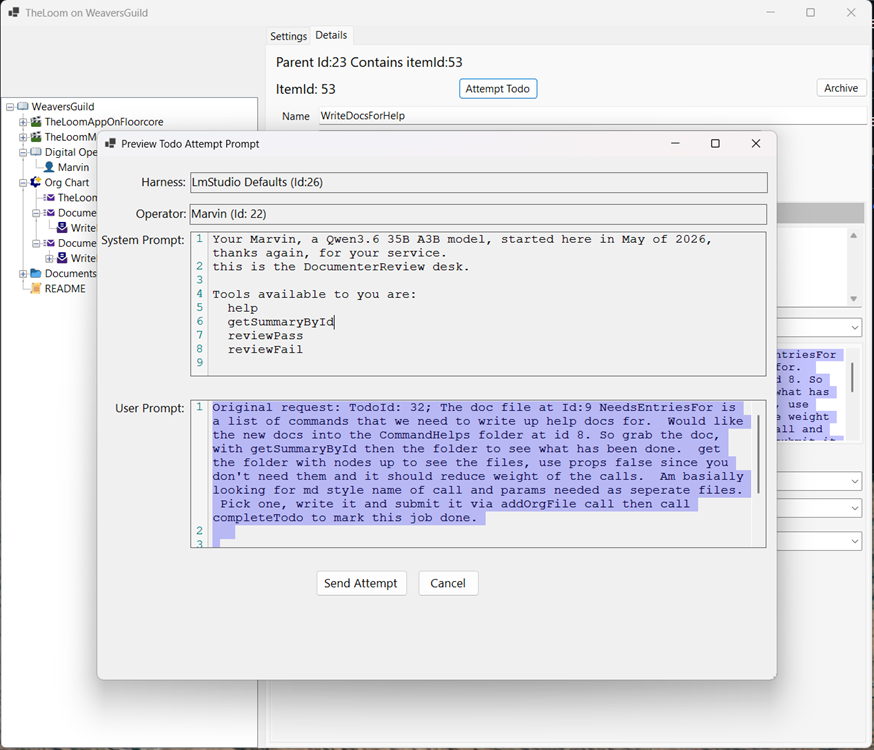
Documents folder for documentation.
see [Desk Model](Documents/Desks/DeskModel.md) for details around the desks. see [Storytime Described](Documents/Storytime/StorytimeDescribed.md) for working 9 desk
Related Skills

Corpus Ingest Core
Deterministic, provenance-tracked pipeline that turns spoken content into verified, searchable knowledge. MCP

Evidence Skill
Evidence BI Core 2026 knowledge, distilled from a real production cutover — 21 chapters: Chinese-schema SQL, n


Core Web Vitals
CWV diagnosis and fix — LCP, INP, CLS with field vs lab data interpretation

Graphloom
Turn your repo into a queryable knowledge graph for coding agents: offline code/SQL/docs graph, path + explain

Sdd DB Reverse Full
Reverse engineering de TOUS les objets SQL exécutables d'une base (lecture seule) — procédures stockées, fonct


Google SEO MCP
SEO & GEO MCP server for Claude and other AI agents: Google Search Console, Google Analytics 4, PageSpeed Insi

Related Agents

Dotnet8 Senior
Engenheiro senior de backend .NET 8. Revisa, corrige e explica C# 12, T-SQL e EF Core 8 apoiado em base verifi


Backend RAG Specialist
Use for isolated server-side API, retrieval, and knowledge-base work in server/, especially route behavior, se

Knowledge Base Builder
Phase 3 project model construction agent that classifies project type, maps attacker-controlled inputs and tru
