
Markmap Forge — Development skill for Claude Code
Deterministic renderer + validator skill: typed JSON in, standalone interactive Markmap HTML5 mind map out.
How to install Markmap Forge
This entry records only its repository, not the path inside it, so there is no
exact command to give. Open ML9373/markmap-forge and copy the folder into
~/.claude/skills/, or the file into ~/.claude/agents/.
What Markmap Forge does
Deterministic renderer + validator skill: typed JSON in, standalone interactive Markmap HTML5 mind map out.
Alternatives in Development
- Portaljs Add Map — Render a GeoJSON dataset on an interactive Leaflet map in the Views section of a dataset's showcase 2.3k ★
- Hive — Browser-native hive-mind for CLI coding agents — Claude Code, Codex, Gemini, and OpenCode collaborate as real 473 ★
- Convex Schema Validator 354 ★
README
markmap-forge
Turn an outline into one standalone, interactive mind map. A small typed JSON file goes in, a single HTML file built on [markmap](https://markmap.js.org) comes out, and a validator checks the input first.
The output is deterministic: the template is a static asset and a Node.js CLI fills it in, validates and escapes the content, so the same JSON always gives the same bytes. That makes it safe to drive from an AI agent: the model writes the outline, never the HTML. [`SKILL.md`](./SKILL.md) is the ready-made instruction file for that use, a Claude Code skill that tells an agent how to turn a document into the JSON and call the CLI.
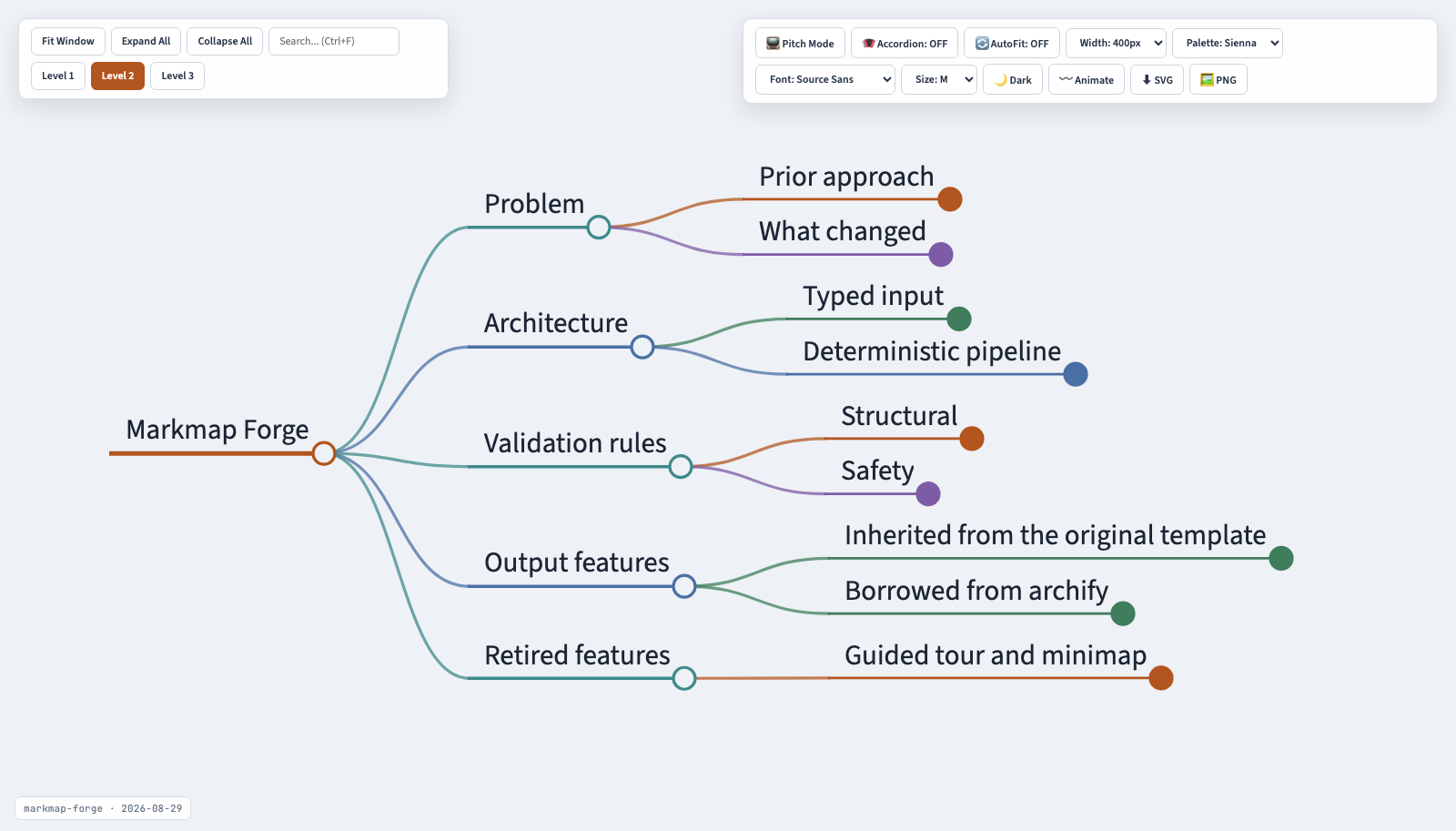
*The document above is `examples/example.html`, produced by the CLI from `examples/example.mindmap.json`. Regenerate the screenshot with `npm run capture:preview` so it never drifts from the template.*
Every output is a single self-contained HTML file: no build step, no script fetched at view time (it opens offline and behind corporate web filters), with search, level folding, pitch mode, dark mode, palette/font/size controls, an in-page markdown editor that regenerates the tree, and SVG/PNG export built in.
Install
Needs Node.js 18 or later. Run it without installing anything:
npx markmap-forge render input.json output.htmlor install it globally with `npm install -g markmap-forge`. To work on the code, clone this repository and run `npm install`.
CLI
markmap-forge validate  [--json]
markmap-forge render  [output.html] [--json]
markmap-forge deliver  [output.html] [--json]
From a clone, run `node bin/markmap-forge.mjs` in place of `markmap-forge`.
`deliver` validates, renders, and prints a SHA-256 receipt for both the JSON source and the HTML artifact.
Input shape
See [`s
Related Skills
Wonder Pill
A Claude skill that turns brainstorming into an interactive mind map of inverted assumptions — no answers, no

Mindmap Generator
Generate an interactive dark-mode Markmap HTML mindmap where EVERY flashcard is visible as a Front → Back node


Frontloom Angular
Use this skill for Angular frontend tasks. Enforces idiomatic Angular patterns including signals, standalone c

Emit
Generate a standalone, org-owned Claude Code plugin (the org's agent harness) from .forge.org.yaml. Reads the


Concepts
Extract key concepts from this mind map and normalize them against the existing taxonomy provided below.

Mindmap Knowledge
Watch the video frames and listen to the audio. When concepts are shown visually (slides, diagrams, code, demo
Related Agents

Vault Migrator
Classify, transform, and migrate vault content from a source vault into this obsidian-mind instance. Two modes


Video Scene Builder
Builds one act (a few scenes) of a video project as deterministic HTML/CSS/WebGL scene modules for the video-k

Typesafe Architect
Finds the shape of a TypeSafe solution: decides whether Jev fits at all, what stays in deterministic code, wha
