
Agent Ps — Productivity skill for Claude Code
A process table for coding agent sessions.
How to install Agent Ps
This entry records only its repository, not the path inside it, so there is no
exact command to give. Open mkhuda/agent-ps and copy the folder into
~/.claude/skills/, or the file into ~/.claude/agents/.
What Agent Ps does
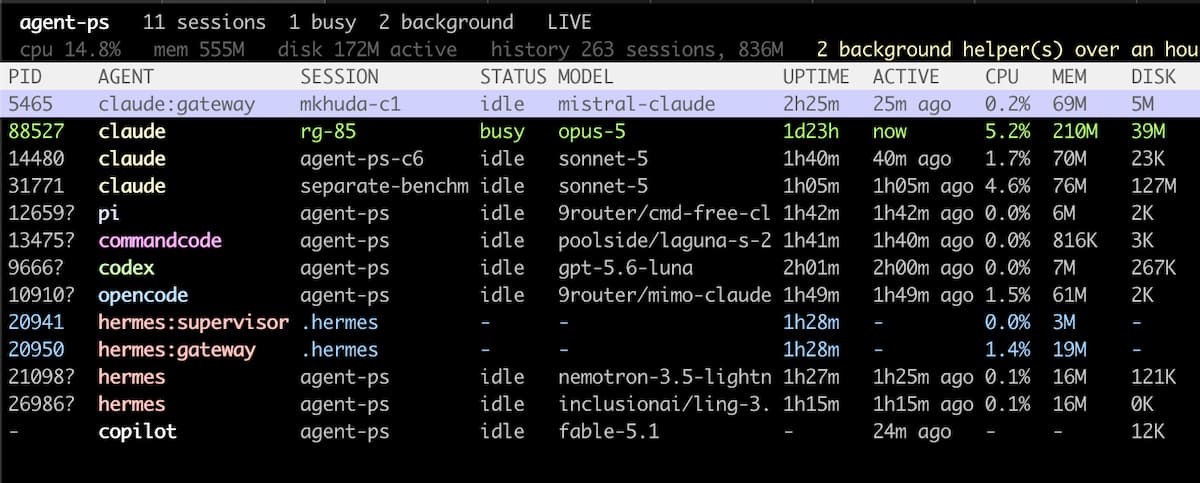
A process table for coding agent sessions. Claude Code, Codex, OpenCode, Hermes, Pi, CommandCode and Copilot in one view, with models, idle time, disk use and one key to stop them.
Alternatives in Productivity
- Business Automation Pack — Business process automation skills 1.6k ★
- Pi Subagents — Claude Code like Sub-Agents & Workflow Orchestration for Pi — parallel execution, live widget, fleet view, cus 967 ★
- Schedule History — View execution history for all scheduled tasks with interactive selection 510 ★
README
agent-ps
**A process table for coding agent sessions, the way `ps` would look if it knew what a session was.**
[](https://github.com/mkhuda/agent-ps/actions/workflows/ci.yml) [](https://pypi.org/project/agent-ps/) [](https://www.npmjs.com/package/@mkhuda/agent-ps) [](https://github.com/mkhuda/agent-ps/blob/main/LICENSE)   
[Install](#install) | [Usage](#usage) | [Agents](#agents) | [Scripting](#scripting) | [How it works](https://github.com/mkhuda/agent-ps/blob/main/docs/internals.md)
curl -fsSL https://raw.githubusercontent.com/mkhuda/agent-ps/main/install.sh | sh`ps aux | grep claude` gives you PIDs. It will not tell you which one is the session you are talking to, what model it is spending on, whether it has been idle for three days, or which rows are background daemons that outlived the terminal that started them. It also misses the other six agents entirely.
agent-ps lists every session with its agent, model, working directory, uptime, idle time and disk footprint,
Related Skills

Forgeo
A scheduled, agent-driven software factory. Keep a plain JSON backlog; Forgeo runs your coding agent (Claude C


Pawscope
Local web dashboard for inspecting Claude / Copilot / Codex CLI agent sessions in real time. Read-only, local-


Claude Timings Wrapper
Tracks idle, typing, and agent work time across Claude Code sessions using PTY wrapping and native hooks. Prov

Ship It Skill
Cross-platform coding-agent skill (Claude Code / OpenCode / omp): disciplined phased workflow with mandatory a

Roadmap Tutor
Hermes Agent skill: learn any roadmap.sh roadmap one topic at a time, tracked across sessions. Stdlib-only Pyt


Agent Remote
Secure, self-hosted Android app for real-time alerts and encrypted remote control of Codex, Claude Code, and O

Related Agents

Developer Overview
code-container (container) creates isolated Docker environments for AI coding harnesses (Claude Code, OpenCode


Consult Agent
Execute cross-tool AI consultations via Task spawning. Use when agents or workflows need a second opinion from


Session Error Analyzer
Analyzes specific AI IDE sessions (Claude Code, OpenAI Codex, OpenCode) for LLM behavior errors and returns a
