
Claude Iphone Cam — Development skill for Claude Code
Show Claude Code what your iPhone camera sees: a snap button above the prompt, no AirDrop, no files.
How to install Claude Iphone Cam
This entry records only its repository, not the path inside it, so there is no
exact command to give. Open mikhin/claude-iphone-cam and copy the folder into
~/.claude/skills/, or the file into ~/.claude/agents/.
What Claude Iphone Cam does
Show Claude Code what your iPhone camera sees: a snap button above the prompt, no AirDrop, no files.
Alternatives in Development
- Kztek Brand Info — PHẢI load khi: tạo hoặc sửa tài liệu/slide/báo cáo có logo KZTEK, áp dụng màu Navy #251C53 hoặc Cam #F05922, t 90 ★
- Claude Image View — See the images you paste into Claude Code: thumbnails above the prompt instead of bare [Image #1] tags 44 ★
- Quicktui — Self-hosted remote terminal for iPhone, iPad & browser — attach tmux and run Claude Code, Codex, or any CLI ag 40 ★
README
Claude iPhone Cam
A Claude Code mod that lets Claude see what your iPhone camera sees. Press **📷 snap** above the prompt, check the thumbnail, type your question, send.
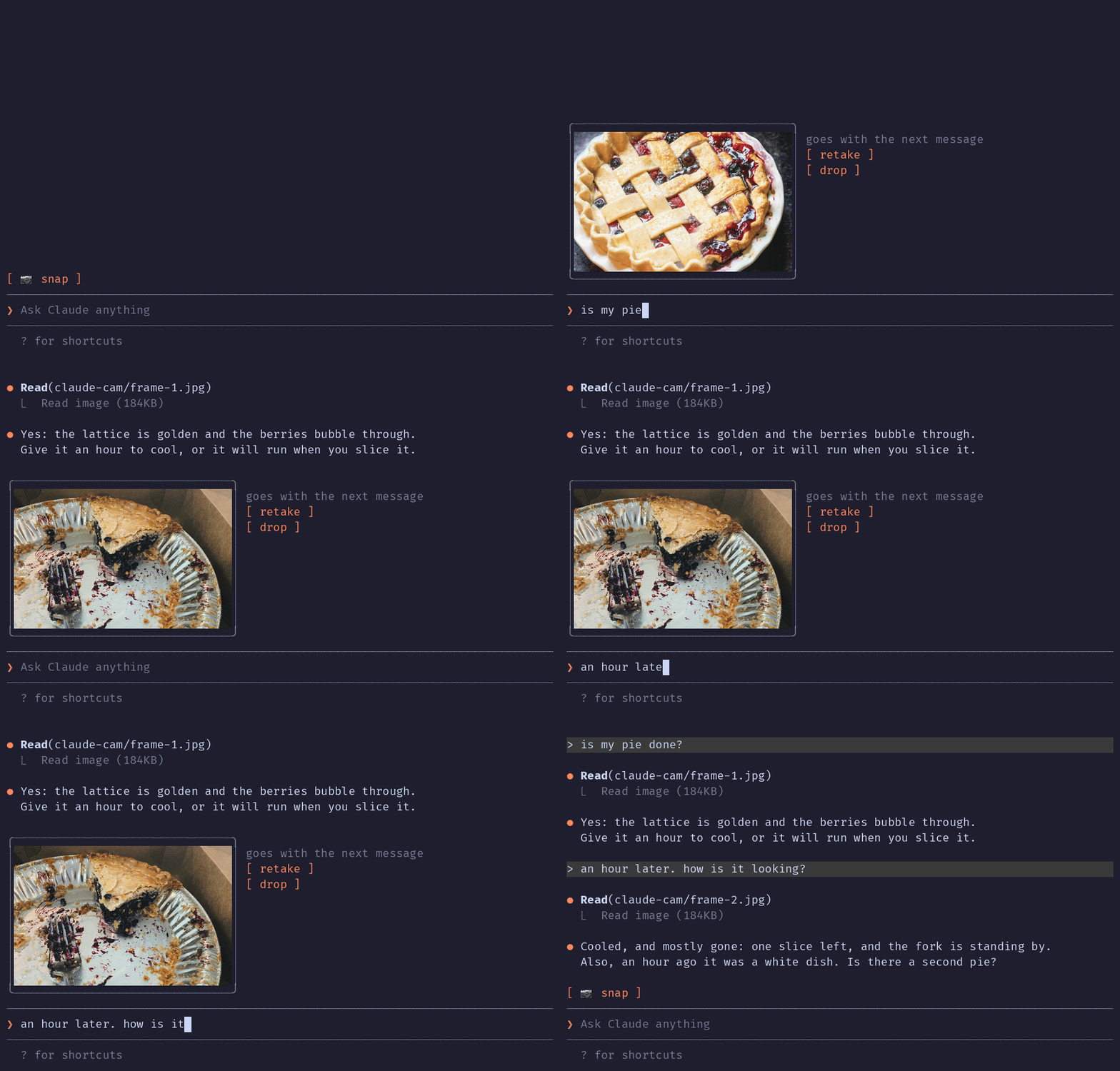
The terminal in the demo is drawn, the pies are real: photos by [Joe Dumas](https://unsplash.com/photos/89zuNmg6w0Y) and [Debby Hudson](https://unsplash.com/photos/IilbCWFsHMg) on Unsplash. The demo and its build script live in the [`demo` branch](https://github.com/mikhin/claude-iphone-cam/tree/demo/demo), so installing the plugin doesn't download them.
No AirDrop, no Telegram-to-yourself, no saving files. The iPhone is already a Mac webcam through [Continuity Camera](https://support.apple.com/en-us/102546); this mod grabs one frame from it.
Install
Inside Claude Code, run:
/plugin marketplace add mikhin/claude-plugins
/plugin install iphone-cam@mikhin
/reload-plugins
Requirements
- macOS Ventura or later, iOS 16 or later, iPhone XR or newer
- Both devices on the same Apple ID, Wi-Fi and Bluetooth on, iPhone locked and near the Mac
ffmpeg(brew install ffmpeg)- Camera access for your terminal app (macOS asks on the first snap)
What you see
[ 📷 snap ]
❯ _
After a snap:
╭──────────────╮ goes with the next message
│   (frame)    │ [ retake ]
│              │ [ drop ]
╰──────────────╯
❯ is my pie done?- retake snaps again, drop forgets the frame.
- On send the frame goes with your message and the band clears.
How it works
ffmpeg -f avfoundation -list_devicesfinds the device named… iPhone … Camera(Desk View is skipped).- One
ffmpegrun waits 1.5 s for exposure, then writes a full JPEG and a 640 px PNG thumbnail to$TMPDIR/claude-cam/. - The band above the prompt draws the thumbnail with Claude Code's
Imageelement. - On send, a
prompt.submithook adds the JPEG's path to the message context, and Claude
Related Skills
Herdr Cam
Show your agent what's on your desk: press a key, point your webcam, and the photo lands in your coding agent'

Trayce
A hand-drawn sketch pad for Claude Code sessions. Draw in your browser, pick a session, submit — Claude sees y

Kinetic Multicam
Claude Code skill: turn one talking-head take into a kinetic supers + camera whips prompt for Seedance 2.0 Fas


Unity Prototype
The killer feature. One prompt to playable prototype — writes scripts, builds scene via MCP, sets up physics/c

Cc Mod Image View
Claude Code mod: thumbnails of pasted images above the prompt instead of bare [Image #n] tags


Claude Paste View
Claude Code mod: preview pasted images and long pasted text above the prompt

Related Agents
Unity Prototyper
The star agent. Rapid end-to-end prototyping — given a mechanic description, writes C# scripts, builds the tes

Self Optimizer
Workflow reflector. Invoke after milestones (PRD 定稿、原型交付、部署完成) or when user says "优化流程"/"更新规则"/"总结偏好". Runs in

Research Auditor
Separate-context auditor for the kit's degraded research path. Verifies that every claim in brainstorm_notes.m
