

Neuron CLI — AI skill for Claude Code
This ia the most powerful cli ai agent that can actually do any thing and combines between open claw and Claude code.
How to install Neuron CLI
This entry records only its repository, not the path inside it, so there is no
exact command to give. Open Marwan78888/Neuron-Cli and copy the folder into
~/.claude/skills/, or the file into ~/.claude/agents/.
What Neuron CLI does
This ia the most powerful cli ai agent that can actually do any thing and combines between open claw and Claude code.
Alternatives in AI
- Repomix — 📦 Repomix is a powerful tool that packs your entire repository into a single, AI-friendly file 22.7k ★
- Firecrawl MCP Server — 🔥 Official Firecrawl MCP Server - Adds powerful web scraping and search to Cursor, Claude and any other LLM c 6.1k ★
- Claw0 — 0 - 1 learn OpenClaw: sections to build an claw-AI agent from scratch 2.6k ★
README
Neuron
Neuron is an open-source coding-agent CLI for cloud and local model providers.
Use OpenAI-compatible APIs, Gemini, GitHub Models, Codex OAuth, Codex, Ollama, Atomic Chat, and other supported backends while keeping one terminal-first workflow: prompts, tools, agents, MCP, slash commands, and streaming output.
[Quick Start](#quick-start) | [Setup Guides](#setup-guides) | [Providers](#supported-providers) | [Source Build](#source-build-and-local-development) | [VS Code Extension](#vs-code-extension) | [Sponsors](#sponsors) | [Community](#community)
Sponsors
Star History
[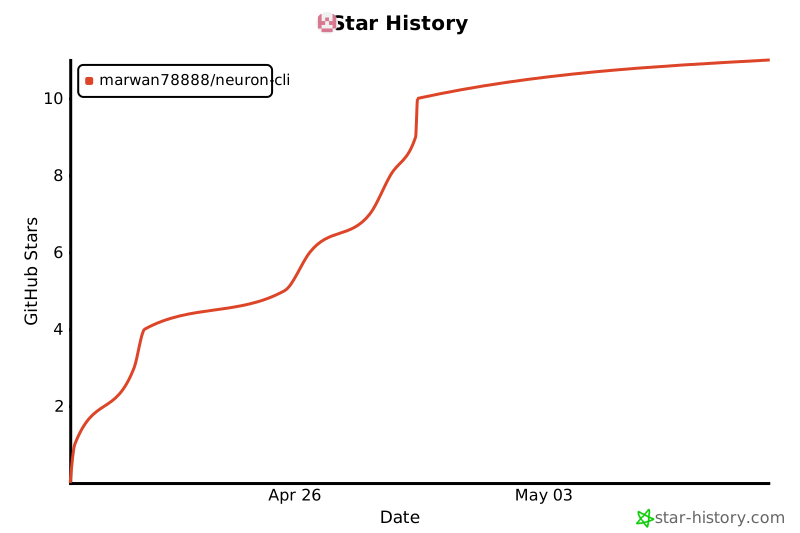](https://www.star-history.com/?repos=Marwan78888%2FNeuron-Cli&type=date&legend=top-left)
Why Neuron
- Use one CLI across cloud APIs and local model backends
- Save provider profiles inside the app with
/provider - Run with OpenAI-compatible services, Gemini, GitHub Models, Codex OAuth, Codex, Ollama, Atomic Chat, and other supported providers
- Keep coding-agent workflows in one place: bash, file tools, grep, glob, agents, tasks, MCP, and web tools
Quick Start
Install
npm i @marwan_reyad/neuron-agentIf the install later reports `ripgrep not found`, install ripgrep system-wide and confirm `rg --version` works in the same terminal before starting Neuron.
Start
neuronIf the global install gets into a bad state later, run:
neuron repairInside Neuron:
- run
/providerfor guided provider setup and saved profiles - run
/onboard-githubfor GitHub Models onboarding
Fastest OpenAI setup
macOS / Linux:
export CLAUDE_CODE_USE_OPENAI=1
export OPENAI_API_KEY=sk-your-key-here
export OPENA
Related Skills
Open CLI Agent
A powerful, interactive CLI agent that provides access to 500+ tools and integrations through Composio. Built


Human In The Loop MCP Server
A powerful MCP Server that enables AI assistants like Claude to interact with humans through intuitive GUI dia

Lovcode CLI
We hacked Claude Code open-source, debugged it from scratch, and made it actually work. Full-featured AI codin

ApexAG3NT
ApexAgent is a multi-model AI developer harness and execution engine. It combines massive context caching and


Advertising Skills
Advertising Skills for Open Claw, Claude Code & AI agents.


Openclaw Knowledge Distiller
Open CLAW Knowledge Distiller · 龍蝦知識蒸餾器 — Turn YouTube/Bilibili videos into structured knowledge articles. Loc

Related Agents

🦀 Claw CR
Der Open-Source-Coding-Agent, in Rust gebaut. Alternative zu ClaudeCode Status Language


Correlator
Finding correlation engine. Use AFTER multiple agents have reported findings to discover attack chains. Combin

Worker Auditor
Periodic drift scanner. Reads CLAUDE.md, logs, and retros; identifies gaps between what the framework claims v
