

Zj Radar — AI skill for Claude Code
A Zellij sidebar that shows Claude Code, Codex, and other AI-agent status across every tab.
How to install Zj Radar
This entry records only its repository, not the path inside it, so there is no
exact command to give. Open marktoda/zj-radar and copy the folder into
~/.claude/skills/, or the file into ~/.claude/agents/.
What Zj Radar does
A Zellij sidebar that shows Claude Code, Codex, and other AI-agent status across every tab.
Alternatives in AI
- Codex Login — Log GPT (Codex) in on this machine with a ChatGPT device login - shows a link and a one-time code 162 ★
- Relay Radar — AI中转站质量监控 · 模型验真 · Token成本优化 — RelayRadar 中转雷达 131 ★
- Comfyui MCP Panel — The local-first sidebar AI agent for ComfyUI — runs on your own Claude OR ChatGPT subscription (no API keys, n 101 ★
README
zj-radar
A native [Zellij](https://zellij.dev) **sidebar** that shows live AI-agent status for every tab — *working*, *waiting for you*, *done*, or *error* — with repo·branch, elapsed time, and the last message. Click a row to jump to that tab; use its right-edge glyph to acknowledge a pane still flagged "needs you" or dismiss a dead peer session (details below).







Quick start · How it works · Cross-session badge · How is this different? · Configuration · Producers
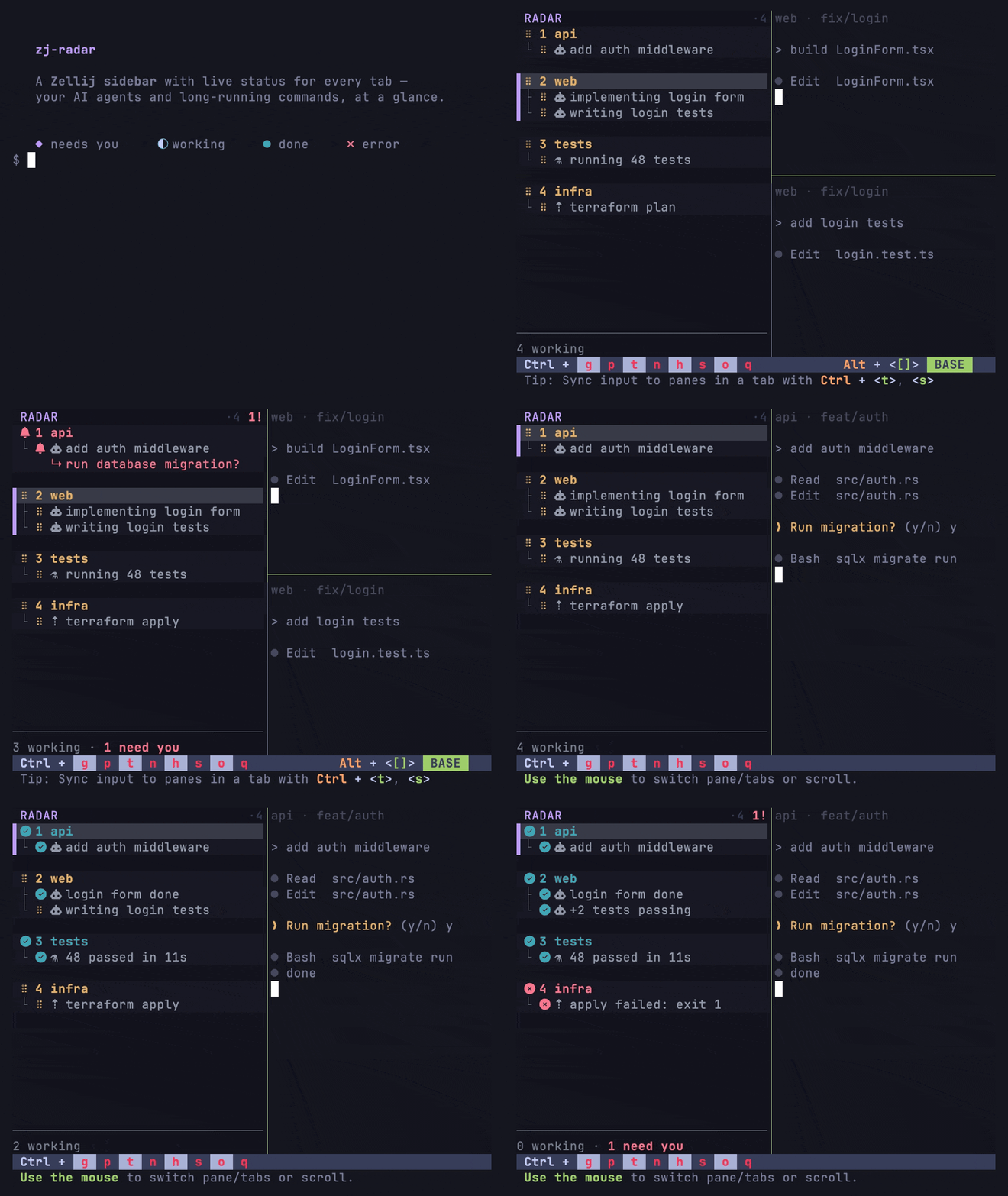
`◆ needs you` · `⠋ working` · `● done` · `✗ error` · `○ idle / plain terminal`
What is it?
Agents like Claude Code spend long stretches working, then quietly block on a permission prompt or finish. In a many-tab Zellij session it's easy to lose track of which agent needs you. zj-radar surfaces that at a gla
Related Skills
GlanceTerm
The terminal for running multiple AI coding agents in parallel — Claude Code, Codex, Gemini CLI, opencode. A l


ZackEyes
Native macOS Dynamic Island for AI coding agents — watches Claude Code & Codex sessions, surfaces permission r

Herdr Agents Tracker
Herdr plugin that shows your AI subscription usage: account limits in the tab bar, a context meter per agent,


Aeo Crawl Radar
Parse your server logs to see which AI crawlers actually visited - GPTBot, ClaudeBot, PerplexityBot, Google-Ex

Kickbacks Kit
Archive every ad kickbacks.ai shows in your Claude Code or Codex spinner, track its status feed, and watch it

Builders Space
Builders Space — A local dashboard that shows what all your AI coding agents are doing across Cursor, Claude C

Related Agents

Council Reviewer
Reviews a council task branch that reached state review. Use for /council:review or when council_status shows

Docs Updater
Interactively updates OVERVIEW.md, ARCHITECTURE.md, CLAUDE.md, backlog status, and open questions after comple

Ghmem Synthesize
Rewrites one dirty ghmem topic into docs/design/ .md and closes it. Use when ghmem status shows a dirty topic
