

React Native UI Claude Skill — Design skill for Claude Code
A Claude skill that makes Claude design React Native UIs like a senior mobile engineer — token-based themes, platform-correct idioms, and a discovery interview before any code.
How to install React Native UI Claude Skill
This entry records only its repository, not the path inside it, so there is no
exact command to give. Open mahfuzurrahman01/react-native-ui-claude-skill and copy the folder into
~/.claude/skills/, or the file into ~/.claude/agents/.
What React Native UI Claude Skill does
A Claude skill that makes Claude design React Native UIs like a senior mobile engineer — token-based themes, platform-correct idioms, and a discovery interview before any code.
Alternatives in Design
- Theme Factory — Style artifacts with professional themes including 10 pre-set color/font combinations 94.1k ★
- Claude Design Engineer — Design engineering for Claude Code 4.1k ★
- Extract Skill — Reverse-engineer design systems, tokens, and components from live products or screenshots 2.8k ★
README
react-native-ui-ux
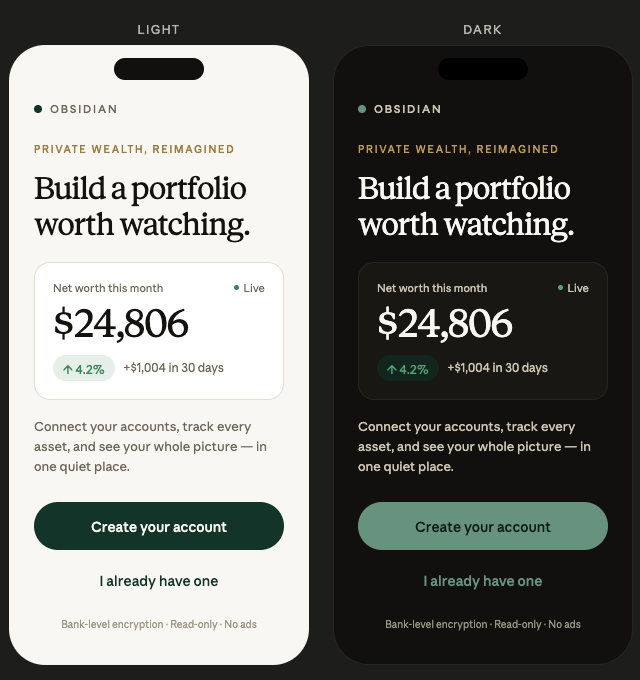
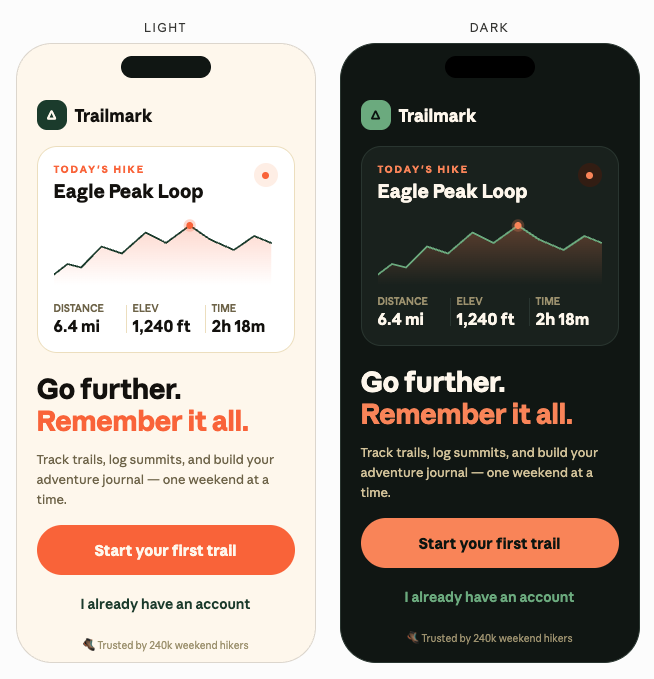
A Claude skill for building React Native UIs that don't look AI-generated.
Drop this skill into Claude and it stops producing the usual generic mobile UI — the boxy cards, the hardcoded hex colors, the same layout no matter what the app actually is. Instead, Claude behaves like a senior mobile engineer: it asks about your product first, builds a token-based theme before any screen, and ships code that respects iOS and Android idioms separately.
What it does
- Runs a short discovery interview before writing UI code for a new app. A meditation app and a trading app shouldn't look the same — this skill makes sure they don't.
- Enforces a token-based theme (primitives → semantic tokens →
useTheme()hook). No hardcoded colors in screen files. - Handles dark mode properly — elevation via surface lightness, desaturated brand colors, warm near-black instead of
#000. - Writes platform-correct code — Android ripple vs iOS opacity, shadow vs elevation,
SafeAreaViewon every screen, 44/48pt touch targets. - Catches common anti-patterns — light gray text on white,
TouchableOpacitywith no feedback, placeholder-as-label, mixed component libraries. - Accessibility by default — labels, roles, contrast ratios, reduce-motion handling.
Install
Place the `SKILL.md` file at `~/.claude/skills/react-native-ui-ux/SKILL.md` (or wherever your Claude environment loads user skills from). Claude will pick it up automatically whenever a request touches React Native UI.
When it triggers
Any mention of React Native screens, components, theming, navigation, dark mode, animations, haptics, or "make this prettier" on a mobile app. Also when you
Related Skills

Discovery Interview
Design an interview guide, rehearse the session, or write up and code what you learned.

Customer Interview
Design a customer discovery interview. Produces interview guide, screener criteria, and synthesis template for


Claude Design X Figma
Figma plugin that scrapes any live URL and rebuilds it as native Figma frames — auto-layout, fills, strokes, t


Native Engine Parity Decoding.Skill
Reverse-engineer an Android NDK-shipped C++ calculation engine (libcalcfacade.so style) to bring a TypeScript

macOS Design Skill
Native macOS app design system - Build apps that feel like Apple designed them


Vibekiller
Kills the vibecoded look. A Claude Code skill for building mobile UI that looks like a well-funded company shi

Related Agents
Mobile
Use for mobile app development, React Native, Flutter, iOS, Android, and cross-platform mobile tasks.

Mobile Engineer
React Native and mobile specialist for Solana game development. Builds cross-platform mobile games using Expo,


Mobile Dev
Implements mobile-specific features, platform APIs, navigation, and responsive layouts for React Native, Flutt
