

Sparktutor — Development skill for Claude Code
Interactive Apache Spark 4.1 learning environment — VS Code extension with Claude-powered tutoring.
How to install Sparktutor
This entry records only its repository, not the path inside it, so there is no
exact command to give. Open lisancao/sparktutor and copy the folder into
~/.claude/skills/, or the file into ~/.claude/agents/.
What Sparktutor does
Interactive Apache Spark 4.1 learning environment — VS Code extension with Claude-powered tutoring.
Alternatives in Development
- AgenticResourceRegistry — Share and discover coding agent resources across your team 4.5k ★
- Spark Prairie Fire 3.7k ★
- Doctor — Environment diagnostics with interactive fixes — providers, auth, RTK, hooks, token optimization 2.8k ★
README
SparkTutor
Interactive Apache Spark 4.1 learning environment — a VS Code extension with Claude-powered tutoring that turns your IDE into a hands-on Spark classroom.
[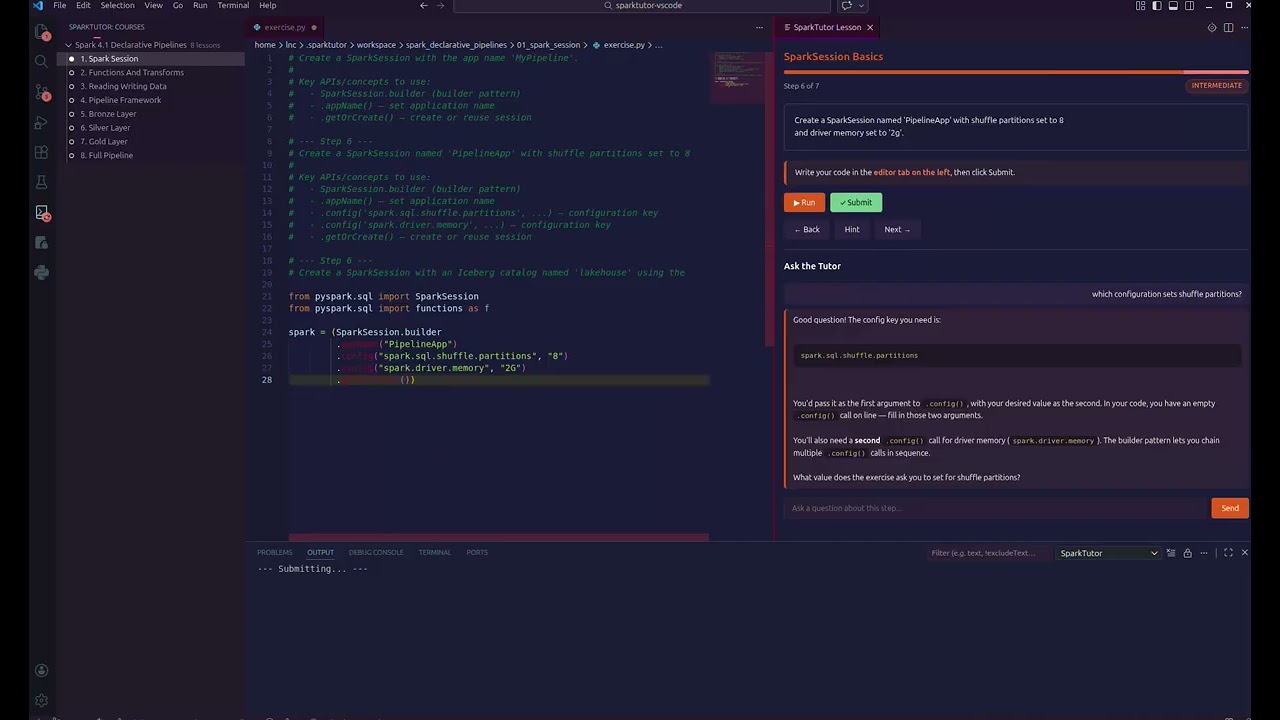](https://www.youtube.com/watch?v=LMDfyscN9FY)
**[Watch the full demo on YouTube](https://www.youtube.com/watch?v=LMDfyscN9FY)**
What is SparkTutor?
SparkTutor is a learn-by-doing environment for Apache Spark 4.1. Instead of watching videos or reading docs, you write real PySpark code in VS Code with an AI tutor guiding you through structured lessons — from creating your first SparkSession to building a complete bronze-silver-gold data pipeline.
**Key features:**
- Real code editor — write PySpark in Monaco with full syntax highlighting, autocomplete, and bracket matching
- Guided lessons — 8 lessons covering SparkSession, transforms, I/O, pipeline framework, bronze/silver/gold layers, and full pipeline assembly
- Depth levels — beginner (skeleton code + TODOs), intermediate (structural hints), advanced (just the objective)
- AI-powered feedback — submit code and get categorized feedback: bugs, conventions, and best practices (via Claude or GitHub Copilot)
- AI tutor chat — ask questions about your code or Spark concepts, grounded in official Spark 4.1 documentation
- Zero-config in Codespaces — works with GitHub Copilot out of the box, no API key needed
- Cumulative exercises — code persists across steps so a SparkSession you build in step 3 is still there in step 7
- Session resume — close VS Code, come back later, pick up where you left off
Architecture
┌─ VS Code ──────────────────────────────────────────────────┐
│ ┌─ Activity Bar ─┐ ┌─ Editor ──────┐ ┌─ Lesson Panel ───┐ │
│ │ Courses        │ │ (Monaco)      │ │ (Webview)        │ │
│ │  └ Lesson 1 ✓  │ │ from pyspark  │ │ Step 3/8         │ │
│ │  └ Lesson 2 ●  │ │ df = spark... │ │ Create a DF...   │ │
│ │  └ Lesson 3    │ │ df.
Related Skills
Claude Study Skills
Claude Code skills for actually learning things — Socratic tutoring, lecture breakdowns, depth-calibrated expl


Claude Code Bmad Skills
BMAD Method skills for Claude Code - Auto-detection, Memory integration, Slash commands. Transform Claude Code


Ipyai
A terminal IPython extension that adds Claude and Codex powered prompting

TYPO3 Ddev Skill
DDEV environment setup for TYPO3 extension development


InstinctMJ
Provide a native mjlab environment for Project-Instinct to support reinforcement learning in humanoid whole-bo

S01 Agent Loop Learning
A standalone learning edition of learn-claude-code s01: agent loop, shell tool, tutorials, and environment set

Related Agents

De Spark Expert
Expert Apache Spark developer for PySpark and Scala distributed data processing. Use for Spark jobs (.py, .sca


Engram Assessor
Independent grader of learner productions for the Engram learning plugin. MUST BE USED for /learn verification

AI Frontend Engineer
AI Frontend Engineer who builds beautiful, performant, accessible UIs for AI-powered products including chat i
