

Hgnucomb — Development skill for Claude Code
Spatial terminal multiplexer: 2D navigable canvas for terminals and Claude agents.
How to install Hgnucomb
This entry records only its repository, not the path inside it, so there is no
exact command to give. Open kylesnowschwartz/hgnucomb and copy the folder into
~/.claude/skills/, or the file into ~/.claude/agents/.
What Hgnucomb does
Spatial terminal multiplexer: 2D navigable canvas for terminals and Claude agents.
Alternatives in Development
- OpenAI Codex CLI — (Rust implementation) 67.8k ★
- Claurst — Your favorite Terminal Coding Agent, now in Rust 9.2k ★
- Lean Canvas — Generate Lean Canvas with problem, solution, UVP, and metrics 7.8k ★
README
hgnucomb
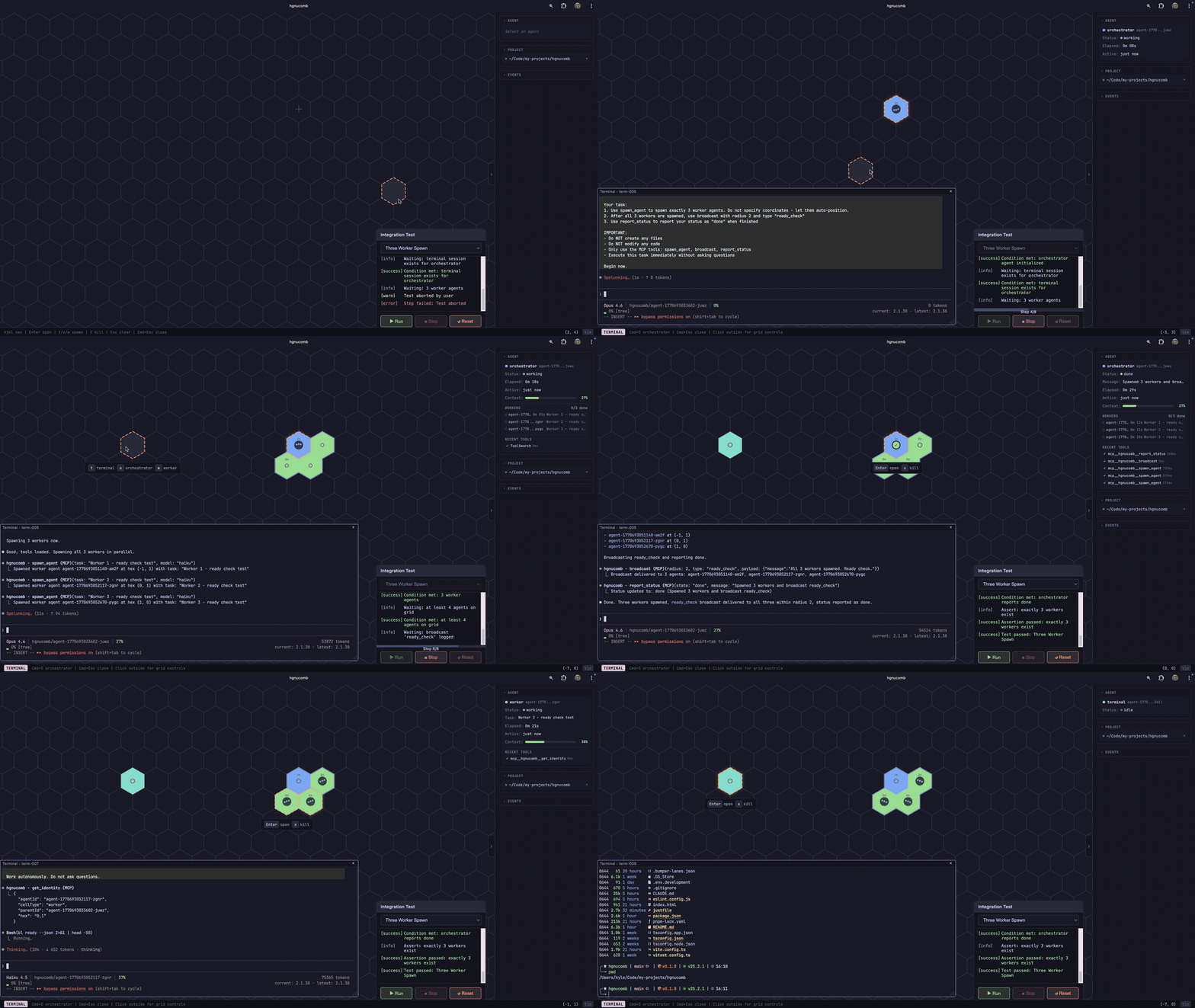
A spatial terminal multiplexer. Your terminals live on a hex grid -- navigate between them like an RTS, build spatial memory of your workspace, and optionally let AI agents coordinate across it.
Vibe amongst the hivemind.
Why
Terminal multiplexers give you tabs and panes. That's a 1D mental model for an multi-dimensional workflow.
hgnucomb puts your terminals on a 2D hex grid. Navigate with vim keys. Build a layout that mirrors how you think about your project. "The API server is up and to the left, the tests are to the right." That spatial memory persists across context switches in a way that "tab 4" never will. Also, it's fun.
AI agents live on the same grid -- spawn them, watch them work, merge their code safely through a staging workflow with human approval.
Quick Start
npm install -g hgnucomb
hgnucomb
Installs the CLI globally, then starts the server and opens the browser. Run `hgnucomb` from any project directory -- it operates in your current working directory.
Prerequisites
- Node.js 20+
- C++ build tools (node-pty compiles a native addon at install time) --
xcode-select --installon macOS - Claude Code CLI (
claude) -- only needed for AI agents
Development
git clone git@github.com:kylesnowschwartz/hgnucomb.git
cd hgnucomb
just install    # pnpm install
just dev        # frontend :5173 + server :3001
The Grid
Navigate with `hjkl` or arrow keys. Press `t` on any empty cell to spawn a terminal. Press `Enter` to open it. Press `Cmd+Escape` to close the panel and return to the grid. Your terminal keeps running in the background -- reopen it anytime.
That's it. Spatial terminals. When the terminal panel is open, prepend navigation with `cmd + ` to navigate the canvas.
The Terminal
Each cell on the grid is a real terminal -- [xterm.js]
Related Skills

Opencove
Your infinite canvas workspace for agents, tasks, knowledge, and research. An infinite canvas for Claude Code,

Agora
A self-hosted cockpit for Claude Code and other CLI coding agents. Real terminals, an infinite canvas, and mul


Seance Skill
Seance Terminal Multiplexer


Tuimux
A terminal multiplexer for TUI apps. Run btop, lazygit, Claude Code, and any other TUI in embedded terminal wi

Swe Mux
Terminal multiplexer and agentic control plane with tailscale enabled. optimized for mobile development

Infiniterm
Terminal cards on an infinite canvas for macOS, with every coding agent's state on its card's border. Native R

Related Agents

49agents
49Agents bills itself as the first 2D agentic IDE — all agents, all terminals, all projects, all machines, one


Tabz Expert
Browser automation and terminal spawning expert with 82 MCP tools. Use when the user asks to 'automate the bro


Dogfood Audit
Full product audit — spawns 5-6 parallel agents to dogfood every surface of o8, checking orchestrator, agents,
