
Superpowers Bench — Development skill for Claude Code
Can your agent use the right skills for the right tasks.
How to install Superpowers Bench
This entry records only its repository, not the path inside it, so there is no
exact command to give. Open kunchenguid/superpowers-bench and copy the folder into
~/.claude/skills/, or the file into ~/.claude/agents/.
What Superpowers Bench does
Can your agent use the right skills for the right tasks?
Alternatives in Development
- Om Dump — Freeform capture mode 4.6k ★
- Part 1 — Deep Research Prompt Builder — I'm going to help you create a research prompt for your project 2.1k ★
- Superpowers Skills — Community-editable skills repository 566 ★
README
superpowers-bench


Can your agent pick the right skill without being told?
You give your agent a set of skills. You describe a task. Does it figure out which skills to use - or does it need hand-holding?
superpowers-bench measures how well coding agents (Claude Code, Codex, OpenCode) discover and invoke skills from [obra/superpowers](https://github.com/obra/superpowers) based on context alone. It tests two conditions: **no hints** (just the task prompt) and **with hints** (task prompt + a natural-language hint that implies the right workflow without naming it).
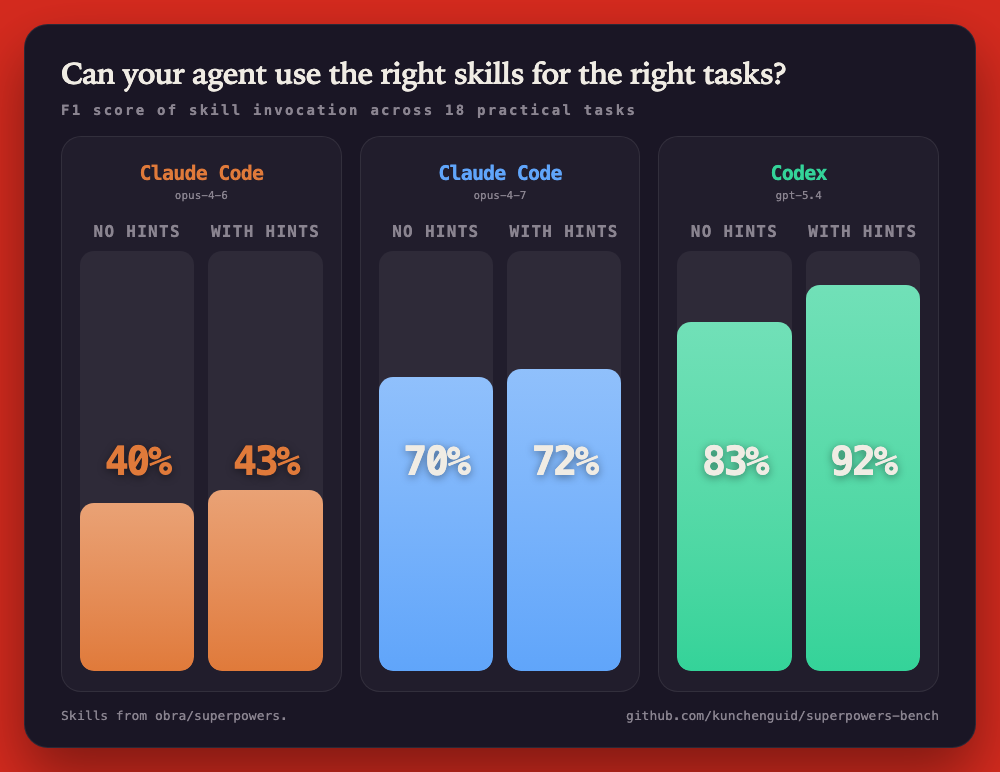
- Skill selection as the unit of measure - not code quality, not pass/fail on tests. Did the agent reach for the right tools?
- Apples-to-apples comparison - same 20 tasks, same skills, same grading. Just swap the agent.
- Baseline vs triggered - quantifies how much a well-written hint improves skill discovery without explicit instruction.
Quick Start
$ npm install
$ npm run fetch-skills            # download skill definitions
$ npm run bench -- run --condition claude --task explain_code
# ... agent runs, result appended to results/results.jsonl

$ npm run bench -- matrix --parallel 4   # run full benchmark
$ npm run bench -- report                # generate report
Install
**From source** (only method - this is a benchmarking tool, not a published package):
git clone https://github.com/kuncheRelated Skills

Max Power
One-command activation — installs ClaudeMaxPower, offers Superpowers plugin install, presents capabilities men

Session Check
GO / NO-GO session readiness check - confirms you're in the right repo/dir AND the SGRR AGI V2 rig + superpowe

In Progress
Show every plan in docs/superpowers/plans/in-progress/ as one table (Plan / Title / Prio / Where / Activity /


Octobench
Benchmark harness that compares coding agents — not just models — on real, contamination-resistant tasks: 80 f

Codex Pacer
A Dynamic Island for macOS that follows Codex and Claude Code: running tasks, output speed and quota pace, rig

Assistant Agent
You are Aurora's assistant — a friendly but persistent personal assistant living in #tasks. You track what nee

Related Agents

Benchmark Sweep
Runs the real benchmark/performance-gate tasks defined in a repo's own deno.json(c) (today, @zanix/server's be

Skill Analyzer
Finds the patterns in eval and bench results that averages hide, assertions that never tell the skill apart, t


Helm Conductor
Use this agent to orchestrate engineering work cycles — decide what to work on next, sequence stories and feat
