
Jev Blindspot — Development skill for Claude Code
A side-panel assistant that finds the blind spots in your prompts.
How to install Jev Blindspot
This entry records only its repository, not the path inside it, so there is no
exact command to give. Open jsk4581/jev-blindspot and copy the folder into
~/.claude/skills/, or the file into ~/.claude/agents/.
What Jev Blindspot does
A side-panel assistant that finds the blind spots in your prompts. For Claude Code and Codex CLI.
Alternatives in Development
- Oob — Out-of-band orchestrator — confirm BLIND SSRF/XXE/SQLi/RCE/Log4Shell by correlating interactsh callbacks to th 4.5k ★
- Claude Scholar — Semi-automated research assistant for academic research and software development 3k ★
- Codex Prompt Handgepflegte Mega Und Mini Prompts — Codex-Prompt — Handgepflegte Mega- und Mini-Prompts fuer alle Plugins 1.5k ★
README
jev-blindspot
    
**Good results start with good requests.**
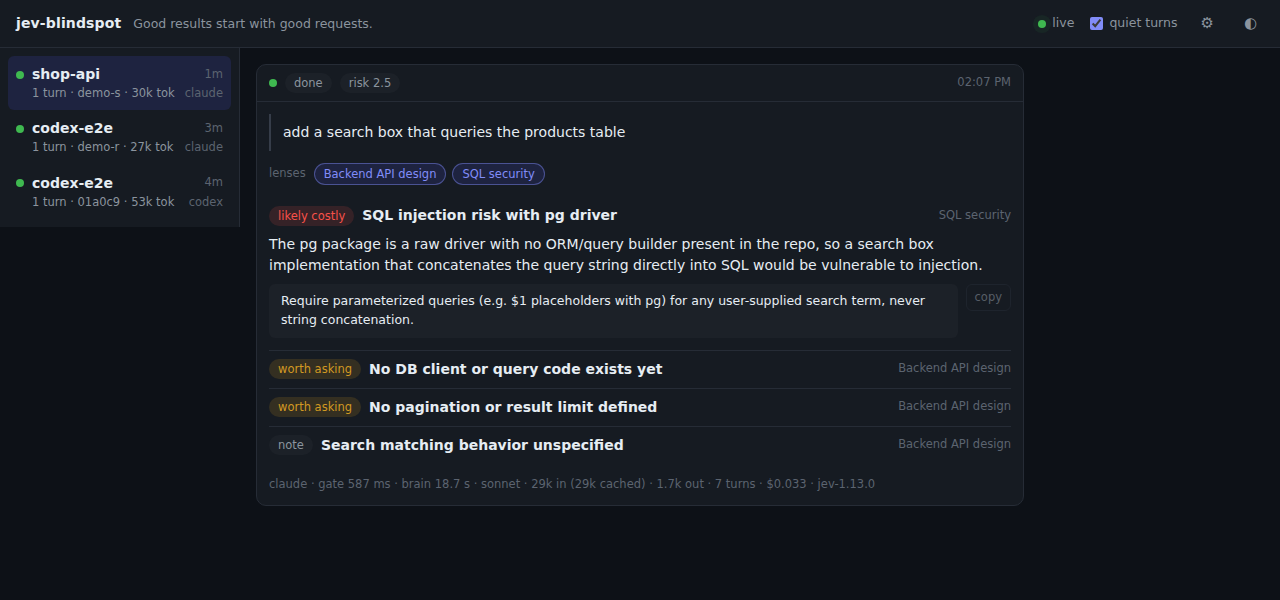
jev-blindspot is a side panel for [Claude Code](https://claude.com/claude-code) and [Codex CLI](https://github.com/openai/codex). Each time you submit a prompt, the panel shows the prompt's blind spots: what the request would have needed to consider, and shows no sign of considering. It runs next to the session in a browser tab. It does not block the prompt, does not edit it, and does not add anything to the agent's context.
Quick start
Node 20 or newer, a [TypeSafe](https://typesafe.ai) API key, and Claude Code or Codex CLI already logged in.
npm install -g jev-blindspot
mkdir -p ~/.config/jev-blindspot
echo 'TYPESAFE_API_KEY=your-key' > ~/.config/jev-blindspot/env && chmod 600 ~/.config/jev-blindspot/env
jev-blindspot install-hook      # hooks into every agent it finds
For Codex, also trust the new hook once: `jev-blindspot install-hook codex --trust`, or `/hooks` inside Codex. Details in [Install](#install).
Then type `/blindspot` in Claude Code, or `/prompts:blindspot` in Codex. The panel URL comes back in the session at once, with no model turn spent. Open it in a browser tab next to the session and keep working as usual.
From then on, every prompt you submit becomes a card in the panel: quiet when there is nothing to consider, otherwise the blind spots of that request, each with a sentence you can paste into the next prompt. The card also shows what the check cost: the model, the time, the tokens in and out, and for Claude the dollar amount and the number of
Related Skills
Claude Replan
Claude Code plugin for validating implementation plans with parallel review subagents — checks codebase alignm

Perspective Analysis
Analyze a newsletter draft through five different perspectives to uncover blind spots and strengthen the conte

DevOrch
A terminal-native, multi-provider intelligent assistant that plans, executes, and tracks developer tasks, not


Openprism Bakeoff
Blind-judge two models on one prompt to decide which earns a panel seat


Inception Mercury Compaction
Universal context compaction tool for CLI coding agents (Claude Code, Codex CLI, OpenCode, Mistral Vibe). Dete

Pvc Img Gen Codex
Claude Code skill that makes and edits real images through the Codex CLI from the OpenAI ChatGPT VS Code exten

Related Agents

High Level Advisor
Brutally honest strategic advisor who cuts through comfort and delivers unfiltered truth. Prioritizes ruthless


Adversarial Coordinator
Multi-perspective critique to stress-test designs. Runs 3 critic passes with different viewpoints to surface b


QA Automation
Senior QA automation engineer for TextStack. Use to design and write tests (xUnit unit/integration, Vitest, Pl
