
Grompt Plugin
Description
Grompt is a self-contained Chrome plugin that re-engineers your prompts for optimal results using the Groq API. It allows users to quickly refine their prompts directly within their browser, enhancing the quality of their AI interactions.
Installation
This entry records only its repository, not the path inside it, so there is no
exact command to give. Open the source below and copy the folder into
~/.claude/skills/, or the file into ~/.claude/agents/.
README
Grompt Chrome Plugin
Description
Grompt is a self-contained Chrome plugin that re-engineers your prompts for optimal results using the Groq API. It allows users to quickly refine their prompts directly within their browser, enhancing the quality of their AI interactions.
Installation
Prerequisites
- Google Chrome browser
- Groq API key
Installing the Grompt Plugin
Clone or download the Grompt repository to your local machine:
git clone https://github.com/your-repo/Grompt.gitor download and extract the ZIP file from the repository.
Open Google Chrome and navigate to `chrome://extensions/`.
Enable "Developer mode" by toggling the switch in the top right corner.
Click on "Load unpacked" button that appears after enabling Developer mode.
Navigate to the `Grompt_plugin` directory within the Grompt folder and select it.
The Grompt plugin should now be installed and visible in your Chrome extensions.
Configuration
- Click on the Grompt icon in your Chrome toolbar to open the popup.
- Enter your Groq API key in the provided field.
- Click "Save" to store your API key securely.
File Structure
Grompt_plugin/
│   background.js
│   content.js
│   icon128.png
│   icon16.png
│   icon48.png
│   manifest.json
│   popup.html
│   popup.js
│   README.md
Usage
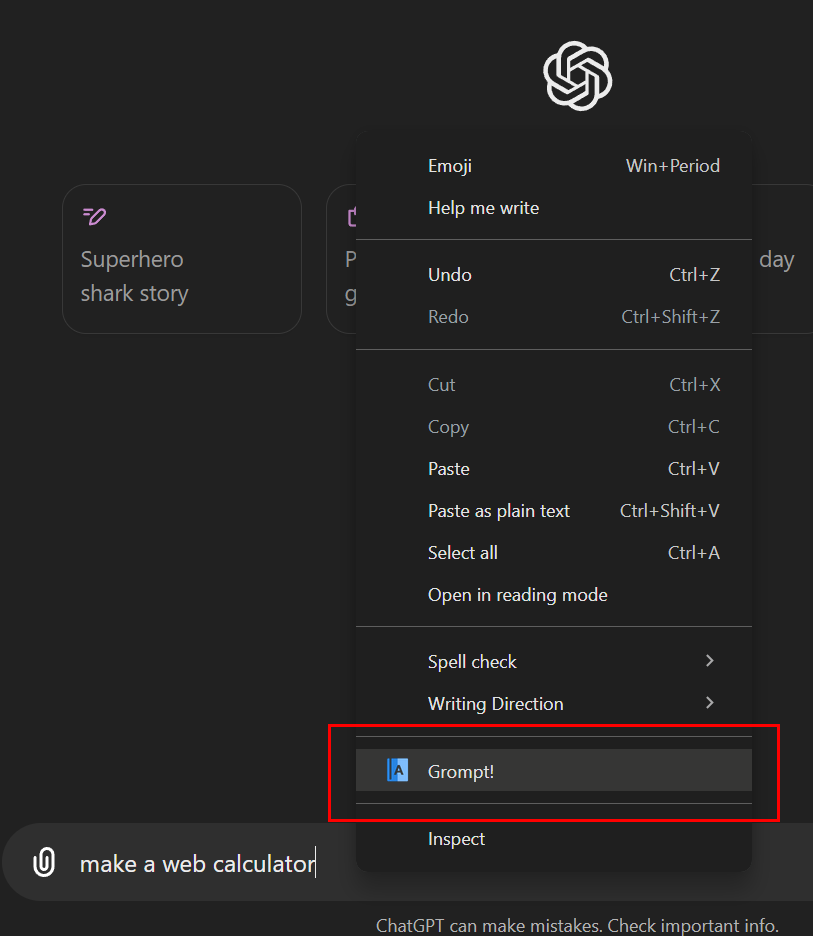
- Right-click on the request input text for any LLM and select 'GROMPT!' from the context menu.
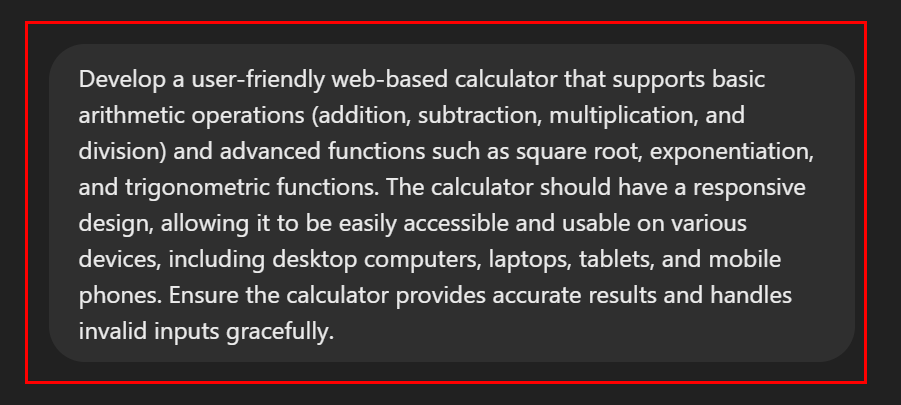
- The optimized text will replace the original text and be copied to your clipboard.
- If the revised text doesn't auto-appear, do a 'Paste' (CTL-V). It's that easy!
Development
To make changes to the plugin:
- Edit the relevant files in the Grompt_plugin directory.
- Save your changes.
- Go to
chrome://extensions/in Chrome. - Find the Grompt plugin a
Related Skills
Auto Update
Pull the latest ECC repo changes and reinstall the current managed targets.

Ecc Guide
Navigate ECC's current agents, skills, commands, hooks, install profiles, and docs from the live repository su
Epic Claim
Claim an epic issue, stamp coordination state, and sync local ownership.
Epic Publish
Publish a validated epic update back to the issue and local cache.
Epic Review
Mark epic review requested, approved, or changes requested.
Epic Unblock
Sweep blocked epic issues and reopen anything whose dependencies are closed.