

Weppy Roblox MCP — AI skill for Claude Code
Roblox Studio MCP server & plugin for Claude Code, Cursor, Codex, and Gemini.
How to install Weppy Roblox MCP
This entry records only its repository, not the path inside it, so there is no
exact command to give. Open hope1026/weppy-roblox-mcp and copy the folder into
~/.claude/skills/, or the file into ~/.claude/agents/.
What Weppy Roblox MCP does
Roblox Studio MCP server & plugin for Claude Code, Cursor, Codex, and Gemini. AI-powered scripts, terrain, assets, lighting, and bidirectional project sync.
Alternatives in AI
- Zen MCP Server — The power of Claude Code + Gemini / OpenAI / Grok / OpenRouter / Ollama / Custom Model working as one 11.3k ★
- Generative Media Skills — Multi-modal Generative Media Skills for AI Agents (Claude Code, Cursor, Gemini CLI) 3k ★
- Matlab MCP Server — Run MATLAB® using AI applications with the official MATLAB MCP Server from MathWorks® 1.4k ★
README
WEPPY Roblox AI Toolkit — AI Game Development for Roblox Studio
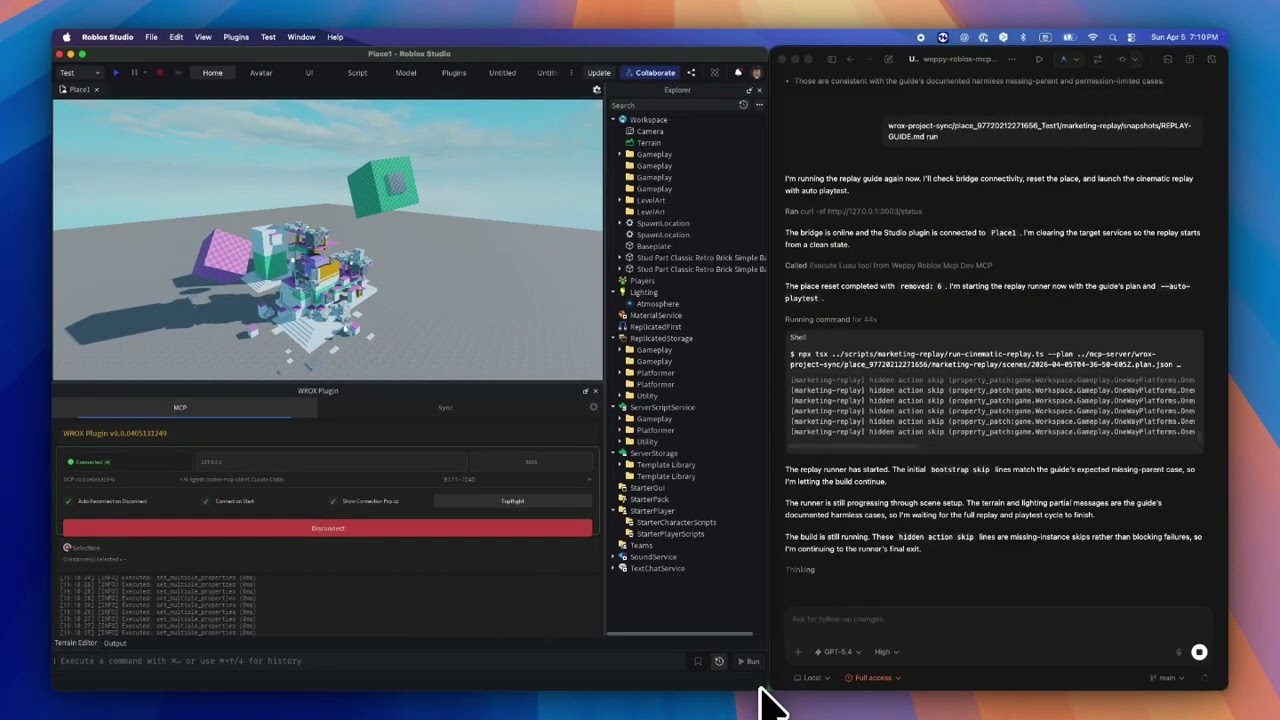
**WEPPY Roblox AI Toolkit** is a Roblox Studio AI development product. It includes the **WEPPY MCP Server** for AI app connections and the **WEPPY Roblox Studio Plugin** for live Studio control. Claude Code, Codex, and Antigravity can also install the optional **WEPPY AI Agent Plugin** for client-native setup and workflow guidance.
**Multi-Place Studio work · Generated assets to Roblox · Bidirectional sync · Automated playtest · UI Studio**
**English** | [한국어](https://weppyai.com/ko) | [日本語](https://weppyai.com/ja) | [Español](https://weppyai.com/es) | [Português](https://weppyai.com/pt-br) | [Bahasa Indonesia](https://weppyai.com/id) | [Deutsch](https://weppyai.com/de)
[](https://www.youtube.com/watch?v=j14LZHYzLg8)
Why WEPPY Roblox AI Toolkit?
AI coding agents like Claude, Codex, and Gemini are powerful, but they cannot see or modify anything inside Roblox Studio. The DataModel, scripts, terrain, and lighting are invisible to external tools. Without a bridge, AI can only generate code snippets that you must paste manually.
The **WEPPY MCP Server** connects AI agents to the **WEPPY Roblox Studio Plugin**. AI directly creates and modifies instances, scripts, properties, terrain, and more inside Studio, and the changes are reflected immediately in Studio and the dashboard so you can see exactly what changed.
WEPPY is also built for Roblox experiences that are split across several Places. Open up to five Studio windows for Lobby, Game, Shop, Tutorial, or other Places, then tell the agent which Studio ID to use. One request can update several Places without re-explaining context or copying changes by hand.
For assets, an agent can create or prepare an image, save it to the Asset Library, upload it through Roblox Open Cloud, and apply the returned asset URI to a Place. The result is a sh
Related Skills
AgentBridge
Migrate AI coding agent config between 12 agents — Claude Code, Codex, Copilot, Cursor, Gemini, Crush, Grok, o

Roqer
An open-source AI agent for Roblox Studio. It builds, scripts, and playtests in your place using your ChatGPT


Rovibe
RoVibe — Multi-Agent AI Coding for Roblox Studio. Connect Claude Code, Codex, and other AI coding agents to a

Claude Playstore Screenshots Generator
Claude Code skill — capture Android screenshots, extract brand colors, and generate Play Store assets (icon, f

Evc Local Sync Plugin
Obsidian plugin for bidirectional sync between Obsidian vault and AI development projects (Claude Code, Cursor


AI Config Sync Manager
Bidirectional sync for Claude Code and Codex — instructions, skills, agents, MCP servers, hooks, permissions.

Related Agents

Roblox Asset Map
Builds a Roblox level from a map spec headlessly - greybox geometry, terrain and the reachability prover - and


Codex Art Director
Codex is the dedicated Art Director & Technical Artist for the studio. Codex owns the visual identity, 3D Voxe


Realitykit Expert
Read-only RealityKit reviewer. Use when building or reviewing native 3D scenes, RealityView, Model3D, USDZ ass
