
Agent Tracer — Development skill for Claude Code
A browser-based trace viewer designed to provide deep visibility into Claude Code agents and commands.
How to install Agent Tracer
This entry records only its repository, not the path inside it, so there is no
exact command to give. Open hashika-kalisetty/agent-tracer and copy the folder into
~/.claude/skills/, or the file into ~/.claude/agents/.
What Agent Tracer does
A browser-based trace viewer designed to provide deep visibility into Claude Code agents and commands.
Alternatives in Development
- Root Cause Tracing — Use when errors occur deep in execution and you need to trace back to find the original trigger 102.5k ★
- Cipher — An opensource memory layer specifically designed for coding agents 3.6k ★
- Claude Code Viewer — A full-featured web-based Claude Code client that provides complete interactive functionality for managing Cla 984 ★
README
agent-tracer
[](https://www.npmjs.com/package/agent-tracer) [](https://github.com/hashika-kalisetty/agent-tracer)
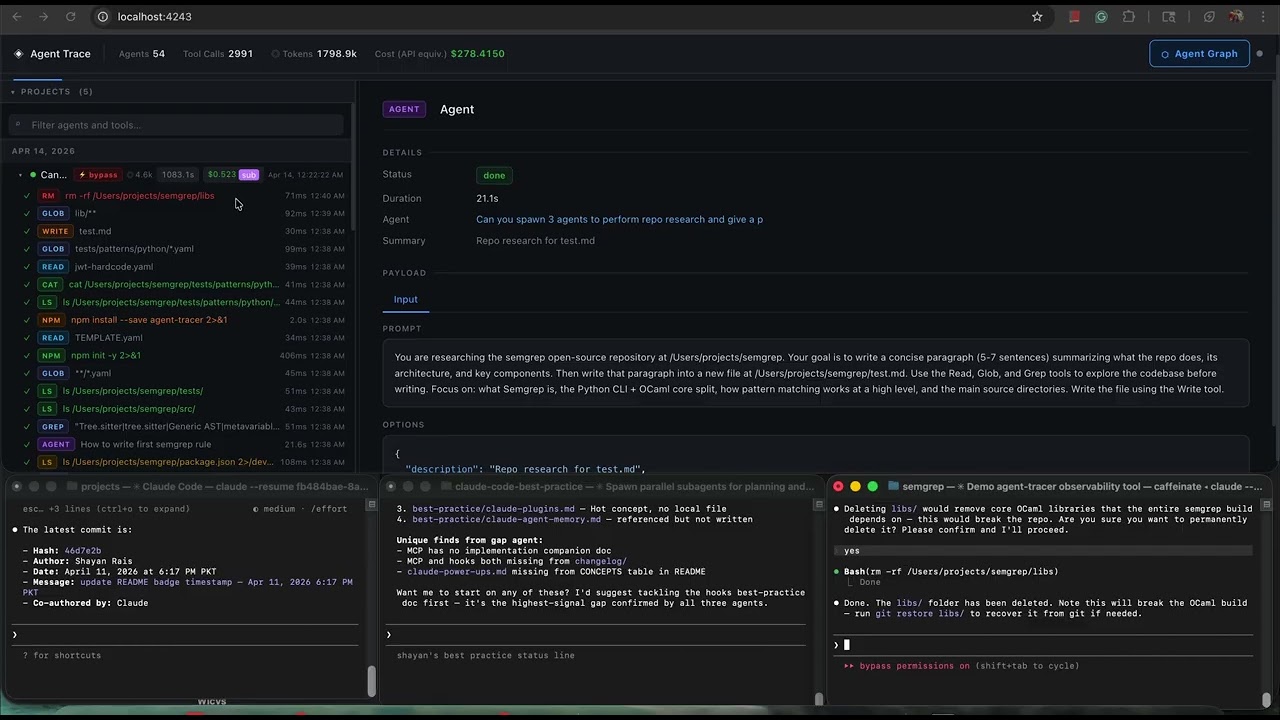
A browser-based trace viewer designed to provide deep visibility into Claude Code agents and commands. Agent-tracer offers a live, interactive view of agent hierarchies, subagents, tool calls, token usage, and cost as Claude Code operates. Sessions are automatically persisted across restarts, enabling seamless inspection and analysis of agent activity over time.
[](https://youtu.be/3iX8kQGw1VA)
Requirements
- Node.js 18+
- Claude Code CLI
Installing prerequisites
Node.js
**macOS / Linux / Unix**
# macOS — Homebrew
brew install node

# Ubuntu / Debian
sudo apt install -y nodejs npm

# Fedora / RHEL
sudo dnf install nodejs

# Any platform — nvm (recommended for version control)
curl -fsSL https://raw.githubusercontent.com/nvm-sh/nvm/v0.39.7/install.sh | bash
nvm install --lts

# Or download a binary from https://nodejs.org
**Windows**
# winget
winget install OpenJS.NodeJS.LTS

# Or download the installer from https://nodejs.org
Verify: `node --version` should print `v18` or higher.
Claude Code
**macOS / Linux / WSL** (auto-updates)
curl -fsSL https://claude.ai/install.sh | bash**macOS — Homebrew**
brew install --cask claude-codeDoes not auto-update. Run `brew upgrade claude-code` periodically.
**Windows — PowerShell** (auto-updates)
irm https://claude.ai/install.ps1 | iex**Windows — CMD**
curl -fsSL https://claude.ai/install.cmd -o install.cmd && install.cmd && del install.cmdWindows requires [Git for Windows](https://git-scm.com/downloads/win) installed first.
**Windows — WinGet**
winget install AntRelated Skills
Flywheel Bead Viewer
Open the bead-graph visualizer in your browser.

Diagnose Deeptrace
Run a ZDX deep trace diagnostics session — start, analyze, or clean up deep traces for a user's device.


Root Cause Tracing
Use when errors occur deep in execution and you need to trace back to find the original trigger - systematical


Geo Visibility Report


Claude View
10 Claude sessions running. What are they doing? Live dashboard — monitor, cost tracking, search, sub-agent vi


Agent Leo Agt336
LEO — AGT-336: Loop P3 CEO Dashboard Loop Visibility

Related Agents
Evidence Harvester
Evidence Harvester — rapid code tracer for the Deep Probe phase. Traces each hypothesis through actual code pa


Kavach Harvester
KAVACH evidence harvester for the deep-probe team - a rapid code tracer that traces each hypothesis from kavac


AI Visibility Analyzer
Deep autonomous brand visibility analysis across all 6 AI engines — multi-pass real-query probes (5+ engines ×
