
Token Save MCP — AI skill for Claude Code
Stop your coding agent burning context on file reads.
How to install Token Save MCP
This entry records only its repository, not the path inside it, so there is no
exact command to give. Open Habartru/token_save_mcp and copy the folder into
~/.claude/skills/, or the file into ~/.claude/agents/.
What Token Save MCP does
Stop your coding agent burning context on file reads. Delegates big reads to a cheap worker model and returns only the answer — 87-99% saved, measured per call. A hook enforces it in Claude Code; the MCP tools work in any client.
Alternatives in AI
- Phantom — An AI co-worker with its own computer 1.3k ★
- Flow Next — Plan-first AI workflow plugin for Claude Code, OpenAI Codex, and Factory Droid 569 ★
- Dsh Auto Review — Second-model AI auto-review for DeepSeek Harness approval requests: a read-only reviewer subagent returns stru 155 ★
README
token-save-mcp
**Your coding agent burns its context reading files. This stops it — and shows you the receipt.**
[](https://github.com/Habartru/token_save_mcp/actions/workflows/ci.yml) [](https://pypi.org/project/token-save-mcp/) [](https://github.com/Habartru/token_save_mcp/blob/main/LICENSE) [](https://www.python.org/downloads/)
An MCP server that sends big files to a cheap worker model and returns only the answer. The file bytes are paid for once, in the worker's context — not permanently in your agent's.
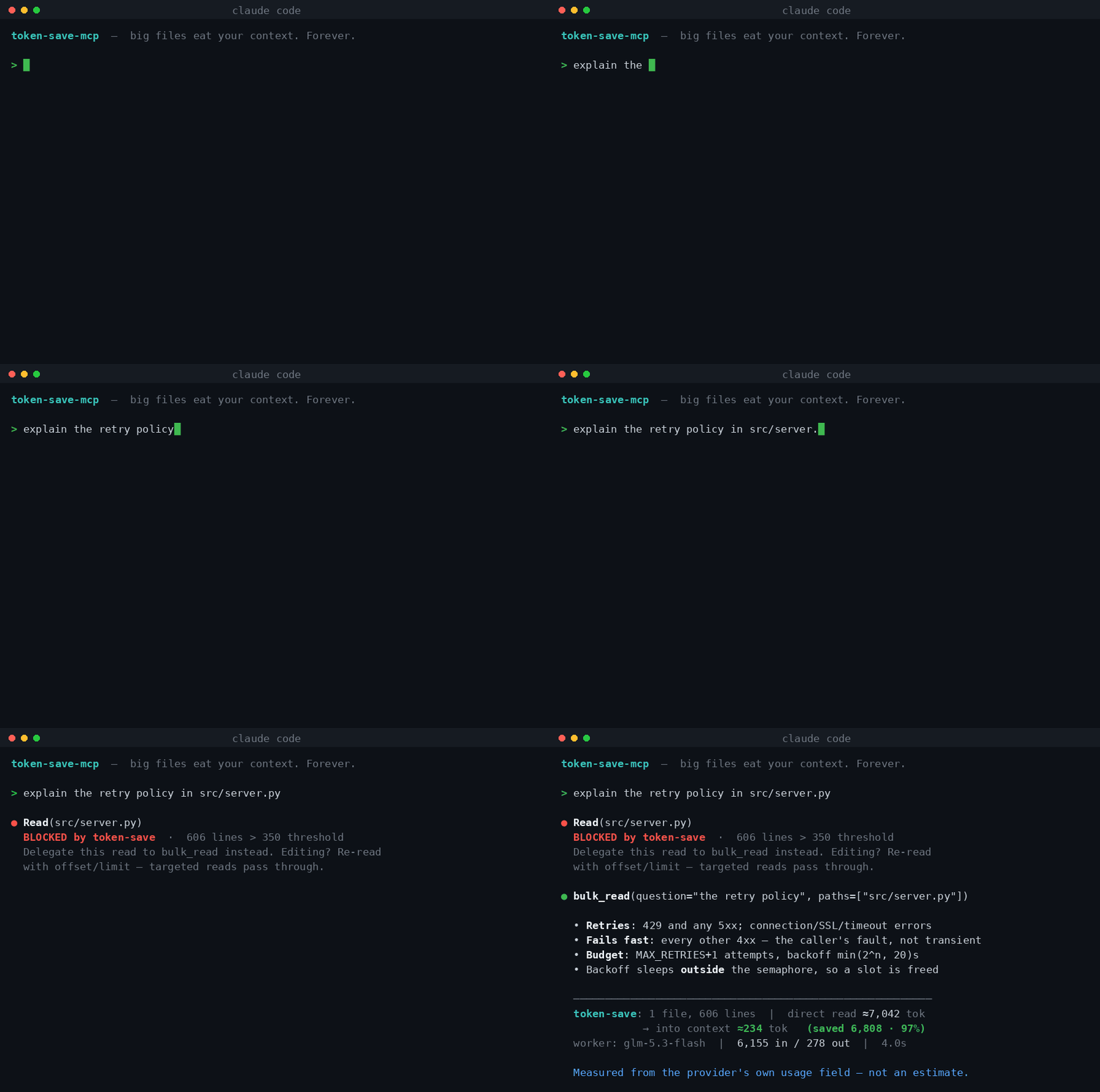
The hook **blocks** the expensive read and redirects it. The answer comes back with the worker's **real token usage from the API response** — not an estimate, a receipt:
─────────────────────────────────────────────────────────────
token-save: 1 file, 606 lines | direct read ≈7,042 tok →
into context ≈234 tok (saved 6,808 · 97%)
worker: glm-5.3-flash | 6,155 in / 278 out | 4.0s
Install
pip install token-save-mcp
token-save-mcp init
`init` finds a provider key you already have and sets everything up. If you have none, it prints the options and where to get one — nothing is connected automatically, and no key ships with the tool. **The worker is yours**: your key, your provider, your bill.
A full run looks like this:
export OPENROUTER_API_KEY=sk-or-...        # your key, from your provider
token-save-mcp init --provider openrouter --hook
Verify with `token-save-mcp doctor`, which checks the config and makes one live call to prove the worker answers:
✓ provider: openrouter -> https://openrouter.ai/api/v1
✓ worker model: deepseek/dee
Related Skills

Claude Orchestrator Skill
Toggleable Claude Code mode: the big model orchestrates, cheap models do the grunt work. Cuts token spend with

Lowkey Effort
An AI skill that auto-calibrates response depth based on task complexity — so you stop burning tokens on simpl

Context Token Budget
Guard AI context usage with a fail-closed token budget — stop burning tokens. 用 fail-closed 的 token 预算守护 AI 上下


Claude Antigravity Agents
A Claude Code skill that delegates coding, review, analysis, and research jobs to Google Antigravity CLI (agy)

Cheap LLM Router
Save Claude/Codex subscription tokens by routing context-only file reads through a cheaper LLM (DeepSeek, Kimi

Settled Computer
Fast computer use for AI agents: event-driven settling MCP server - replaces time.sleep between clicks, waits

Related Agents
Us Performance Grader
US stock performance grader. Grades past picks on the v6.3 RANK bar (BIG WIN = weekly rank ≤ 100, WIN = ≤ 500,


Tp Session Restorer
PROACTIVELY use this as the FIRST step after /clear, compaction, or a fresh window when a recent session_snaps

Deal Coach
Reviews an open deal and coaches the next move: qualification gaps, stakeholders, risks, objections and a conc
