
Peekme — Development skill for Claude Code
Select text in Codex CLI or Claude Code output and get a short explanation right under it, inside the terminal.
How to install Peekme
This entry records only its repository, not the path inside it, so there is no
exact command to give. Open GregoryBolshakov/peekme and copy the folder into
~/.claude/skills/, or the file into ~/.claude/agents/.
What Peekme does
Select text in Codex CLI or Claude Code output and get a short explanation right under it, inside the terminal.
Alternatives in Development
- OpenAI Codex CLI — (Rust implementation) 67.8k ★
- Lazycodex — The one and only agent harness for complex codebases 3.3k ★
- Stt System — Transcribe this voice message accurately 198 ★
README
peekme
Peek me. Pick me. Select text in [Codex CLI](https://github.com/openai/codex) or [Claude Code](https://github.com/anthropics/claude-code) output, press **Alt+P** (**Option+P** on a Mac), and a short explanation opens right next to that text, inside the terminal. The other lines move to make room, like Peek in VS Code. Esc closes it and the screen is exactly as before.
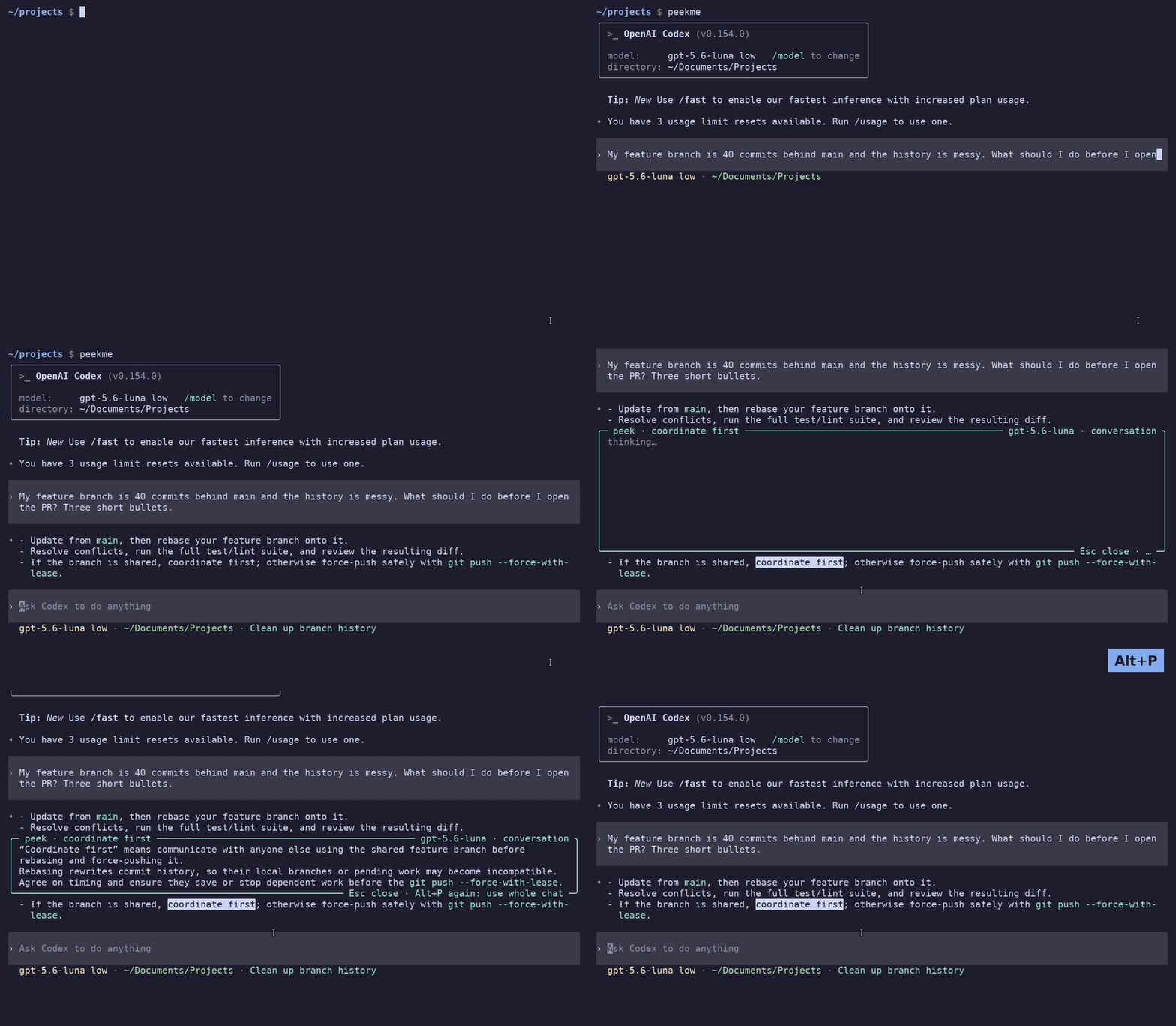
The explanation comes from a small, fast model and it knows the conversation. If you select "its split panes" in an answer that recommends Kitty, it tells you it is about Kitty.
Status: 0.2.3. Tested on Linux with X11 and bash, with Codex 0.157 and Claude Code 2.1.283.
Install
You need Codex CLI or Claude Code (logged in). Both is fine too. Then install peekme in one of these ways and run `peekme install`:
npm i -g peekme                               # you have npm already if you installed an agent with it
brew install gregorybolshakov/tap/peekme      # Homebrew, on macOS or Linux
cargo install peekme                          # builds it with Rust
peekme install
npm 12 may say that it skipped an install script of peekme. That is fine: peekme then downloads its binary the first time it runs.
Without npm, Homebrew or Rust, the script from the [latest release](https://github.com/GregoryBolshakov/peekme/releases/latest) puts peekme in `~/.local/bin`:
curl --proto '=https' --tlsv1.2 -LsSf https://github.com/GregoryBolshakov/peekme/releases/latest/download/peekme-installer.sh | shReady binaries are there too, for Linux and macOS on x86_64 and ARM. macOS is not tested yet.
After this, `codex` and `claude` open with peekme in every new terminal. You keep typing `codex` or `claude`, and your aliases and scripts that call them keep working. `peekme install` adds a short
Related Skills

Agent Toast
No more babysitting the terminal - Agent Toast pings you the instant Claude Code or Codex CLI needs you, then


Tmux Rc
Watch and control whatever runs in a tmux pane — Codex, Claude Code, Gemini CLI, OpenCode, or any program that

Speak
A fast CLI tool for Agents to convert their text output to speech using Chatterbox TTS on Apple Silicon. Agent


ClaudeHere
Opens Claude Code and OpenClaude straight from any Windows folder via the right-click context menu. No termina


Dsh Crew
Watch Claude Code and Codex work inside dsh: each gets a real terminal pane in your session's workspace that y


Rmine
Redmine CLI in Go, built for two callers: a developer at a terminal and a coding agent. Ships an embedded Clau

Related Agents
Dx Engineer
Use for the verdict output surface (human line, --json, truncation notices), CLI ergonomics, error message qua

Contract Neutral Reviewer
Contract-neutral fallback reviewer. Executes the attached family review template verbatim when Codex is unavai


Agent Of Empires
Claude Code, OpenCode, Mistral Vibe, Codex CLI, Gemini CLI Coding Agent Terminal Session manager via tmux and
