

Glade MCP — AI skill for Claude Code
Connect any MCP-compatible AI client (Claude Code, Cursor, Windsurf) to Unity or Godot.
How to install Glade MCP
This entry records only its repository, not the path inside it, so there is no
exact command to give. Open Glade-tool/glade-mcp-unity and copy the folder into
~/.claude/skills/, or the file into ~/.claude/agents/.
What Glade MCP does
Connect any MCP-compatible AI client (Claude Code, Cursor, Windsurf) to Unity or Godot. 235+ granular tools, an editor aware system prompt, game design document project context, script semantic search, and skill calibration.
Alternatives in AI
- Loli Profiler — Memory instrumentation tool with CI and AI support for android app&game developers 695 ★
- Octocode — Structural code intelligence for AI agents — semantic search, knowledge graphs, and a built-in MCP server in o 464 ★
- UltraGameStudio — UltraGameStudio - AI coding agent for game development: engine workflows, gameplay code, and asset generation 296 ★
README
GladeKit MCP
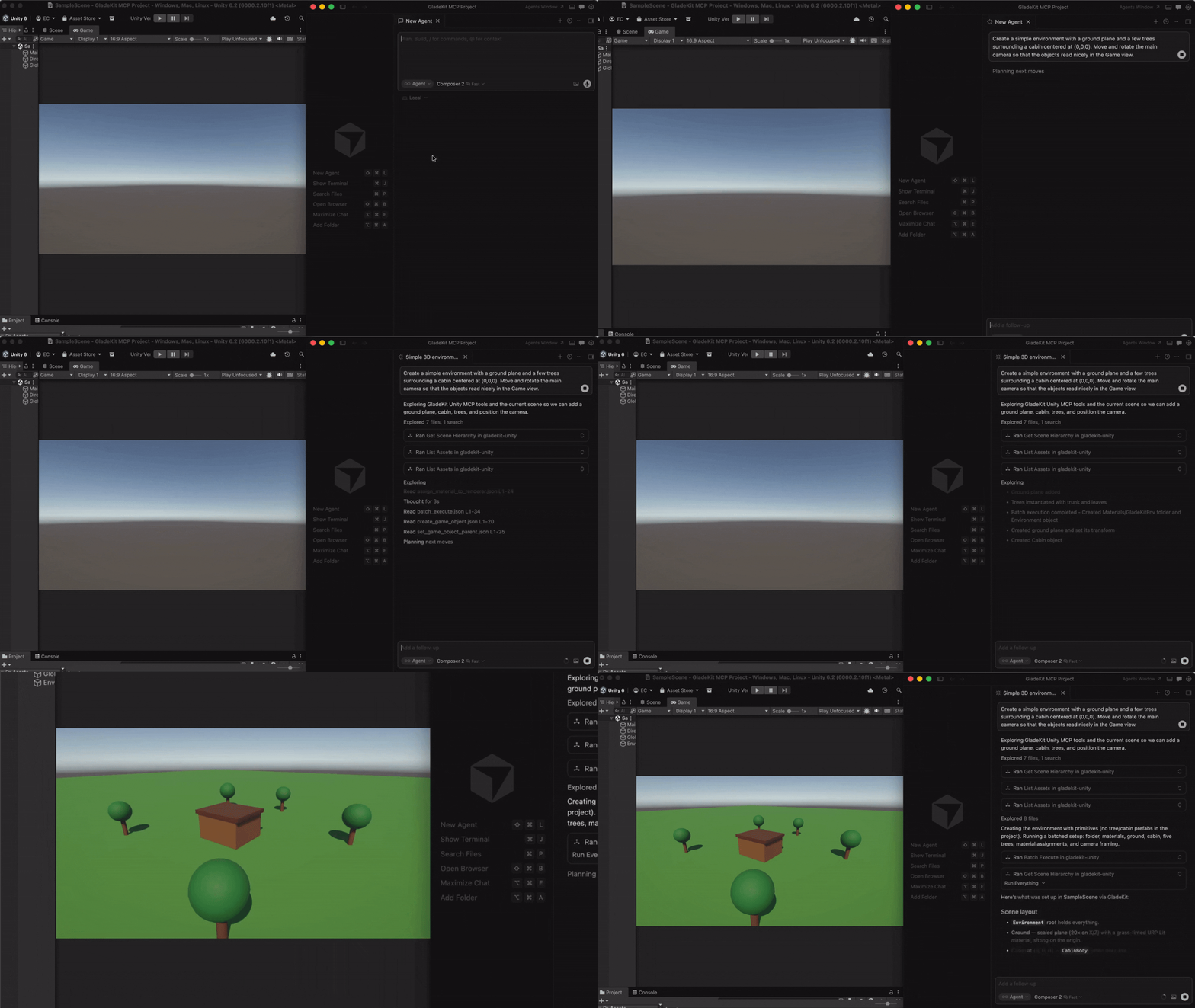
Connect Cursor, Claude Code, Windsurf, Claude Desktop, and other AI clients directly to your Unity or Godot editor.
**Unity:** 260+ tools, full Unity-aware system prompt, GLADE.md project context, script semantic search, skill calibration, free CC0 asset pipeline, cloud intelligence layer with RAG and cross-session memory.
**Godot (4.3+):** 105 native tools across scene/node, scripts, resources, signals, physics, 2D (sprites, tilemaps, parallax), audio, particles, animation, camera, navigation, runtime (incl. structured runtime-event observation), project introspection, Control / Window UI, and lighting & WorldEnvironment.
The MCP server auto-detects which editor is running (Unity on `:8765`, Godot on `:8766`) and exposes the matching tool set.
Quick Start
1. Install the editor bridge
GladeKit MCP supports both Unity and Godot. Install the bridge for your engine by following the instructions below.
UnityIn Unity, open **Window > Package Manager > + > Add package from git URL...**
https://github.com/Glade-tool/glade-mcp.git?path=/unity-bridgeThe Unity bridge starts automatically on `localhost:8765`.
Godot (4.3+)- Download
com.gladekit.mcp-bridge.zipfrom the latest Godot bridge release. (Grab the zip asset under Assets - not "Source code".) - Extract it and you get a single
com.gladekit.mcp-bridge/folder. Move it into your project'saddons/directory, so the final path is/addons/com.gladekit.mcp-bridge/plugin.cfg. - In Godot: Project → Project Settings → Plugins → enable GladeKit MCP Bridge.
The Godot bridge starts automatically on `localhost:8766`. You should see a confirmation line in the editor Ou
Related Skills
AI Game Dev Plugin
Claude Code plugins for AI game development — Unreal, Unity & Godot. Let Claude create a project, install the

Claude Skills Library
520 drop-in skills for Claude across 45 categories: coding, decision-making, gym, game dev (Godot, Unity, Unre


Beckett Godot MCP
Zero-sidecar MCP server inside the Godot editor. AI agents (Claude Code, Cursor) inspect, author, run and SEE


Unity MCP Plugin
Unity MCP Plugin (UPM) — Editor bridge for AI-assisted game development. Enables Claude, Cursor & MCP-compatib


MCP Game Deck
Unity Editor package that bridges Claude AI to Unity via MCP. 268 tools, embedded chat UI, knowledge-driven ag

Godot AI
Native C++ AI assistant module for the Godot 4.7 editor - multi-provider LLM chat, GDScript code generation &

Related Agents

Game Developer
Game development across all platforms (PC, Web, Mobile, VR/AR). Use when building games with Unity, Godot, Unr


10x Tool Calls
Cursor and Windsurf meter usage by requests and tool calls rather than tokens, which means a finished or stall


P2a Task Graph
Converts an approved implementation plan into schema-compatible small dependency-aware tasks for agent executi
