
Openclaude — Git skill for Claude Code
Open Claude Is Open-source coding-agent CLI for OpenAI, Gemini, DeepSeek, Ollama, Codex, GitHub Models, and 200+ models via OpenAI-compatible APIs.
How to install Openclaude
This entry records only its repository, not the path inside it, so there is no
exact command to give. Open Gitlawb/openclaude and copy the folder into
~/.claude/skills/, or the file into ~/.claude/agents/.
What Openclaude does
Open Claude Is Open-source coding-agent CLI for OpenAI, Gemini, DeepSeek, Ollama, Codex, GitHub Models, and 200+ models via OpenAI-compatible APIs.
Alternatives in Git
- OSS PR — Commit + PR workflow for open source contributions: auto-creates a user-prefixed branch when on main/master, t 19.7k ★
- Git MCP — GitHub Repo stars Free open-source remote MCP server for any GitHub project Git integration MCP 7.8k ★
- 40+ Claude Code Tips — Tips for getting the most out of Claude Code, including a custom status line script, cutting the system prompt 5.8k ★
README
OpenClaude
OpenClaude is an open-source coding-agent CLI for cloud and local model providers.
Use OpenAI-compatible APIs, Gemini, GitHub Models, Codex OAuth, Codex, Ollama, Atomic Chat, and other supported backends while keeping one terminal-first workflow: prompts, tools, agents, MCP, slash commands, and streaming output.
[](https://github.com/Gitlawb/openclaude/actions/workflows/pr-checks.yml) [](https://github.com/Gitlawb/openclaude/tags) [](https://github.com/Gitlawb/openclaude/discussions) [](SECURITY.md) [](LICENSE)
OpenClaude is also mirrored to GitLawb: [gitlawb.com/node/repos/z6MkqDnb/openclaude](https://gitlawb.com/node/repos/z6MkqDnb/openclaude)
[Quick Start](#quick-start) | [Setup Guides](#setup-guides) | [Providers](#supported-providers) | [Source Build](#source-build-and-local-development) | [VS Code Extension](#vs-code-extension) | [Community](#community)
Star History
[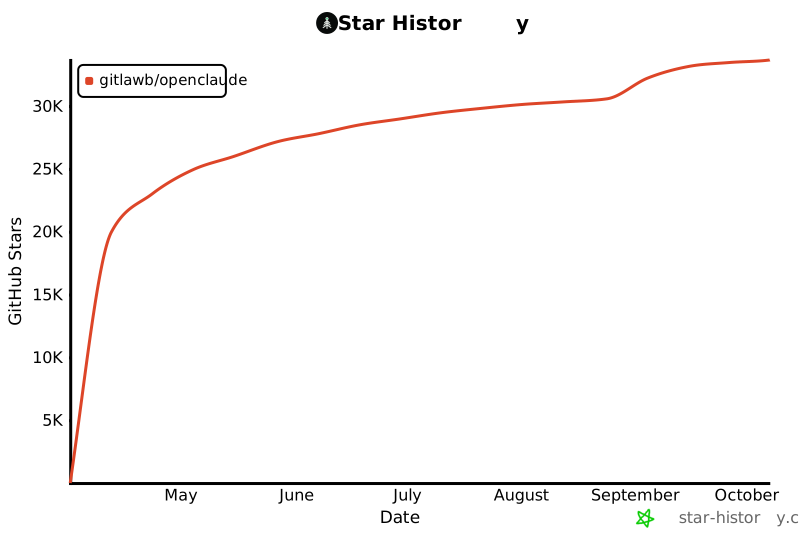](https://www.star-history.com/?repos=gitlawb%2Fopenclaude&type=date&legend=top-left)
Why OpenClaude
- Use one CLI across cloud APIs and local model backends
- Save provider profiles inside the app with
/provider - Run with OpenAI-compatible services, Gemini, GitHub Models, Codex OAuth, Codex, Ollama, Atomic Chat, and other supported providers
- Keep coding-agent workflows in one place: bash, file tools, grep, glob, agents, tasks, MCP, and web tools
- Use the bundled VS Code extension for launch integration and theme support
Quick Start
Install
npm installRelated Skills

Memorix
Open-source cross-agent memory layer for coding agents via MCP. Compatible with Cursor, Claude Code, Codex, Wi

Mimi Remote
Open-source native iPhone/iPad client for OpenAI Codex CLI and Claude Code — review diffs, approve actions, st

Voicemode MCP
by Mike Bailey - VoiceMode MCP brings natural conversations to Claude Code. It supports any OpenAI API compati

AIProxy
Use your GitHub Copilot, ChatGPT/Codex, and Anthropic subscription accounts with any coding agent like Claude

Rankmath SEO Wp
Rank Math SEO compliant WordPress article writer skill. Battle-tested on moksaweb.com. Compatible with Claude

Raindrop Bookmark Organizer
Agent Skills-compatible skill: batch-organize a Raindrop.io library — structured notes, three-axis controlled

Related Agents

ZeroClaw Android
Run AI agents 24/7 on your Android phone. Native Rust core, 25+ providers (OpenAI, Claude, Gemini, Groq, DeepS


Codex CLI
Codex CLI → any OpenAI-compatible endpoint


Agent Of Empires
Claude Code, OpenCode, Mistral Vibe, Codex CLI, Gemini CLI Coding Agent Terminal Session manager via tmux and
