

Open Researcher — AI skill for Claude Code
🔥 Visual AI research assistant that displays real-time thinking, provides split-view analysis, and automatic citations using Claude and Firecrawl.
How to install Open Researcher
This entry records only its repository, not the path inside it, so there is no
exact command to give. Open firecrawl/open-researcher and copy the folder into
~/.claude/skills/, or the file into ~/.claude/agents/.
What Open Researcher does
🔥 Visual AI research assistant that displays real-time thinking, provides split-view analysis, and automatic citations using Claude and Firecrawl.
Alternatives in AI
- Firecrawl MCP Server — 🔥 Official Firecrawl MCP Server - Adds powerful web scraping and search to Cursor, Claude and any other LLM c 6.1k ★
- Ccstatusline — by sirmalloc - A highly customizable status line formatter for Claude Code CLI that displays model info, git b 5.5k ★
- AI Investigator — An automated AI system (Python framework) designed to analyze any type of website content and generate structu 733 ★
README
Open Researcher
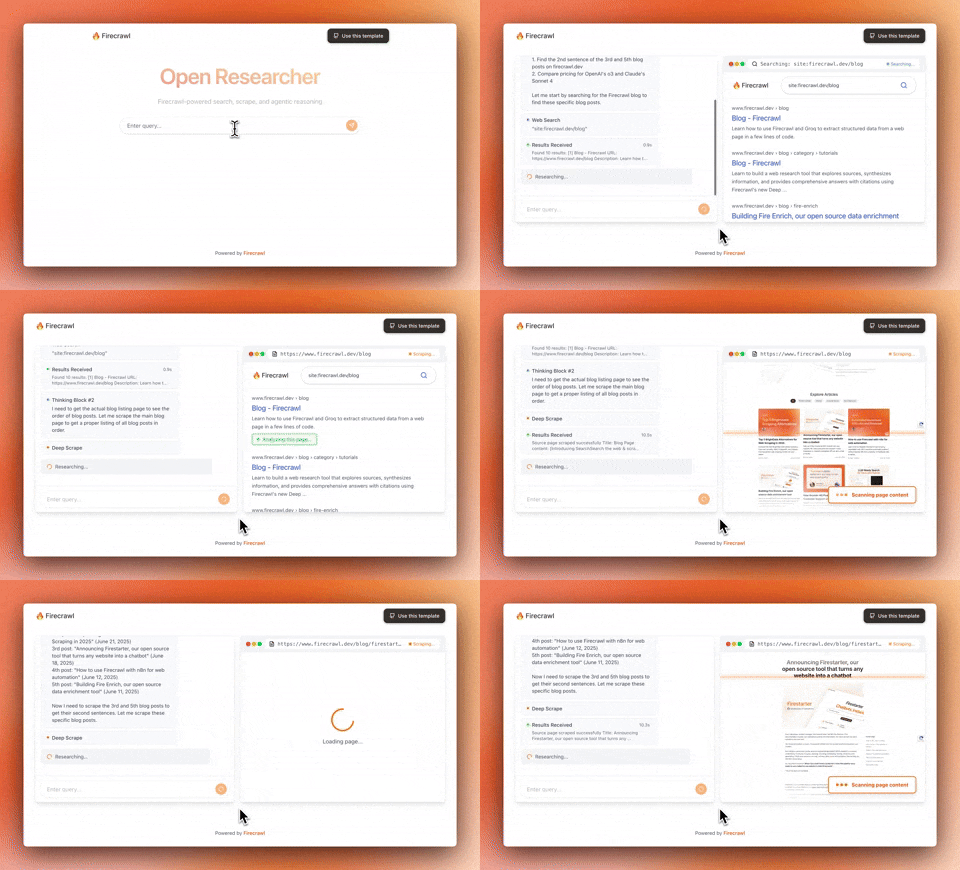
A powerful AI-powered research tool that combines Firecrawl's web scraping capabilities with advanced AI reasoning to help you search, analyze, and understand web content.
Features
- AI-Powered Search: Intelligently search and analyze web content
- Real-time Web Scraping: Powered by Firecrawl for accurate, up-to-date information
- Thinking Display: See the AI's reasoning process in real-time
- Smart Citations: Automatic source tracking and citation generation
- Split View Interface: Side-by-side view of chat and search results
Prerequisites
- Node.js 18+ and npm
- API Keys (at least one required):
ANTHROPIC_API_KEY- For AI functionalityFIRECRAWL_API_KEY- For web scraping (can be added via UI)
Quick Start
**Clone the repository**
git clone https://github.com/mendableai/open-researcher
cd open-researcher
**Install dependencies**
npm install**Set up environment variables**
cp .env.local.example .env.localEdit `.env.local` and add your API keys:
ANTHROPIC_API_KEY=your_anthropic_api_key
FIRECRAWL_API_KEY=your_firecrawl_api_key  # Optional, can be added via UI
**Run the development server**
npm run dev**Open your browser** Navigate to [http://localhost:3000](http://localhost:3000)
Environment Variables
| Variable | Required | Description |
|---|---|---|
ANTHROPIC_API_KEY |
Yes | Claude API key for AI functionality |
FIRECRAWL_API_KEY |
No* | Firecrawl API key for web scraping |
*Can be provided through the UI if not set in environment variables
Getting API
Related Skills
Claude Code Rewind
🕰️ Time machine for Claude Code sessions - Automatic snapshots, granular rollbacks, and visual diffs. Never f


Social Lead Researcher
LinkedIn & X lead research agent — give your AI coding assistant one job: find qualified prospects from your I

Task Split
You are a Task Decomposition AI assistant. Your primary function is to break down a user's request or goal int


Aiwatch Skill
Claude Code skill for AI governance intelligence. Researches any topic across UK Parliament, ICO, FCA, EU AI A


Accordio Tracker
Open-source automatic time tracker for Mac, built for AI agents. Over MCP, Claude finally understands your day


Ragent
Agentic RAG chatbot that answers questions from uploaded PDFs using semantic search (FAISS + embeddings), with

Related Agents

Drupal Config Executor
Generates Drupal config YAML from drupal-planner specs — entity types, fields, form/view displays, taxonomy, s

Teaching Assistant
You are a teaching aid and thinking partner that helps students and developers learn through explanation, guid

Conditioning Planner
Plans the cardiorespiratory conditioning — standalone cardio sessions and session finishers — inside the split
