
Copilot Setup — AI skill for Claude Code
Universal AI coding assistant configuration engine.
How to install Copilot Setup
This entry records only its repository, not the path inside it, so there is no
exact command to give. Open ericchansen/copilot-setup and copy the folder into
~/.claude/skills/, or the file into ~/.claude/agents/.
What Copilot Setup does
Universal AI coding assistant configuration engine. Discovers, merges, and deploys config from multiple sources.
Alternatives in AI
- Part 4 — Generate AGENTS.md And AI Agent Configuration Files — I'll help you create the instruction files that will guide your AI coding assistant to build your MVP 2.1k ★
- Codesight — Universal AI context generator 979 ★
- Registry Broker Skills — AI agent skills for the Universal Registry - search, chat, and register 72,000+ agents across 14+ protocols 410 ★
README
copilot-setup
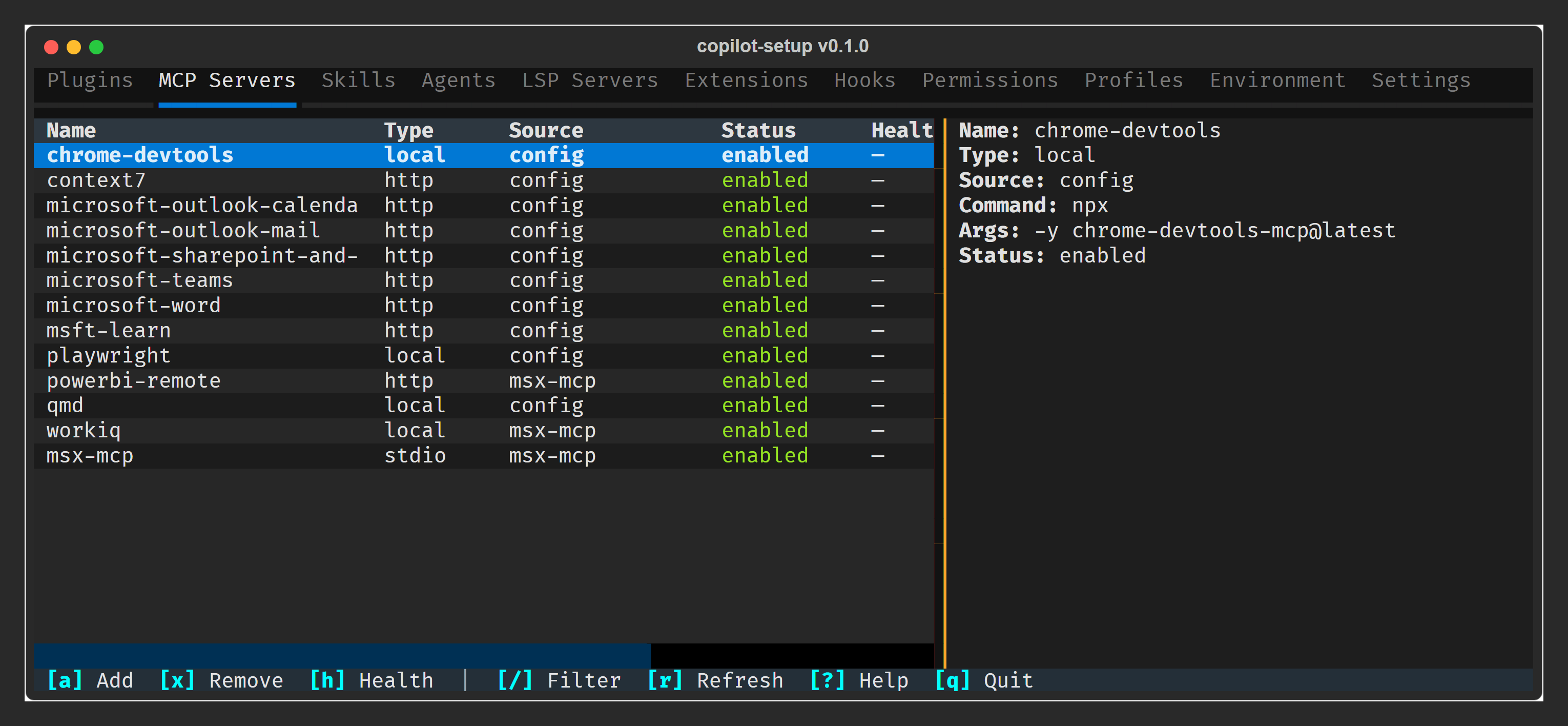
A Textual TUI dashboard for viewing and managing your GitHub Copilot CLI configuration. Browse MCP servers, plugins, skills, agents, settings, and more — toggle, upgrade, and remove plugins or MCP servers without leaving the terminal.
Installation
Install as an isolated CLI tool with [uv](https://docs.astral.sh/uv/) (recommended):
uv tool install copilot-setupOr run directly without installing:
uvx copilot-setupFor **development** from a local clone:
git clone https://github.com/ericchansen/copilot-setup.git
cd copilot-setup
uv tool install -e .           # editable install
uv tool install ruff pytest    # dev tools
The `-e` flag enables editable mode — code changes are reflected immediately without reinstalling.
Requires Python ≥ 3.10.
**Why `uv tool install` over `pip install`?** Global pip pollutes your system Python and causes version conflicts. `uv tool install` gives each tool its own isolated venv (like `pipx`, but faster). If you previously installed with `pip install copilot-setup`, clean it up with `pip uninstall copilot-setup` then reinstall via uv.
Usage
copilot-setup           # Launch the TUI dashboard
copilot-setup doctor    # Probe MCP server health
**11 tabs** · **Instant filter** (`/`) · **Detail pane** · **Plugin management** · **Doctor health probes**
📖 **[Full documentation →](https://ericchansen.github.io/copilot-setup/)**
Releasing
Releases are published to [PyPI](https://pypi.org/project/copilot-setup/) automatically via GitHub Actions when a version tag is pushed.
# 1. Update version in pyproject.toml
# 2. Commit and push
git commit -am "chore: bump version to X.Y.Z"
git push

# 3. Tag and push
git tag vX.Y.Z
git push origin vX.Y.Z
The workflow validates the tag matches `pyproject.toml`, runs lint + tests, builds the
Related Skills
Claude Code Global Config
Production-ready global CLAUDE.md template for Claude Code CLI - Anthropic's AI coding assistant. Clean Archit

Ajolote AI
Shared AI agent configuration for multi-tool teams. ajolote keeps a single canonical config (.agents/config.js


Universal AI Config
Generate tool-specific AI config files from shared templates. Write your AI instructions, skills, and agents o

Inaricode
InariCode — TypeScript CLI for an AI coding assistant: multi-provider chat (Claude, OpenAI, Kimi, Ollama, …),


Godot Agent Arena
Dockerized Godot Engine accessible via browser (noVNC + Guacamole) — a testbed for benchmarking browser-based

Pact
Multi-agent coding orchestration CLI -- isolates AI agents (Claude Code, Copilot CLI, Codex) in git worktrees,

Related Agents

Copilot Assistant
GitHub Copilot coding agent onboarding specialist. Use PROACTIVELY when


Config Workbook Author
Compile the canonical 10-section Salesforce Configuration Workbook. SfSkills admin workflow agent, /author-con


Home Automation Engineer
Use this agent when the user needs to work on Home Assistant integrations, IoT device setup, smart home automa
