
Pi Fleet Console — Development skill for Claude Code
Multi-machine web console and gateway for the pi coding agent.
How to install Pi Fleet Console
This entry records only its repository, not the path inside it, so there is no
exact command to give. Open dreamhunter2333/pi-fleet-console and copy the folder into
~/.claude/skills/, or the file into ~/.claude/agents/.
What Pi Fleet Console does
Multi-machine web console and gateway for the pi coding agent.
Alternatives in Development
- Ctf 24h Fleet — 24h unattended multi-target Web CTF fleet loop runner 1.1k ★
- Herdrm — Native macOS console for herdr — all your coding agents and their live terminals, across devices 635 ★
- Docmancer — Find out what your coding agents already know 121 ★
README
Pi Web
[中文文档](./README.zh-CN.md) | [日本語](./README.ja.md) | [Русский](./README.ru.md)
Local browser UI for the [pi coding agent](https://github.com/earendil-works/pi). Pi Web uses the same local configuration and session files as pi, so you can browse and resume conversations, run agent turns, configure models and resources, and inspect project files from a browser.
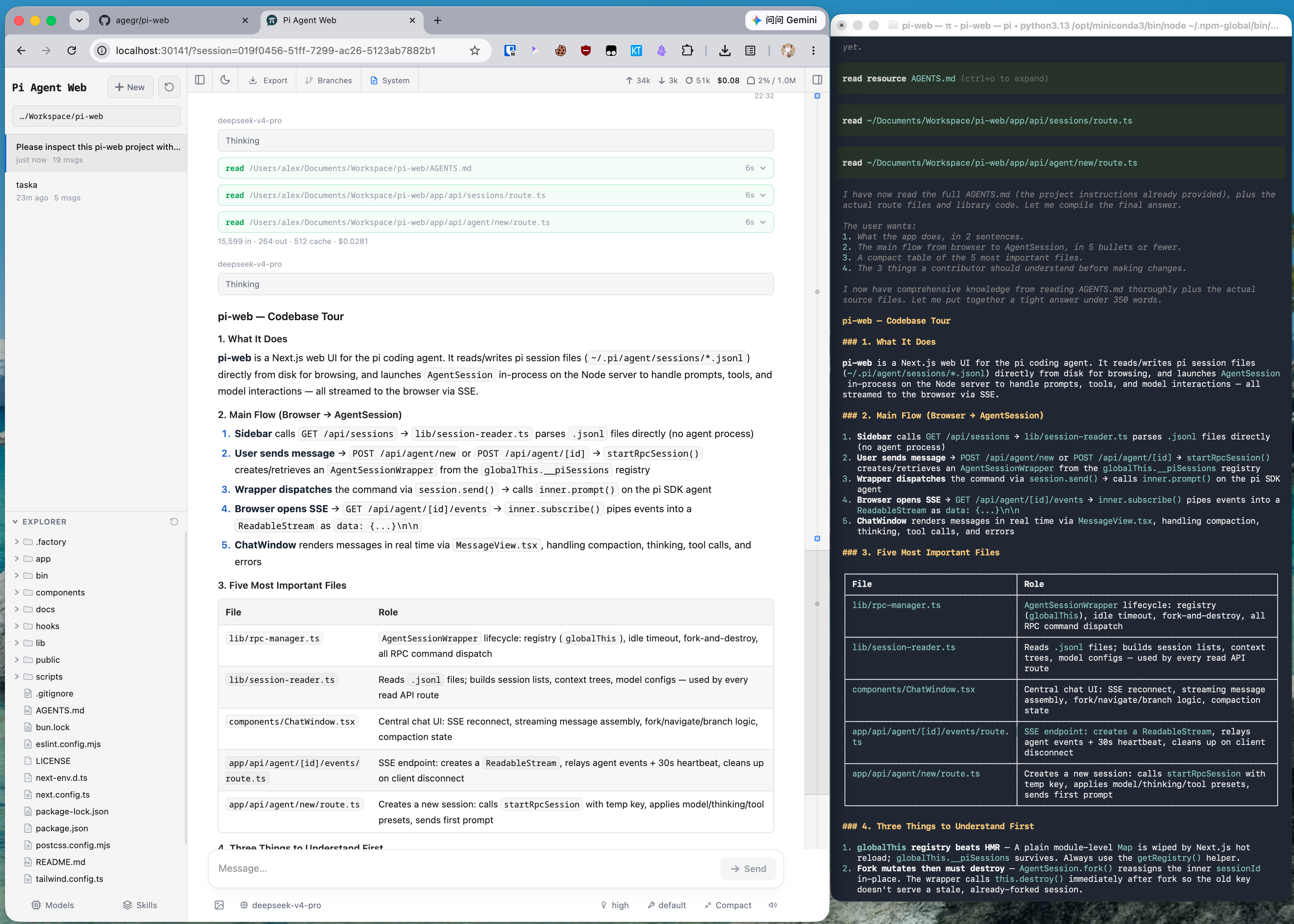
Features
- Session workspace: browse, resume, rename, export, and delete conversations grouped by project, with running state, context usage, cost, and compaction details.
- Two ways to branch: New session creates an independent session file from an earlier message; Edit from here creates a branch inside the current session.
- Project file tools: browse and upload files, inspect Git diffs, and preview source, Markdown, images, audio, PDFs, and DOCX files with automatic refresh.
- Git worktrees: switch checkouts from the sidebar while keeping sessions from the same repository grouped together.
- Web-based configuration: manage provider login and API keys, models, model tests, plugin packages, and skills without leaving Pi Web.
- English, Simplified Chinese, and Traditional Chinese UI: Pi Web follows the browser language initially and provides a language switcher in the top bar.
Quick Start
Pi Web requires Node.js 22.19.0 or newer. Check your version with `node --version`, then run:
npx @agegr/pi-web@latestThe CLI opens a browser after the server is ready. If it does not, open [http://127.0.0.1:30141](http://127.0.0.1:30141). Pi Web listens only on `127.0.0.1` by default.
If no model provider is configured yet, open the **Models** panel to sign in or add an API key.
To install the `pi-web` command globally:
npm install -g @agegr/pi-web@latest
pi-web
To update, stop
Related Skills
Puppy
One persistent web console for every coding agent you run. Drive Claude Code, Codex and OpenCode from your bro

Fleet Dashboard
A live board of every coding-agent session on your Mac — Claude Code, Codex, Antigravity — what each is doing


Mows Harness
A layered, self-hosted Claude Code harness: config + skills, unattended watchdogs, VPS web cockpit (Caddy/oaut

Claude Code Mini App
Self-hosted multi-agent console for Claude Code, Cursor Agent, Codex and Kiro — run and supervise coding agent
Coding Agent Config
Shared SoT for a multi-agent coding fleet: host rules, skills/agents, hook policy, and a crossed-axis knowledg


Openwork
Browser-based agent platform with a user workspace, admin console, product gateway, and per-user runtime isola

Related Agents
Deepseek Worker
Coding worker on DeepSeek, served by the multi-model gateway's upstream. Use when the user says "use deepseek"

Fleet Plan
Plan before coding: architecture, multi-file design, comparing approaches, or deciding how to build something.


Guidewire Reference Librarian
Use this agent when you need authoritative public Guidewire documentation links, Cloud API endpoint references
