
Dsh Agy
Description
Google Antigravity (agy) OAuth auth + model access plugin for DeepSeek Harness: multi-account pool, 429 rotation, device fingerprinting, CLI and web login.
Installation
This entry records only its repository, not the path inside it, so there is no
exact command to give. Open the source below and copy the folder into
~/.claude/skills/, or the file into ~/.claude/agents/.
README
dsh-agy
[](https://github.com/chaos-03x/dsh-agy/actions/workflows/ci.yml) [](https://www.npmjs.com/package/dsh-agy)
Google Antigravity (agy) access for [DeepSeek Harness](https://github.com/deepseek-ai/deepseek-harness): OAuth authentication, a multi-account pool with automatic 429 rotation, device fingerprinting, and both CLI and web management.
中文文档:[docs/README_zh.md](docs/README_zh.md)
Features
- OAuth login: one-click sign-in via browser OAuth callback, with headless paste-URL mode and a remote paste-credential blob channel.
- Two management surfaces: web and CLI, either one works, core features are the same.
- Multi-account pool: encrypted account store, usage-aware account selection (family-scoped quotas, OMP-aligned ranking), automatic rotation on rate limits, per-account cooldown to the real reset time, per-account device fingerprints.
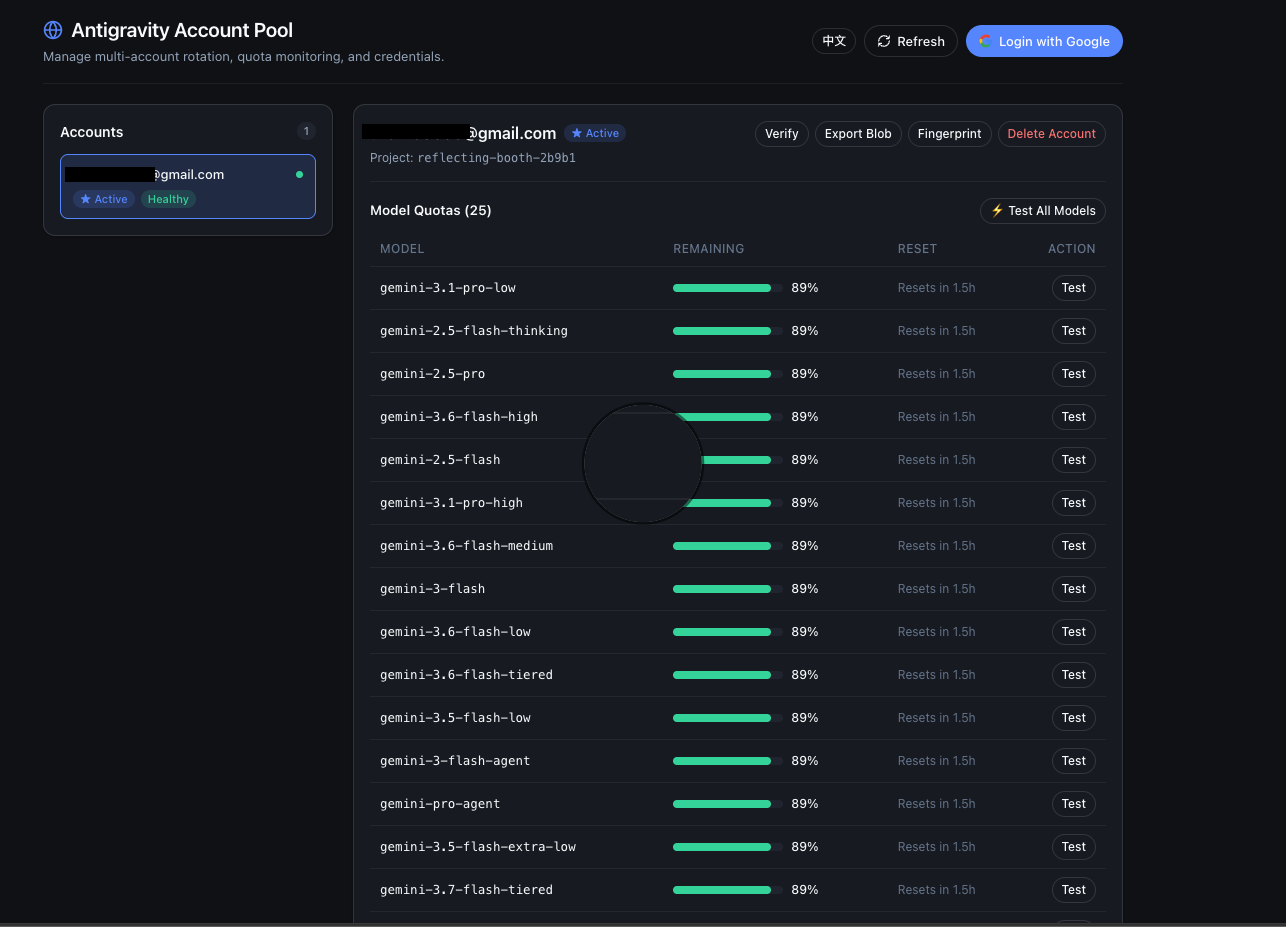
- Quota dashboard: only active when DSH Web is running; append
/agyto your dsh web address: login, account management, per-model quota bars, model testing, credential export/import, fingerprint management. - CLI:
dsh-agy login|status|import|verify|logoutworks standalone, with or without a harness.
Screenshots
The `/agy` dashboard inside DSH Web — account cards, per-model quota bars, and one-shot model tests:
Quickstart
Path A: DSH Web GUI Users (Recommended — 100% Web UI, zero CLI commands)
For users using DeepSeek Harness browser workspace / Web GUI:
# 1. Install plugin into DSH web profile (via dsh CLI, or pnpx/npx if dsh is not in PATH)
dsh plugin --profile web add dsh-agy
# or: npx @deepseek-ai/dsh plugin --profile web add dsh-agy

# 2. Launch DSH Web
dsh web

# 3. Open dashboard at http://127.0.0.1:3080/agy
# Click
Related Skills
Agency Agents
A complete AI agency at your fingertips - From frontend wizards to Reddit community ninjas, from whimsy inject

Awesome Llm Apps
100+ AI Agents, Agent Skills and RAG Apps - Free and Open Source.

Firecrawl
🔥 The API to search, scrape, and interact with the web for AI

Artifacts Builder
Suite of tools for creating elaborate, multi-component claude.ai HTML artifacts using modern frontend web tech

Headroom
Compress tool outputs, logs, files, and RAG chunks before they reach the LLM. 20% fewer tokens for coding agen

CrewAI
Framework for orchestrating role-playing, autonomous AI agents. By fostering collaborative intelligence, CrewA
