
AppleAI — AI skill for Claude Code
Apple AI is a lightweight, privacy‑minded macOS menu bar app that keeps your favorite AI assistants one keystroke away.
How to install AppleAI
This entry records only its repository, not the path inside it, so there is no
exact command to give. Open bunnysayzz/AppleAI and copy the folder into
~/.claude/skills/, or the file into ~/.claude/agents/.
What AppleAI does
Apple AI is a lightweight, privacy‑minded macOS menu bar app that keeps your favorite AI assistants one keystroke away. Open a compact, always‑on‑top chat window and jump between services like ChatGPT, Claude, Copilot, Perplexity, Gemini, and more. All from one place
Alternatives in AI
- Session Kit — Close the terminal windows, not the AI coding sessions 649 ★
- Qiaomu Markdown Proxy — Fetch any URL as clean Markdown via proxy services (r.jina.ai / defuddle.md) or built-in scripts 426 ★
- MioIsland — macOS Dynamic Island for AI coding agents 388 ★
README
⛔ Apple AI is discontinued: use [Utilix](https://github.com/bunnysayzz/utilix) instead
**AppleAI is no longer maintained. The name is retired, and every feature now lives in [Utilix](https://github.com/bunnysayzz/utilix):** the same menu-bar AI chat, plus 25+ utilities (⌘Space command palette, clipboard, OCR, translate, window snap, calendar, AI chat with your own API key), with automatic in-app updates.
AppleAI (this repo, archived) Utilix (active) AI chat (ChatGPT, Claude, Gemini…) ✅ frozen as-is ✅ + Web AI, no key needed New versions ❌ none, ever ✅ in-app, signed Bug reports & ideas ❌ closed ✅ Issues + in-app form **Get Utilix:** [GitHub Releases](https://github.com/bunnysayzz/utilix/releases) · [itch.io](https://bunnysayzz.itch.io/utilix)
This repository stays up as an archive. The last AppleAI release below still works, but no new versions will ship here.
Archive (AppleAI history)
Everything below describes the archived AppleAI app, kept for reference.
Apple AI is a lightweight, privacy‑minded macOS menu bar app that keeps your favorite AI assistants one keystroke away. Open a compact, always‑on‑top chat window and jump between services like ChatGPT, Claude, Copilot, Perplexity, Gemini, and more. All from one place.
Download
The last AppleAI release still works. Get it from this repo's [Releases page](../../releases). For everything new, get [Utilix](https://github.com/bunnysayzz/utilix/releases) instead.
App Preview

Video Demo
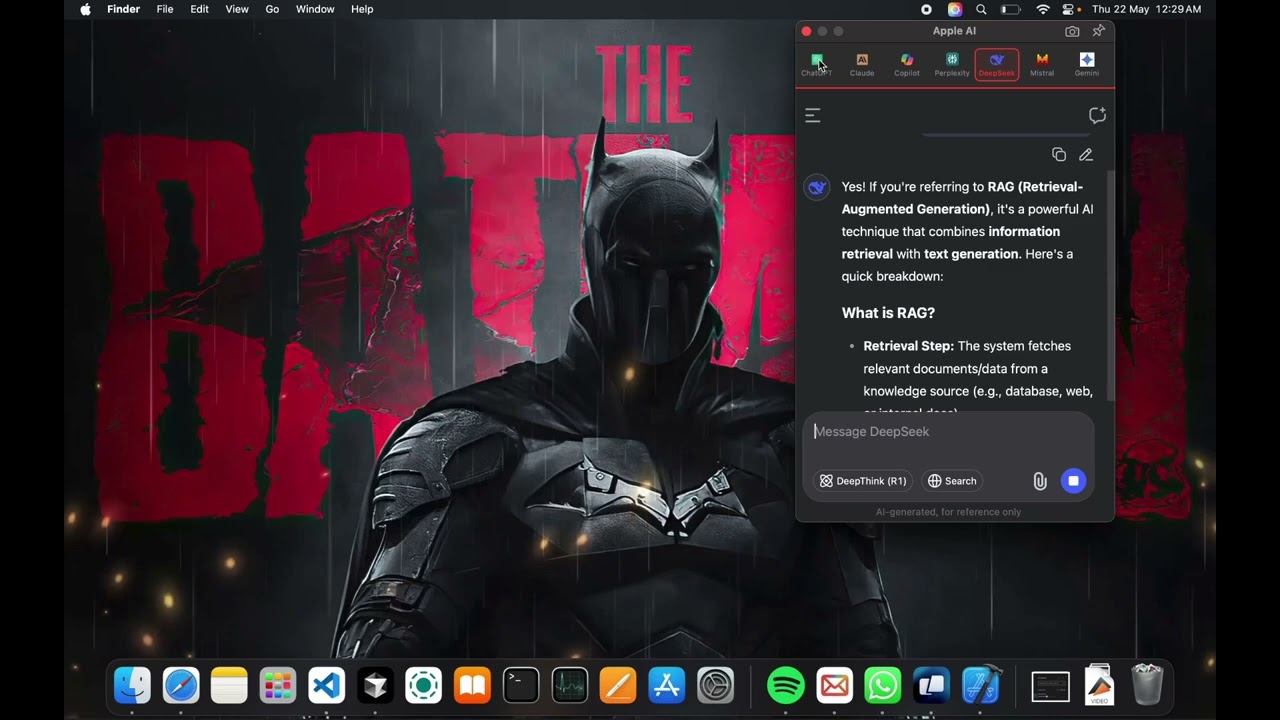
Click to watch the demo video
Scr
Related Skills

Orbitbar
Cross-platform, always-on-top bar that shows what your local AI coding agents (Claude Code, Codex, OpenCode) c


Vinos
An agentic Linux distro — local LLMs + Claude Code one keystroke away. Arch + Hyprland, boots on any x86_64 (T


Bayloob
A local status overlay for AI coding agents. Watch Claude Code, Codex and Gemini CLI sessions from the top of

Wardlume
Lock your Mac keyboard & mouse, keep the screen visible — botsit your AI agents (Claude Code, Codex, Cursor) w

Pw Claude Usage Widget
Always-on-top Windows widget showing your Claude Code usage — 5h, weekly & per-model limits with reset timers

ClaudeUsageMonitor
Free always-on-top desktop widget for Windows and macOS that shows your Claude usage limits live - 5-hour sess

Related Agents
Apple UI Designer
Visual and theme redesigns in current Apple design language (macOS 27 / iOS 26+ Liquid Glass, vibrancy, system

OpenAI Assistants
Setup: OpenAI Assistants API / ChatGPT Custom GPT


macOS UI Designer
Use this agent when you need to plan, design, or evaluate macOS application user interfaces from a UI/UX persp
