
Botbus Protocol — Development skill for Claude Code
The BotBus protocol: how a menu bar app on your computer and the companion apps on your phone and watch stay in sync — with public fixtures.
How to install Botbus Protocol
This entry records only its repository, not the path inside it, so there is no
exact command to give. Open botbus-io/botbus-protocol and copy the folder into
~/.claude/skills/, or the file into ~/.claude/agents/.
What Botbus Protocol does
The BotBus protocol: how a menu bar app on your computer and the companion apps on your phone and watch stay in sync — with public fixtures. BotBus lets you follow, approve and start Codex and Claude Code tasks from anywhere: https://botbus.io/en
Alternatives in Development
- Call Me — Minimal plugin that lets Claude Code call you on the phone 2.5k ★
- Claude Engineer — A version of command line interface(CLI) that leverages the power of Claude Opus(3-4.7) 954 ★
- Write Fixtures — ../../skills/write-fixtures/SKILL.md 902 ★
README
BotBus Protocol
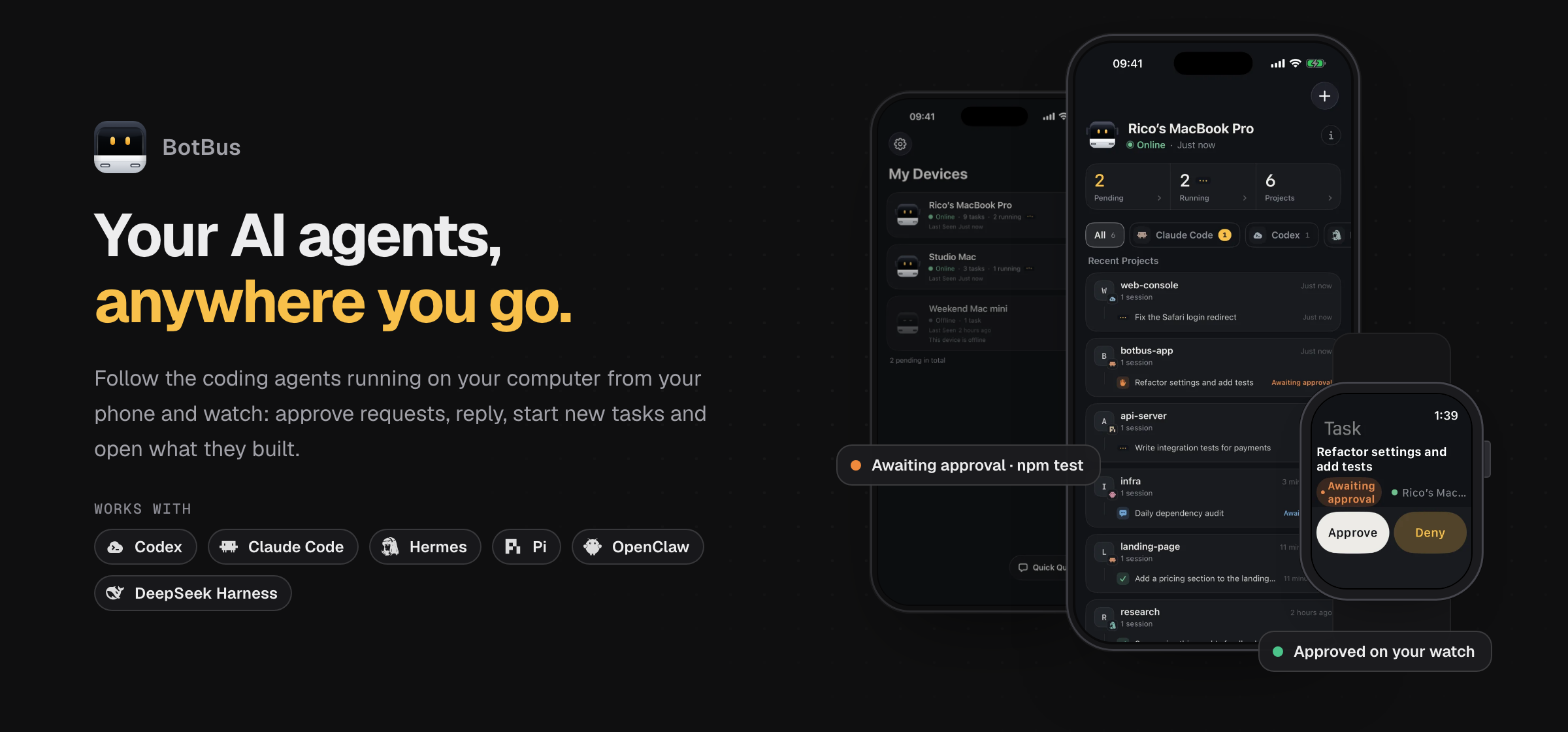
Your AI agents, anywhere you go.
Follow the coding agents running on your computer from your phone and watch.
Approve requests, reply, start tasks, and open what they built.
Website · Download BotBus · App Store · Security · Connect your agent · 简体中文
The BotBus app
BotBus connects the AI coding agents on your computer to your phone and watch. Your agents keep running beside your repositories, tools and credentials while you check progress and act on their requests from anywhere.
- Keep every session in view. Tasks are grouped by computer and project, including sessions started in your own terminal or IDE.
- Approve and keep going. Approve or deny commands, answer questions, follow up, interrupt, and start new tasks from your phone or Apple Watch.
- Open the results. Receive screenshots, videos, documents and links, preview dev-server pages, and review working changes on your phone.
- Reach your computer. Browse files and use a terminal from your phone. On macOS, you can also open the desktop and send clicks and keystrokes when a task needs your help.
- Pair your devices. Connect multiple computers and phones; your Apple Watch receives pairing from your iPhone and then connects independent
Related Skills
Hommies
Hommie, a floating Omarchy companion that watches your coding agents (Claude Code, Codex, OpenCode, Omacode) a

Riffpad
Watch, approve and steer your coding agents from your phone.

Backstage
Backstage: a macOS menu-bar focus guard. Automation browsers and background agents stay backstage and ask befo

Protonctl
Local, read-only MCP server and CLI for Proton Mail, Proton Drive and Proton Calendar, in Rust, for macOS and


Computer Use
Computer use for Grok Build: a plugin and MCP server that let the agent see the screen, click and type in desk

Hyadex
A cluster of coding agents. Self-hosted server that lets Claude Code and Codex work together in group discussi

Related Agents
Electron Menubar Engineer
Builds and fixes Electron macOS menu-bar (tray) apps — main/renderer IPC, tray icons, windows, open-at-login,

Miband Dev
Builds and installs Xiaomi Smart Band 10 / 10 Pro / 11 watch faces and Vela JS apps (with an Android companion


Computer Use Operator
Desktop automation specialist. Controls native macOS apps via Computer Use MCP. Handles Finder, System Setting
