
Orchboard — AI skill for Claude Code
Orchboard: an agentic project board for Claude Code and Codex.
How to install Orchboard
This entry records only its repository, not the path inside it, so there is no
exact command to give. Open Blaketon/orchboard and copy the folder into
~/.claude/skills/, or the file into ~/.claude/agents/.
What Orchboard does
Orchboard: an agentic project board for Claude Code and Codex. Plan, queue, and track your AI coding agents across every project. Local-first, zero dependencies.
Alternatives in AI
- Codeburn — Free, local tool to track AI coding token usage and cost across 37 tools and agents (Claude Code, Cursor, Code 9.7k ★
- Chat Ollama — ChatOllama is an open source agentic app for running AI agents across local and hosted models 3.5k ★
- Flow Next — Plan-first AI workflow plugin for Claude Code, OpenAI Codex, and Factory Droid 569 ★
README
Orchboard
An agentic project board for Claude Code and Codex: plan, queue, and track your AI coding agents across every project.




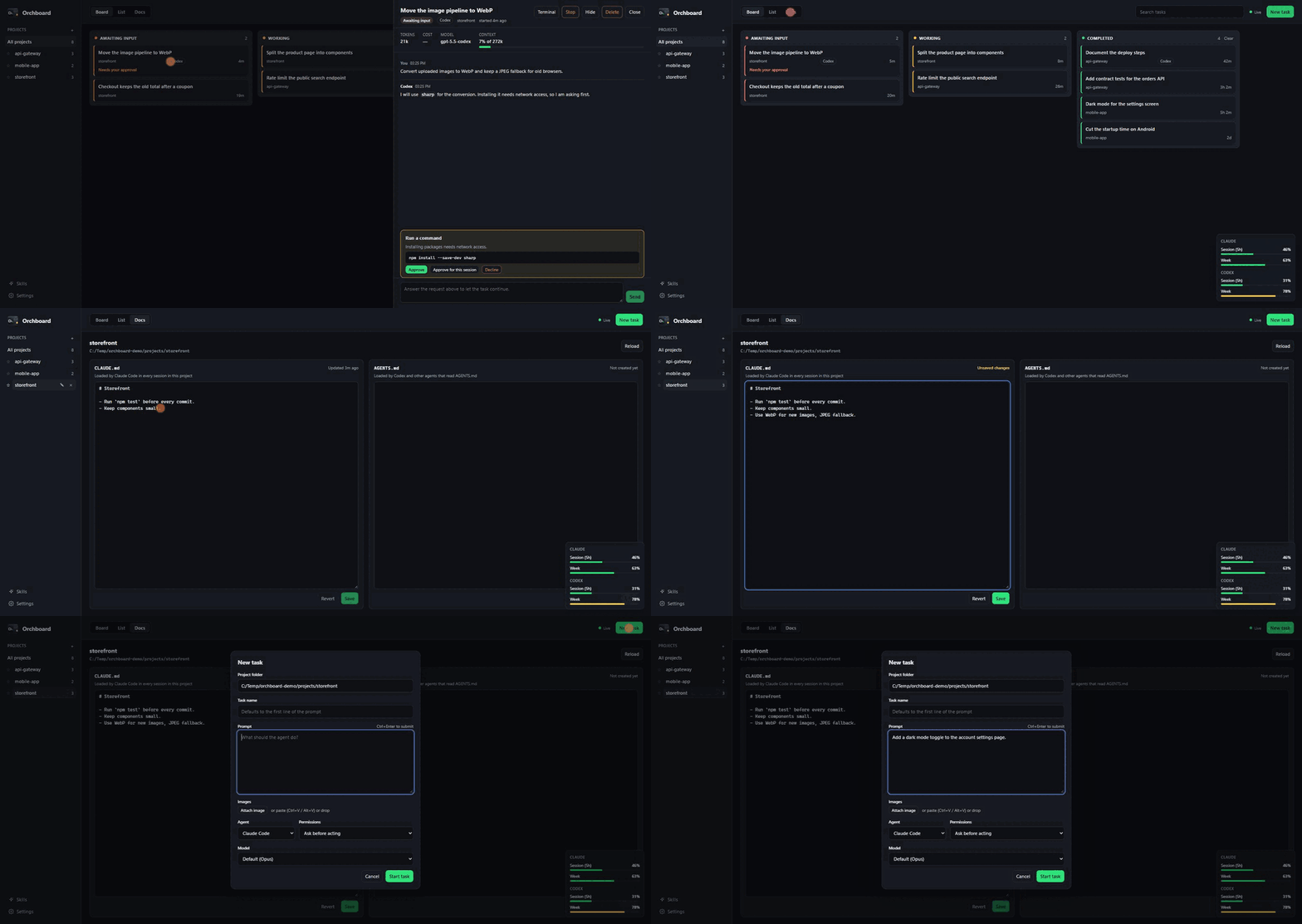
Run several coding agents at once and you lose track of them: which one is waiting for you, which one is still working, what each of them actually did. Orchboard is a local dashboard that shows every Claude Code and Codex task on one board, tells you the moment one needs input, and lets you reply, approve, or start the next task without hunting through terminal windows.
It runs on your machine, talks to the `claude` and `codex` CLIs you already have, and keeps its own data in a single folder. No account, no telemetry, no cloud.
Try it
npx orchboard --demo --openDemo mode fills the board with sample projects and agents, so you can click around before pointing it at your own work. It never starts an agent or touches a real file.
Install
npx orchboard          # run it
npx orchboard --open   # run it and open the browser
Or install it globally:
npm install -Related Skills

Agentbill
Track token usage and dollar cost across Claude Code, Cursor, Codex and other AI coding agents. Zero-config, t
Observer
Local-first control plane for AI coding agents — launch browser terminals, run and remotely control sessions,

Codeflow
OpenVibeCoding is the command tower for AI engineering: plan, delegate, track, resume, and prove long-running

Gemini Model Router
Local-first agentic terminal that routes prompts across local Gemma 4 (vLLM), Gemini CLI, and Claude Code — pi

Carrymem
Your portable AI memory — preferences, decisions, and corrections that follow you across models, tools, and de

TrustMeBro
A plan-first project workflow for Claude Code and IBM Bob: map the code in LAYOUT.md, plan the work in PLAN.md

Related Agents

Kimi Worker
Forward a coding, diagnosis, or review task to Kimi K3 (Moonshot) through the local kimi-worker.sh runtime. Us


Ade
Agent sessions routinely outlast the machine that started them, and checking a Claude Code or Codex run from a


Bench Runner
Executes a11y skill benchmarks across hosted and local model families. Runs cloud/Codex/Ollama benchmark scrip
