

Tandem — AI skill for Claude Code
One coding session.
How to install Tandem
This entry records only its repository, not the path inside it, so there is no
exact command to give. Open Bhavya6187/tandem and copy the folder into
~/.claude/skills/, or the file into ~/.claude/agents/.
What Tandem does
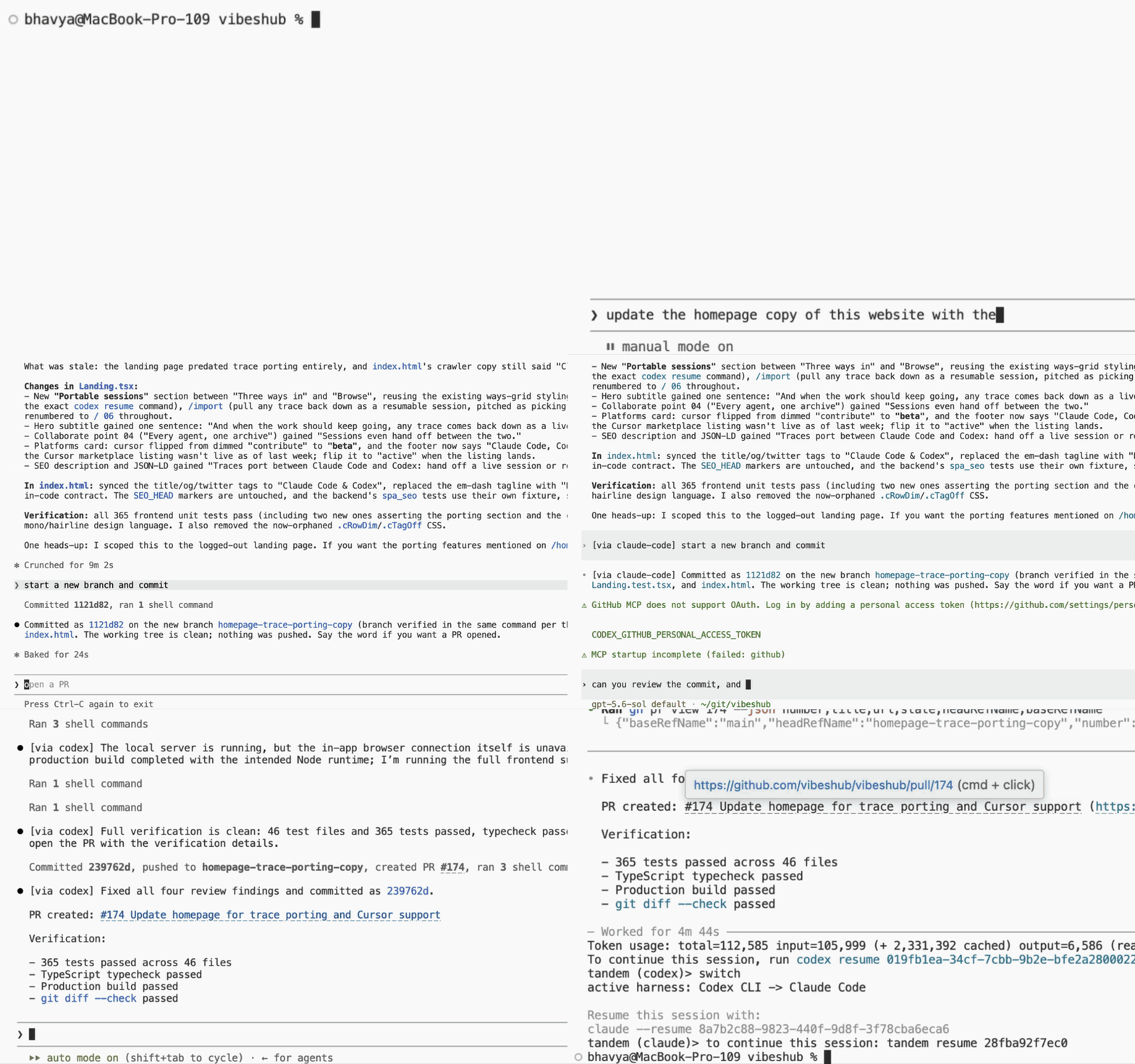
One coding session. Two AI agents. Zero lost context. Run Claude Code and Codex CLI as a single paired session.
Alternatives in AI
- Guild — Shared context, memory, and task coordination across AI coding agents 311 ★
- Engram — The context spine that 10x's every AI coding session 141 ★
- Single File Wbs — 単一HTMLで動く WBS/ガント+イナズマ線ビューア 123 ★
README
🤝 tandem
**One coding session. Multiple AI agents. Shared context.**
Use [Claude Code](https://docs.anthropic.com/en/docs/claude-code), [OpenAI Codex CLI](https://github.com/openai/codex), and [opencode](https://opencode.ai) in one continuous coding session. Work in their native interfaces, press **Ctrl-]** to move to the next CLI, and continue without copying prompts or rebuilding context by hand.
[](https://github.com/Bhavya6187/tandem/actions/workflows/ci.yml) [](https://pypi.org/project/tandem-cli/) [](https://github.com/Bhavya6187/tandem/blob/main/pyproject.toml) [](https://github.com/Bhavya6187/tandem/blob/main/LICENSE)
Quick start
You need Python 3.11+ and at least two supported CLIs installed and signed in: [Claude Code](https://docs.anthropic.com/en/docs/claude-code), [Codex CLI](https://github.com/openai/codex), or [opencode](https://opencode.ai).
uv tool install tandem-cli   # or: pip install tandem-cli
cd your-project
tandem
`tandem` starts a fresh chat: one composer for every CLI. Prompts run on the last-used harness; start one with `/claude`, `/codex`, or `/opencode` to run it there and make that the default. `tandem --on codex` chooses the harness for the first prompt.
Sessions have their own IDs, so you can keep multiple conversations in the same project. Resume from any directory; the session uses its saved working directory, conversation, last-used harness, and model pins:
tandem resume        # choose from sessions across all directories
tandem resume    # reopen a specific session
t
Related Skills
Gocode
Claude Code rewritten in Go.. High-performance AI agent harness runtime in Go. MCP server, CLI tool orchestrat


AI Usage Rings
Activity-style rings for Claude Code and Codex weekly usage limits: macOS menu bar, desktop widgets, paired iP


Claude Handoff
Summarize & export a Claude Code session into one clean handoff.md for Gemini, GPT, or another Claude. Zero de


MCP Sophon
Deterministic context compressor for MCP agents. Slots in front of prompt caching, mem0, Letta, or Claude Code

Context Engine
Drop-in token saver for Claude Code & MCP agents — auto-rewrite hooks + 10-tool MCP server + BM25/PageRank rep


Session Handoff Skill
Seamless AI session handoff: preserve context across conversations so agents pick up where they left off — zer

Related Agents
Independent Reviewer
Product-technical alignment reviewer. Spawned in a tmux pane via OpenAI Codex CLI with zero inherited context.

Agent Of Empires
Claude Code, OpenCode, Mistral Vibe, Codex CLI, Gemini CLI Coding Agent Terminal Session manager via tmux and


End Session
Use at the end of every working session. Chains learn → memory update → drift check → status update in the cor
