
Cc Calendar — Design skill for Claude Code
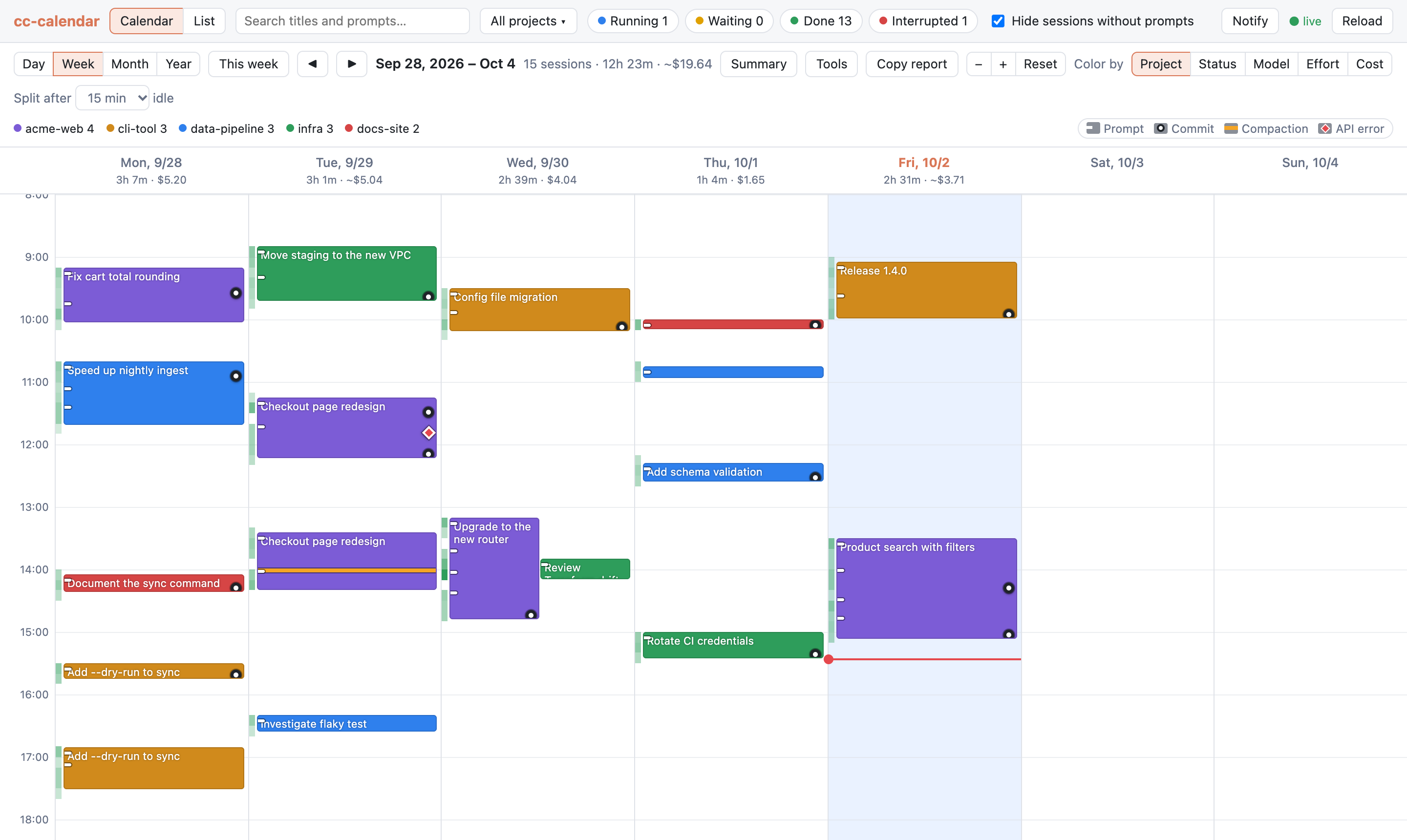
Google Calendar-style weekly view of your Claude Code sessions — local, live, read-only.
How to install Cc Calendar
This entry records only its repository, not the path inside it, so there is no
exact command to give. Open atinfinity/cc-calendar and copy the folder into
~/.claude/skills/, or the file into ~/.claude/agents/.
What Cc Calendar does
Google Calendar-style weekly view of your Claude Code sessions — local, live, read-only.
Alternatives in Design
- Studio — Launch the local design Studio — a live token editor over the latest extraction 3.6k ★
- Hn Rewrite — Read {{arg1}} (either a file path or GitHub issue URL) and rewrite it in a technical, matter-of-fact style sui 570 ★
- Hermes Plan Mode — Claude Code-style plan mode for Hermes Agent: enforced read-only planning, then approval through Hermes' own a 97 ★
README
cc-calendar
[](https://pypi.org/project/cc-calendar/)
A Google Calendar-style weekly view of your [Claude Code](https://claude.com/claude-code) sessions.
`cc-calendar` reads the transcripts Claude Code already writes to `~/.claude/projects/` and shows when you worked, on what, what it cost, and what came out of it — commits, changed files and pull requests — in a local web UI that updates live while sessions run.
**Project site:**
Install
With [uv](https://docs.astral.sh/uv/) (Python 3.12+ is fetched automatically):
uv tool install cc-calendar
cc-calendar
Or try it without installing: `uvx cc-calendar`. Update with `uv tool upgrade cc-calendar`.
With Python 3.12+ already installed, `pipx install cc-calendar` works too.
Installed v0.3.0 or earlier from GitHub? Switch to the PyPI package once with `uv tool install --force cc-calendar`; `uv tool upgrade` works from then on.
To run it from a checkout:
uv run cc-calendarThe server binds to `127.0.0.1` on a free port and opens your browser.
| Option | Description |
|---|---|
--port N |
Listen on a specific port instead of a free one |
--no-browser |
Do not open a browser window |
--claude-dir [NAME=]PATH |
Read logs from another Claude Code config directory (default ~/.claude). Repeat it to show several directories in one calendar |
--notes PATH |
File that keeps your session notes and tags (default: see Notes and tags) |
--search-index PATH |
File that keeps the full-text search index (default: see Full-text search) |
--version |
Print the version and exit |
Several config dire
Related Skills
Daily Prep
Read today's lectures from Google Calendar, download each session's pre-read material from Moodle, and produce

TokenUsage2
A live, btop-style terminal dashboard for developers to track Claude Code, Codex CLI, and OpenCode token usage

Figloo
Chrome extension + local MCP server that lets coding agents like Claude Code and Codex read Figma designs thro

Jsonl Liveness
Read-only live Claude JSONL sessions: Bun CLI/TUI, React + Tailwind web popup, time-first change checks.

Codehelm
Local web UI for Claude Code CLI sessions — read JSONL, spawn terminals, edit CLAUDE.md. Linux + macOS.


Agent View
One VS Code panel for Claude Code & Codex: every chat with status, cost and subagents, live usage bars, unread

Related Agents
Content Engine
Writes posts, captions, reel and video scripts, and the weekly content calendar across Instagram, Facebook, Li

Schedule Scout
Stage 1 of the LectureLoop pipeline. Reads Google Calendar for a given date, parses each lecture event into {s

Inbox Tracker
Scan Gmail (and Google Calendar) for job-search activity — recruiter mail, ATS/application updates, interview
