

Tuipo — Development skill for Claude Code
Grammarly for your terminal — underlines typos in Claude Code, Codex, Aider & any other terminal app.
How to install Tuipo
This entry records only its repository, not the path inside it, so there is no
exact command to give. Open ARahim3/tuipo and copy the folder into
~/.claude/skills/, or the file into ~/.claude/agents/.
What Tuipo does
Grammarly for your terminal — underlines typos in Claude Code, Codex, Aider & any other terminal app.
Alternatives in Development
- OpenAI Codex CLI — (Rust implementation) 67.8k ★
- Agentapi — An HTTP API for Claude Code, Goose, Aider, and Codex 1.3k ★
- Herdr Reviewr — Review your coding agent's diff in a terminal pane and send line comments back to Claude Code, Codex, OpenCode 823 ★
README
tuipo
**Grammarly for your terminal.**
The red squiggly line from your editor — now for the prompts you type into Claude Code, Codex, Aider, and any other terminal app.
[](#license) [](#install) [](https://crates.io/crates/tuipo)
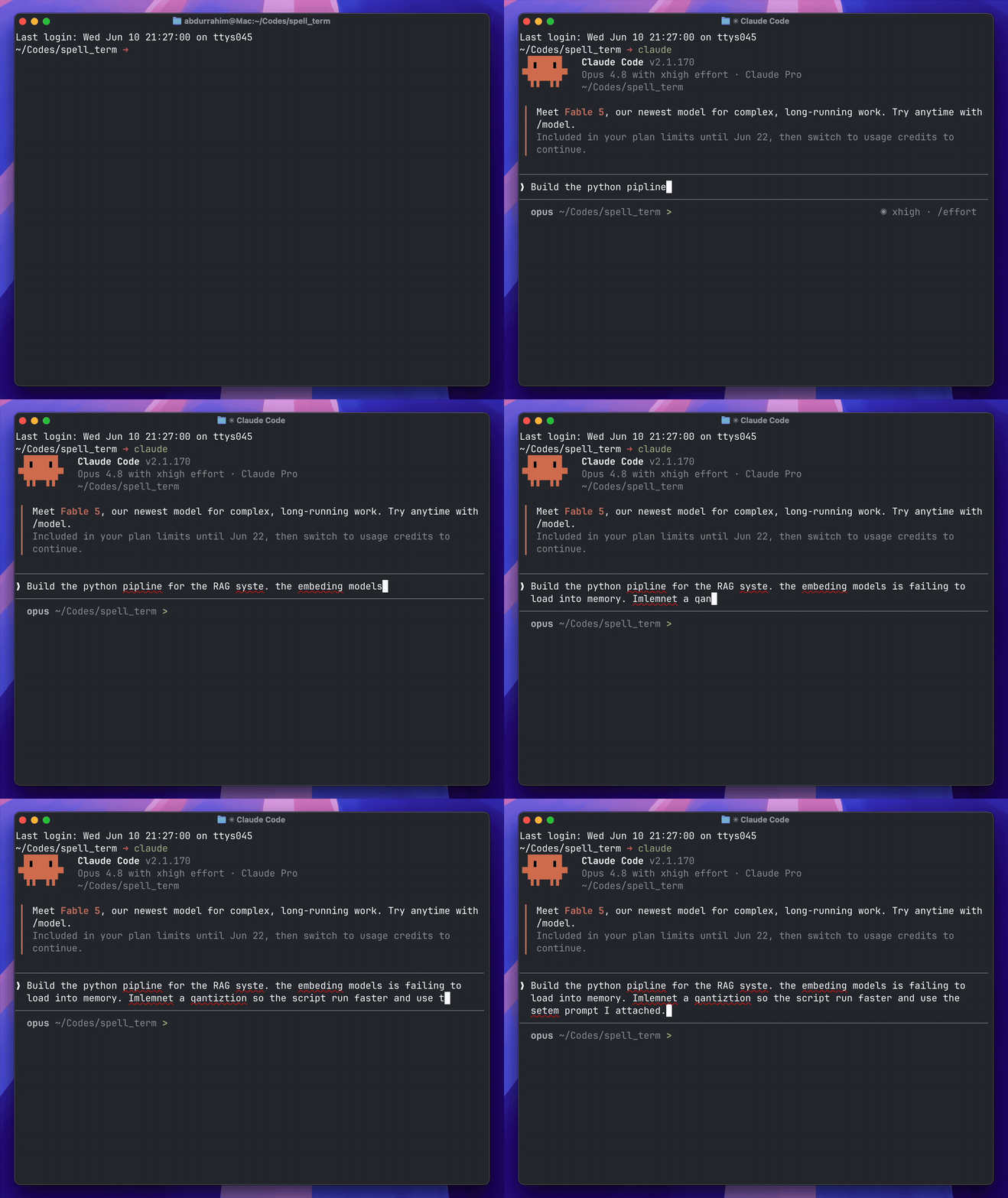
tuipo catching typos in a prompt to Claude Code. It never touches the app it's wrapping — the underlines are drawn on top.
Why I made this
I type a lot of prose into terminal apps — long prompts for **Claude Code**, **Codex** and other AI agents, commit messages, SQL, quick notes. None of them spell-check, so my typos just sail straight through into prompts and history. My editor has had the red squiggly line for years; my terminal never got it.
So I built it. You wrap a terminal program once, and you get that squiggly line back — in Claude Code, Aider, Codex, vim, `psql`, your shell, whatever. It only shows up when you actually misspell something, and it never changes how the app you're running behaves.
To be fair: modern LLMs shrug off everyday typos — mistype "recieve" and Claude knows what you meant. But that robustness comes from the model having seen a word (and its common misspellings) countless times, so it fades exactly where the stakes are highest: rare words, names, and jargon, where the model quietly guesses — and an agent doesn't ask, it acts on its guess. It shrinks with model size, too: what a frontier model shrugs off, the local Qwen or Gemma behind your coding agent has to guess at. Spelling also outlives the prompt: agents echo your words into commit messages, PR text, c
Related Skills

Meow Coding
Meow Coding — a desktop app (Electron + React) that runs multiple CLI coding agents (opencode, Claude Code, ai


BS Coding
BS Coding — a desktop app (Electron + React) that runs multiple CLI coding agents (opencode, Claude Code, aide

HiveForge
Autonomous Multi-CLI Agent Team Mission Control & Orchestrator. Coordinate Google Antigravity, Claude Code, Op

Momo Hop
Momo Hop: one-click project launcher for macOS. Lists your projects from Claude Code, Codex, Gemini CLI, OpenC

Agent Run Monitor
Desktop app for Windows, macOS and Linux that shows what your coding agents are doing, live. Watch Claude Code


Palm
Use your whole Mac from your iPhone: the live screen with touch and typing, every app, your files, terminal an

Related Agents
Claude Squad
Manages multiple AI terminal agents including Claude Code and Aider in parallel


Aider Pairprogrammer
Aider, the open-source terminal pair programmer, for code questions and


Ensemble Curator
High-volume triage agent for external-AI-agent PRs (Codex, Jules, Hermes, Droid, Aider, etc.). Analyzes, conso
