
Tv Detox — Development skill for Claude Code
Make an old Android TV fast again with Claude Code or Codex: a tiny ad-free home screen plus the prompt to clean it up.
How to install Tv Detox
This entry records only its repository, not the path inside it, so there is no
exact command to give. Open Ansub/tv-detox and copy the folder into
~/.claude/skills/, or the file into ~/.claude/agents/.
What Tv Detox does
Make an old Android TV fast again with Claude Code or Codex: a tiny ad-free home screen plus the prompt to clean it up.
Alternatives in Development
- System Cache Cleanup — Clean temporary files and caches to free disk space: $ARGUMENTS 23.4k ★
- Codenotch — A macOS app that pins usage limits from Claude Code, Cursor, Codex, and Antigravity to a screen edge 1.3k ★
- Claude Skills Supercharged — A "supercharged" implementation of Claude Code Skills – using Haiku prompt analysis/critical skill scoring and 37 ★
README
TV Detox
Make an old, slow Android TV fast again.
Claude Code or Codex does the work. You just press OK on the remote.
[](https://github.com/Ansub/tv-detox/releases/latest) [](https://github.com/Ansub/tv-detox/actions) [](LICENSE) [](https://www.youtube.com/@ansubkhan)

| 🧹 Removes the junk Bloatware, ads and sponsored rows, gone. |
📺 A calm home screen Your apps, your HDMI inputs and a clock. Nothing else. |
↩️ Undo anytime Apps are turned off, never deleted. |
Watch it work
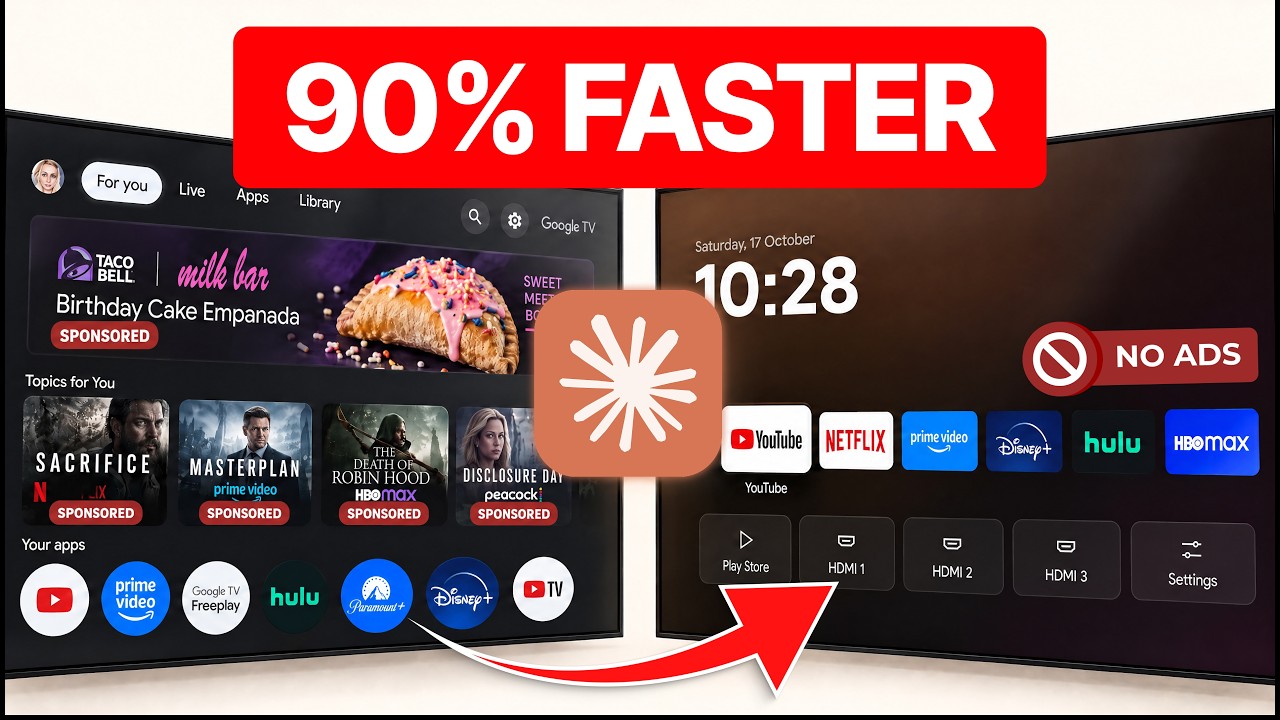
**[▶ Claude Made My Old Android TV Feel Brand New](https://www.youtube.com/watch?v=fP2SGGVsaB0)** · the full setup on a real TV, in 4 minutes.
Get started
**1. Turn on developer mode on the TV.** Settings → Device Preferences → About → press **Build** 7 times. Then turn on **USB debugging** in **Developer options**. [Stuck?](#help)
**2. Open [Claude Code](https://claude.com/claude-code) or [Codex](https://openai.com/codex) on your laptop.** The laptop and TV must be on the same Wi-Fi.
**3. Paste this in.**
Help me clean up my Android TV and make it faster.
My TV is a .

1. Connect to my TV over Wi-Fi. Walk me through anything
   I need to tap on the TV.
2. Bef
Related Skills

Sede
🧹 Fast TUI tool to clean old coding-assistant sessions


Husk
A desktop home for your CLI agent. Wraps claude / copilot / codex / aider in a clean Electron window with PTY,

Phosphorpulse
Matrix/TRON-themed statusline for Claude Code with full subagentStatusLine support — byte-parity rewrite of ph


Nanopi
Tiny Rust port of Pi — a ~4 MB statically-linked coding agent CLI for old/low-resource Linux boxes. OpenAI + A


Fast Fix
Fires on /fast-fix for tiny prod changes (favicon, color, copy, spacing) — a FAST-lane alias to /ship that for

Mod Maker
Mod Maker: find what you ask Claude Code again and again, and turn it into a mod. Plus 8 example mods and a vi

Related Agents

Codex Dispatcher
Dispatches an already-prepared batch of codex-swarm subtask prompt files to parallel codex exec sessions, wait

GPT Image Prompter
Prompt engineer for the Codex image generator (gptimage skill, ChatGPT subscription). Turns image ideas — ofte


Tiny Spec Build Executor
Implements a single task — writes/modifies code to satisfy one task, adhering to the project's constitution, a
