
Patch Cc — AI skill for Claude Code
Interactive patcher for the Claude Code native binary.
How to install Patch Cc
This entry records only its repository, not the path inside it, so there is no
exact command to give. Open anfreire/patch-cc and copy the folder into
~/.claude/skills/, or the file into ~/.claude/agents/.
What Patch Cc does
Interactive patcher for the Claude Code native binary. Live inline thinking, detailed tool calls, subagent model overrides, custom branding — and your ChatGPT/Codex-plan GPT models as native models. Pure Python.
Alternatives in AI
- Pal Configuration Docs — for model and thinking mode options 11.3k ★
- Open Researcher — 🔥 Visual AI research assistant that displays real-time thinking, provides split-view analysis, and automatic 634 ★
- Field Lab — A field lab for thinking with AI 570 ★
README
patch-cc
[](https://github.com/anfreire/patch-cc/actions/workflows/ci.yml) [](https://pypi.org/project/patch-cc/)
An interactive patcher for the **Claude Code native binary**. Pick the tweaks you want — inline and live thinking, detailed tool calls, subagent model overrides, your own startup name, your **ChatGPT/Codex-plan GPT models as native models** — and apply them to your installed `claude` in one keystroke. Fully reversible: a pristine backup is kept, `patch-cc restore` puts it back. No Node, no Bun.
uvx patch-cc # fullscreen menu, no install needed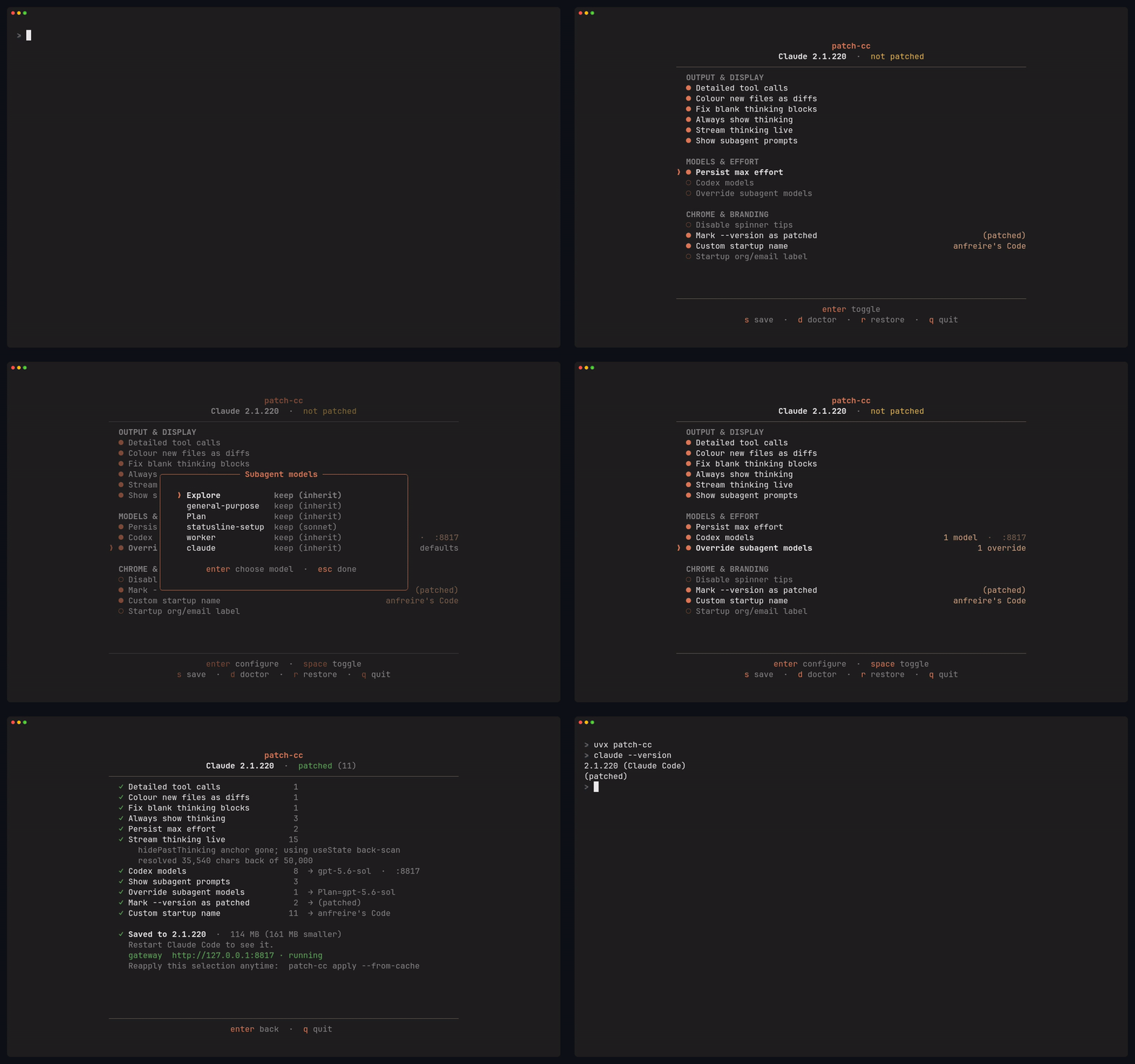
Requirements
- Linux or macOS
- Python 3.11+
- uv — how patch-cc is run and installed
below. Install it with
curl -LsSf https://astral.sh/uv/install.sh | sh. Not using uv?pipx install patch-cc(orpip install patch-cc) works too; it is an ordinary PyPI package. - macOS only: the Xcode command line tools, for
codesign— a patched binary has to be re-signed or macOS refuses to run it.
The menu is a single centered panel: move with `↑ ↓`, toggle with `space`, press `s` to save. Patches that carry a setting — subagent models, Codex models, the startup name, the `--version` marker, the org/email label — open a centered modal on `enter`, and the row then shows what you chose. Everything choosable is a picker: the agent names and model aliases are **discovered from your binary itself** (and the Codex ones from your plan), so the menu can never offer something your build would reject. Typing exists only for the genuinely free-text values.
A patched binary records what was applied inside itself, so the menu always comes up showing the real current
Related Skills

Network Chronicles
by Fimeg - Presents detailed implementation plan for AI-driven game characters with technical specifications f

Plan Mode Arken
Create detailed technical implementation plans for Arken AI development. Ask clarifying questions one at a tim

Agentic Host Starter Kit
Open-source starter kit for building your own AI chat host that renders MCP Apps. Connect any MCP servers (std

Bayesian Reasoning
A cognitive base that shifts reasoning from binary judgments to calibrated probability thinking. Works with an


Grill With Docs
Grilling session that challenges your plan against the existing domain model, sharpens terminology, and update


Kincode
AI coding assistant in Go. 9MB single binary, zero dependencies. MCP support, Soul files for custom AI persona

Related Agents
Deep Research Patcher
Applies critic findings to a nav-deep-research draft as surgical Edit hunks and records a patch log. Tool-lock


GPT 5.6 Luna
General-purpose agent that runs on GPT-5.6-Luna (routed through the shunt gateway to the ChatGPT/Codex subscri

OpenAI Assistants
Setup: OpenAI Assistants API / ChatGPT Custom GPT
