

Claude Code Toolbox — Development skill for Claude Code
Claude Code Toolbox — automated installers and environment configuration framework for Claude Code with one-line setup across Windows, macOS, and Linux.
How to install Claude Code Toolbox
This entry records only its repository, not the path inside it, so there is no
exact command to give. Open alex-feel/claude-code-toolbox and copy the folder into
~/.claude/skills/, or the file into ~/.claude/agents/.
What Claude Code Toolbox does
Claude Code Toolbox — automated installers and environment configuration framework for Claude Code with one-line setup across Windows, macOS, and Linux.
Alternatives in Development
- Claude Scholar — Semi-automated research assistant for academic research and software development 3k ★
- 05 Env And Auth — Prompt 05: Environment Configuration & API Authentication 2.3k ★
- Claude Code Zh Cn — Claude Code CLI 简体中文本地化 / 汉化插件;支持 macOS、Linux、WSL、Windows 与新版 native,一行安装,更新后自动修复 721 ★
README
Claude Code Toolbox
[](https://github.com/alex-feel/claude-code-toolbox/blob/main/LICENSE) [](https://deepwiki.com/alex-feel/claude-code-toolbox)
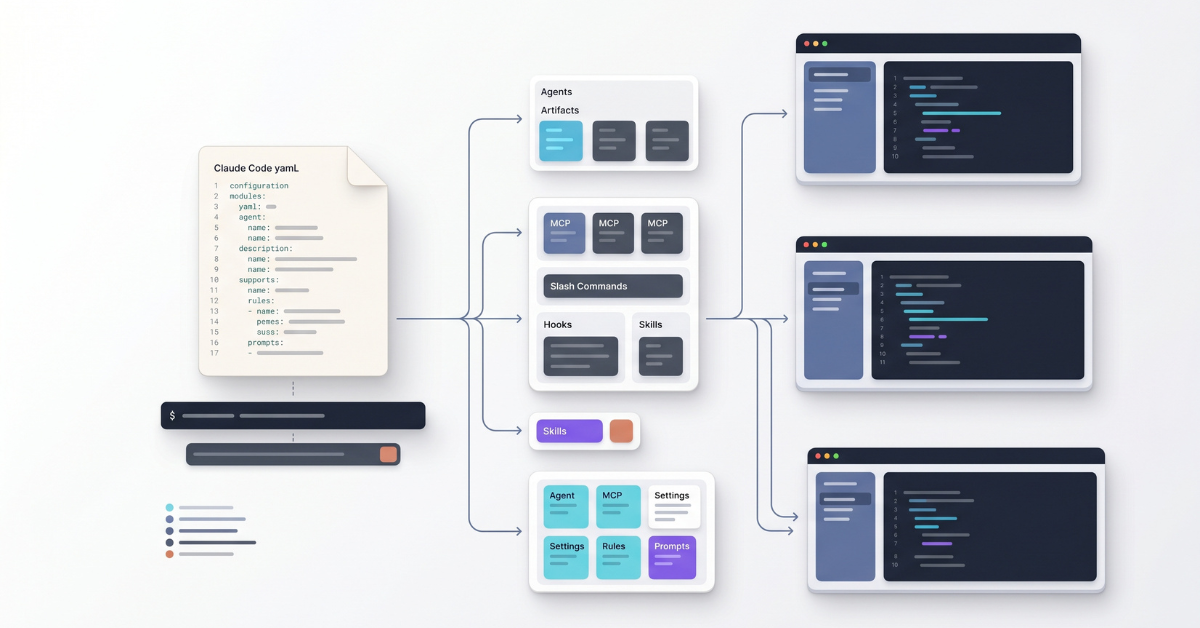
Automated installers and an environment configuration framework for Claude Code on Windows, macOS, and Linux.
Define your complete Claude Code environment in a single YAML file -- custom agents, MCP servers, slash commands, hooks, skills, settings, and more -- and install everything with one command.
Features
- Custom agents -- specialized subagents for code review, research, debugging, and any workflow you design
- MCP servers -- HTTP, SSE, and stdio transports with scope-based registration
- Slash commands -- custom commands for frequently used workflows
- Rules -- user-scope rule files for coding standards, security policies, and project conventions
- Skills -- multi-file skill packages for complex agent capabilities
- System prompts -- replace or append to the default Claude Code prompt
- Hooks -- five hook types: command (shell scripts, shell or exec form), HTTP (webhooks), prompt (LLM evaluation), agent (subagent with tools), and MCP tool (a tool on a configured MCP server)
- User and global settings --
user-settingsis rawsettings.jsoncontent (camelCase keys) andglobal-configis raw~/.claude.jsoncontent, covering model selection, permissions, effort levels, thinking mode, environment variables, and every other Claude Code setting - Status line -- custom status bar scripts for real-time session information
- **Configuration inher
Related Skills
Uni Switch
Open-source Codex and Claude API configuration manager for Windows, Linux and macOS. AGPL-3.0-only.

Dogfiles
Development environment as code: automated macOS setup + codified Claude Code skills, agents, and config


Florians Claude Code Kit
Cross-platform Node status line for Claude Code, plus /handover, /handover-check, dialogue, grill-me and an RC

Cc Same
Keep Claude Desktop's local sessions identical across all your accounts. Desktop app (macOS, Windows, Linux) a


Transcribe Summarize
Claude Code / Codex skill for local-first meeting transcription. Runs Whisper on your own machine across macOS


Claude Public
A public template of my personal Claude Code configuration: settings, sync scripts, file-manager agent, and a

Related Agents

Byok Token Security Expert
BYOK (Bring-Your-Own-Key) and OAuth token security expert. Deep on cross-platform OS keychain integration (mac


Slim Wrapper
tfx-route.sh 경유 전용 래퍼 에이전트. 코드를 직접 읽거나 수정하지 않고 Bash(tfx-route.sh)를 통해 Codex/Antigravity에 위임하는 thin wrapper. OS

Bash Scripter
Use this agent when you need to write or fix bash/shell scripts — entrypoints, setup scripts, statusline scrip
