
Aicage — DevOps skill for Claude Code
Runs agentic coding assistants in Docker containers.
How to install Aicage
This entry records only its repository, not the path inside it, so there is no
exact command to give. Open aicage/aicage and copy the folder into
~/.claude/skills/, or the file into ~/.claude/agents/.
What Aicage does
Runs agentic coding assistants in Docker containers.
Alternatives in DevOps
README
aicage
Run your favorite AI coding agents comfortably in Docker.
Why use `aicage`?
Agents need deep access (read code, run shells, install deps). Their built-in safety checks are naturally limited.
Running agents in containers gives a hard boundary - while the experience stays the same. See [Why cage agents?](#why-cage-agents) for the full rationale.
Quick start
Install:
pipx install aicageIn your project directory, run:
aicage For a first useful run, you can usually just press Enter or select `OK` when prompted.
Built-in agent examples:
aicage agy
aicage claude
aicage codex
aicage copilot
aicage crush
aicage droid
aicage gemini
aicage goose
aicage opencode
aicage qwen
Your existing CLI config for each agent is mounted inside the container so you can keep using your preferences and credentials.
What you see first
After `aicage ` starts, you will see this setup overview:
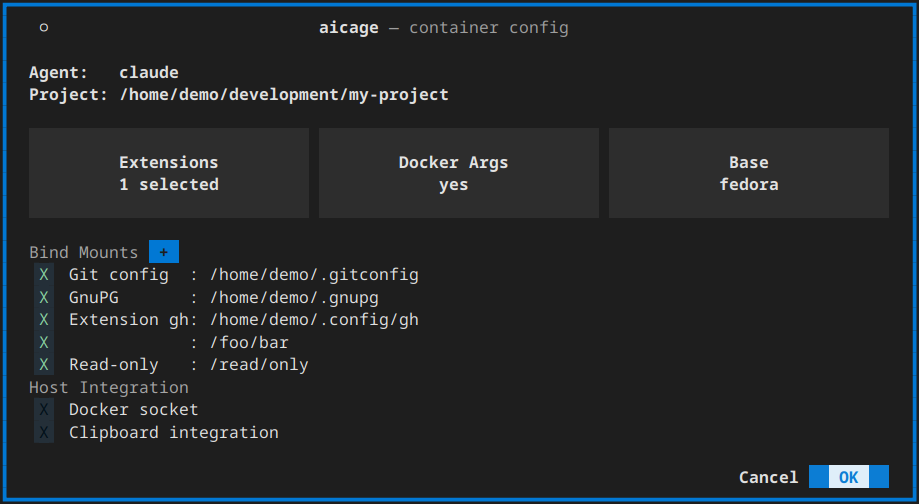
The overview brings the most common choices together in one place:
Agent: the built-in or custom agent you want to run.Bind Mounts: extra host files and directories the container should be able to access.Base: the base image used for the agent image. The suggested default is best for most users.Extensions: optional local additions that install tools or request extra host shares.Docker Args: extradocker runarguments such as-e,-p, or--network.Docker socket: lets the agent use Docker on the host when you explicitly enable it.OK: saves the current project config for that agent and starts the container.
Common next steps
Bind mounts
Use `Bind Mounts` when the agent needs access to files or directories outside the project.
Docker args
If you want to adjust how the container starts, open `Docker Args` in the setup screen.

Codecontainer
Isolated container environments for AI coding assistants (codex, claude code, opencode) support for Docker /po

Claude Container
A secure Docker container for running Claude Code (Anthropic's agentic coding tool) in isolation, with awesome


Agentor
Self-hosted alternative to Claude Code Web, Codex in the Cloud, and similar managed agent environments. Spawns

AI Dev Container
devc creates isolated, sandboxed Docker containers for AI coding agents (Claude Code, Codex, Gemini CLI, Openc


Iron Mem
Agent-native memory infrastructure for AI coding assistants. Governed session capture, LLM compression, hybrid

Vibectl
Manage all your agentic engineering projects (i.e., vibe coding) for Claude Code in one place. Orchestrate, de

Related Agents

Callstackincubator
A collection of agent-optimized React Native skills for AI coding assistants.


Rememora Triage
Use this agent when triaging issues, feature requests, or bugs for the Rememora project — a cross-agent persis

AI Code Security Auditor
Security reviewer for AI-generated and vibe-coded apps — hunts the hardcoded secrets, broken row-level securit
