

Agents Sandbox — AI skill for Claude Code
Run AI agents(Claude Code, Codex, OpenClaw, etc.) with Full Power in Isolated Local Sandbox.
How to install Agents Sandbox
This entry records only its repository, not the path inside it, so there is no
exact command to give. Open 1996fanrui/agents-sandbox and copy the folder into
~/.claude/skills/, or the file into ~/.claude/agents/.
What Agents Sandbox does
Run AI agents(Claude Code, Codex, OpenClaw, etc.) with Full Power in Isolated Local Sandbox. Zero cost, Zero risk to your host.
Alternatives in AI
- Codeburn — Free, local tool to track AI coding token usage and cost across 37 tools and agents (Claude Code, Cursor, Code 9.7k ★
- Token Monitor — Local-first desktop widget for tracking token usage, costs, and limits across 32+ AI coding tools—including Cl 1.8k ★
- TokenTracker — Local-first AI token usage & cost tracker for 31 coding tools incl 1.4k ★
README
Agents Sandbox
**Full power for your agents. Full safety for your machine.**
The best runtime environment for your AI agents.
The Permission Dilemma of Running AI Agents LocallyEvery AI agent running on a personal machine today faces the same lose-lose trade-off. If you use Claude Code or Codex, you know the drill: the agent is midway through a task, and a dozen permission dialogs pop up. You click `Yes` until your fingers go numb. Or you switch to `Yes always` and spend the rest of the day wondering if the agent just `rm -rf`'d something important.
Claude Code and Codex both offer sandbox-like capabilities that let you configure permission levels, but in practice they boil down to two choices:
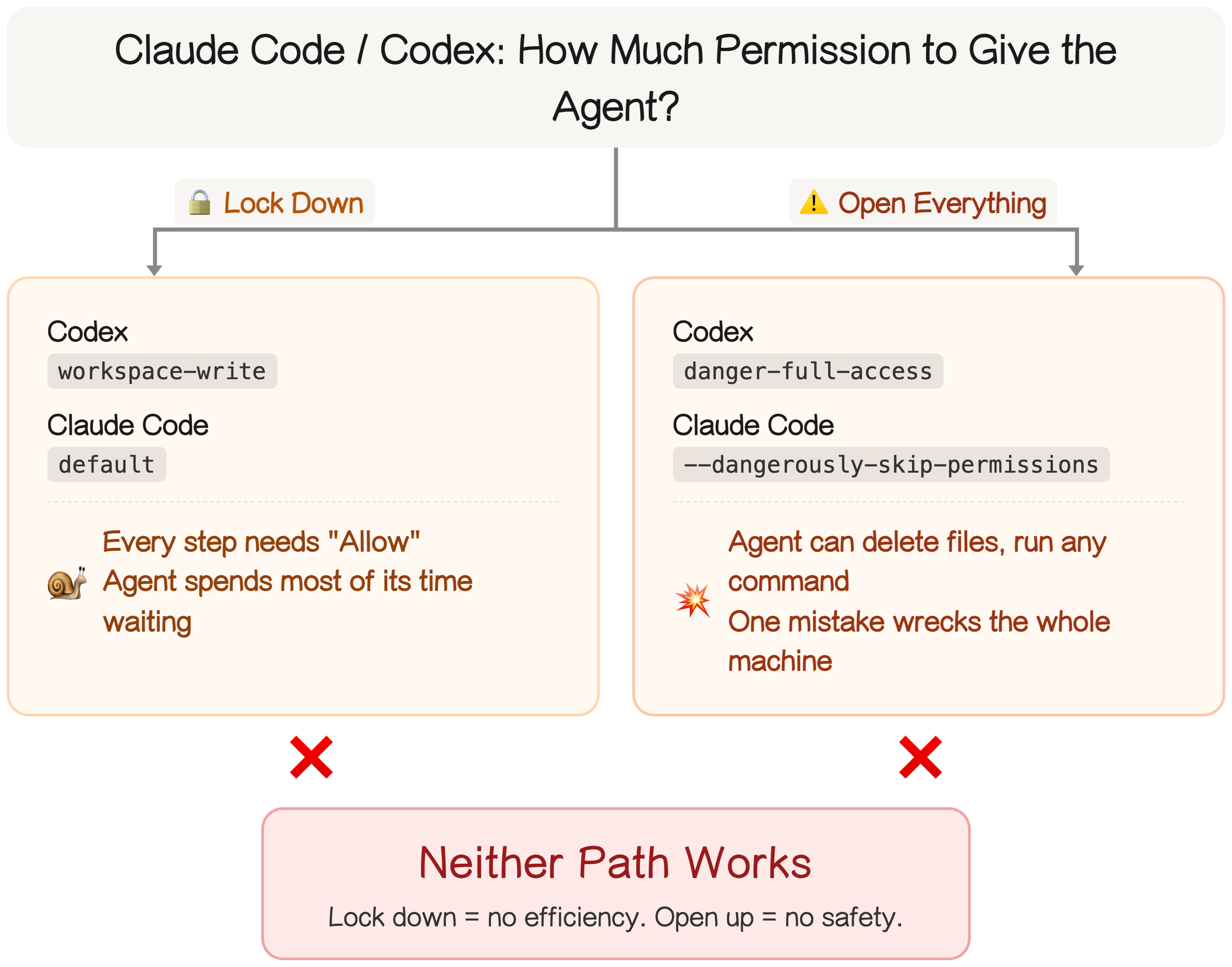
This is exactly why Mac Minis took off in the AI agent community. People started buying a dedicated machine just for the agent — that way, even if it trashes something, it's the agent's files, not yours. Makes sense — except now you own a whole extra computer.
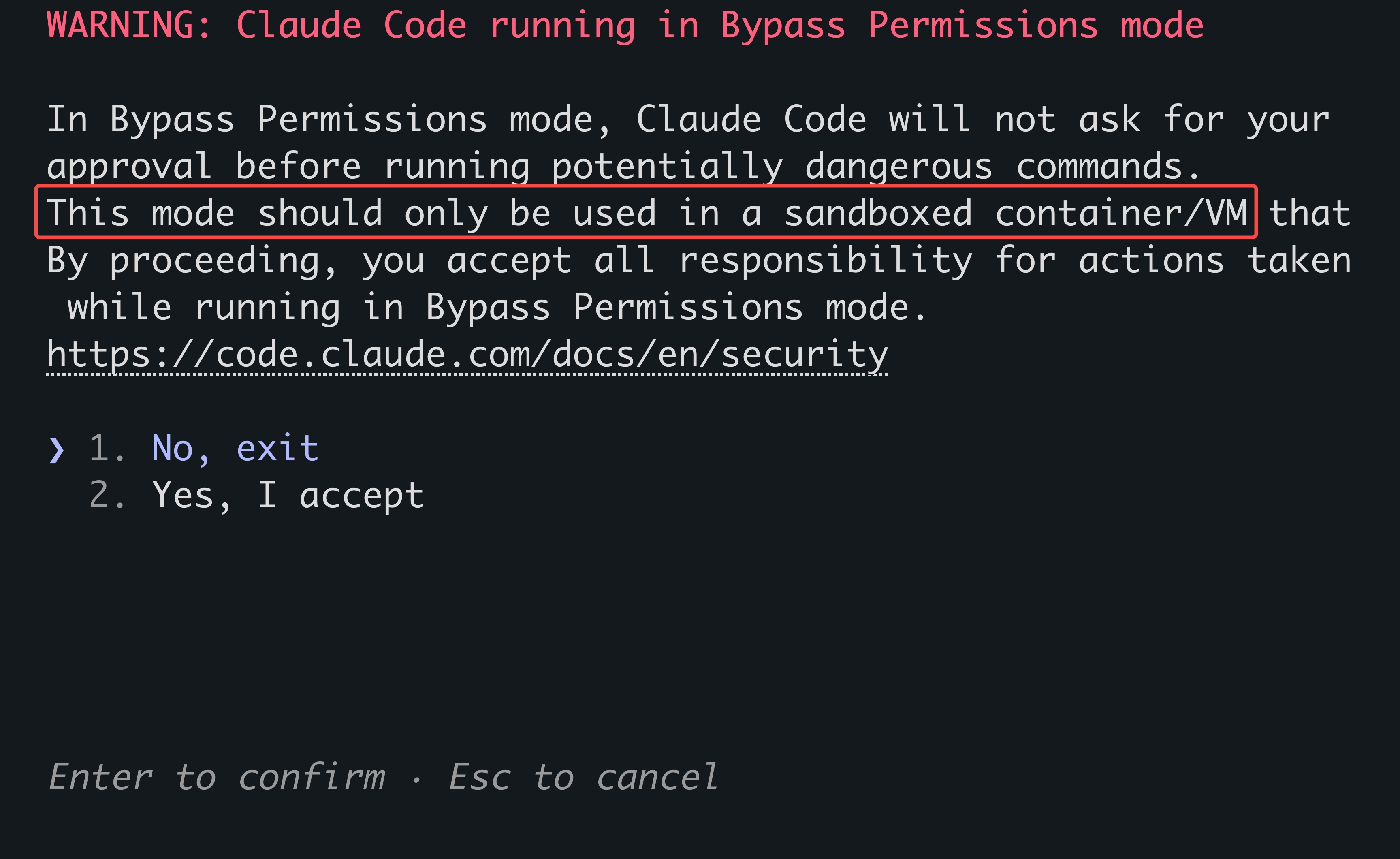
Give Claude Code full permissions (`claude --dangerously-skip-permissions`) and you're greeted with Anthropic's own disclaimer: only run this in a sandbox or VM, because dangerous commands will execute without asking. The default option is to decline and exit. You can ignore the warning and run it on bare metal, but if something breaks, that's on you.
What Matters Most When Running AI Agents Locally?
Related Skills
Agentic Sandbox
Run AI agents(Claude Code, Codex, OpenClaw, etc.) with Full Power in Isolated Local Sandbox. Zero cost, Zero r


Enclave
Sandbox for running AI coding agents autonomously: isolated, network-restricted, host-safe


Xiaoyaoclaw Usage Report
OpenClaw usage & performance reporting - parse session JSONL for task duration, tool/skill/model usage, token

Local LLM Setup
Runbook and PowerShell automation to host two isolated local LLMs (KYC analyst and KB-chatbot reasoning) on on


Clawhuddle
Self-hosted OpenClaw for teams — Give every person on your team their own AI assistant. Each team member gets

Agents Monitor
🏢 Your AI coding agents living in a pixel-art office — watch Claude Code, Codex, Cursor, Gemini & OpenCode wo

Related Agents
Omhc Tester
Hands-on tester for omhc. Use after a change is implemented (and ideally reviewed) to exercise it for real in

Delforge Fullstack Engineer
Use for general full-stack software development tasks — turning requirements into working, tested applications

Docker Sandbox
Isolated autonomous scanning agent — runs in a temporary worktree with restricted Bash access. Requires ROE au
