
PowerTerminal — AI skill for Claude Code
Run Claude Code in your browser — several sessions side by side, on your PC and phone at once.
How to install PowerTerminal
This entry records only its repository, not the path inside it, so there is no
exact command to give. Open 1215kkm/PowerTerminal and copy the folder into
~/.claude/skills/, or the file into ~/.claude/agents/.
What PowerTerminal does
Run Claude Code in your browser — several sessions side by side, on your PC and phone at once. AI browser, login vault, on-screen helper, auto-run, note mode. Free & open source. (포미널·파워터미널)
Alternatives in AI
- Dinotty — Multi-device terminal server for AI coding agents 643 ★
- Browser Search — A skill for AI agents: search the web with SearXNG, browse with Camofox, bypass protections with CloakBrowser 499 ★
- Alphacode — Free MIT AI coding agent — no API key needed 203 ★
README
🚀 PowerTerminal
**Run Claude Code from your browser — on your PC and your phone, at the same time.**
[](https://github.com/1215kkm/PowerTerminal/releases/latest) [](LICENSE) 
Open multiple Claude Code sessions side by side, watch them work, and send requests from anywhere. Sessions keep running on your PC; your phone is just a window into them.
It uses the real Claude Code CLI on your machine — same behavior, same usage, same subscription. Just a much better view.
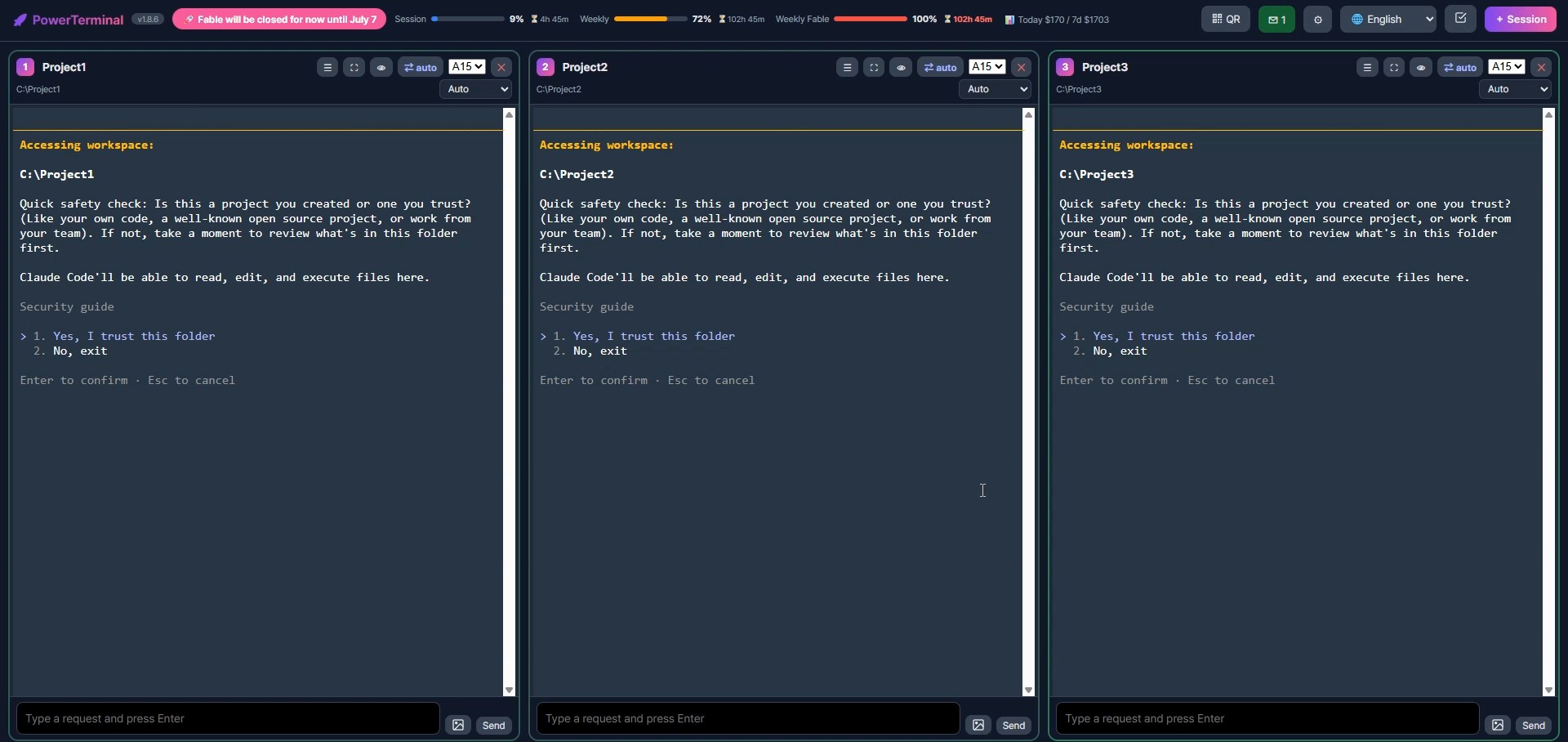
▶ **[Video guide](https://pominal.com/#videos)** — 17 one-minute videos in English and Korean, each also as a vertical short: install, sessions side by side, phone, new project, faster requests, memo pad, note mode, auto-run, code editor, GitHub upload, mind map, the AI browser, the login vault, the on-screen helper, and three for mobile.
Why PowerTerminal?
- Not a cloud service. Everything runs on your machine with your Claude subscription. Nothing is sent anywhere except the private tunnel you choose to open.
- Made for humans, not just devs. No tmux keybindings to learn — big buttons, status colors, sounds, and a phone layout your thumb can drive.
- Walk away from your desk. Kick off a long task, then check it from the sofa, the subway, or another PC. The session never stops.
⚠️ Read this first — security
PowerTerminal exposes a terminal on your machine to your browser, and (optionally) to the internet via a private link/QR. **Anyone who has that URL or scans that QR can run commands on your computer** — the same as sitting at it.
-
Related Skills
Auto Vault
Vault help — save logins once, AI uses them without seeing them

Clifleet
CliFleet — a 3 MB native, portable workbench for running several AI coding CLIs side by side. One folder, many

OpenTerm
A vibe coding workspace for Windows — run several AI agents side by side in split, keyboard-driven terminal se


All Code
Configure LLM providers once, then launch Claude Code, Codex CLI, or OpenCode with the provider you want — inc


Note Wiki
NotebookLM 으로 리서치하고 그 결과를 LLM Wiki 구조로 Obsidian vault 에 저장합니다.

Icor For Life Chat
Talk to your AI team where the knowledge lives. A Claude chat inside the vault: it sees the note you have open

Related Agents

9remote
Long-running AI coding sessions keep working after you leave the desk, but checking on them from a phone usual


ZeroClaw Android
Run AI agents 24/7 on your Android phone. Native Rust core, 25+ providers (OpenAI, Claude, Gemini, Groq, DeepS

Journey Auditor
Runtime UI/UX audit that drives a real browser through the running app, as every role, on desktop and a 375px